web
You’re offline. This is a read only version of the page.
close
Skip to main content

Notifications

Announcements

No record found.

Community site session details

Community site session details

Session Id :
Finance | Project Operations, Human Resources, ...
Suggested Answer

How to implement a new table map in D365?

(1) ShareShare
ReportReport
Posted on by 573

As far as known, table map is controlled by interface class. When a new field is to be added to map, just implement a set of methods (parm and assign) in extension of interface class. Does it meas no field is required to be added to new table map?

BTW, I found something when researching table map. for example, SalesPurchTable map have both fields SalesPurchId and CurrencyCode. However, only field SalesPurchId is mapping with SalesTable.SalesId., while field CurrencyCode is not mapped. And very different result when I execute following codes.

When I select record according to SalesPurchId, the result is correct as follow
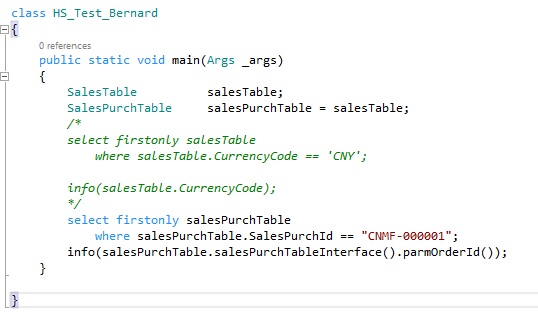
codeOrderId.jpgresultOrderId.jpg

But when I select record according to CurrencyCode, the error (means runtime error, wrong type to compare) comes as follow
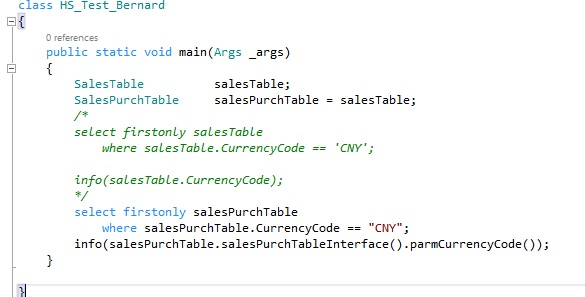
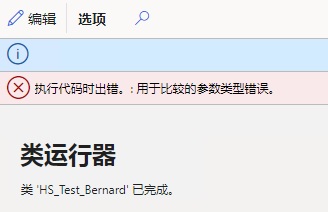
codeCurrency.jpgresultCurrency.jpg

So I want to know,

1. Is field of map required to be added to table map?

2. What is the difference between the map filed is mapped with table field or not?

3. As second part of code, how to retrieve the correct CurrencyCode?

Thanks a lot.

I have the same question (0)
  • Suggested answer
    Sergei Minozhenko Profile Picture
    23,093 on at

    Hi bernardqin,

    1 and 2. If the table field is not mapped in a mapping, you can't use it in your implementation (you will get errors). In the case of unmapped CurrencyCode, it's a most likely bug, because CurrencyCode is available in SalesTable and it can be mapped. But there are cases when you need to leave the mapping empty because there is no suitable field to be mapped.

    3. Since you can't modify mappings in extensions, you can create your own map and add only needed fields (salesPurchId and currency) and map them in table extensions.

    Or you can work around the issue by comparing SalesPurchTable.TableId with tableNum(SalesTable) and if it's equal use SalesTable directly.

    But do you really need to use the map in your case? What is your requirement?

  • Suggested answer
    Mea_ Profile Picture
    60,284 on at

    There is docs article with code samples, it show how to extend this map https://docs.microsoft.com/en-us/dynamics365/fin-ops-core/dev-itpro/extensibility/maps-as-interfaces

  • bernardqin Profile Picture
    573 on at

    Thank you Ievgen, I know how to extend a table map. I just want to know the difference between table fields mapped with table map and ones not mapped.

  • bernardqin Profile Picture
    573 on at

    Thank you Sergei for your reply.

    I have extend SalesPurchTable map successfully, and a new field "RemainUnitPhysical" is added which refers to RemainSalesPhysical or RemainPurchPysical, and it seems work well.

    I just want to know why CurrencyCode cannot be retrieved?

    Sorry, I don't take it as a bug.  Since the table map does not have map field RemainUnitPhysical, and it is not mapped in both table SalesTable and PurchTable, just like CurrencyCode. But I can retrieve the value of RemainUnitPhysical, but cannot do for CurrencyCode.

    Why?

  • Sergei Minozhenko Profile Picture
    23,093 on at

    Hi bernardqin,

    Hmm, how did you extend SalesPurchTable map? Are you talking about an extension using new "Maps as interfaces" feature? Are you retrieve the value of RemainUnitPhysical using this interface or directly from SalesPurchTable map object?

  • bernardqin Profile Picture
    573 on at

    Here are the steps:

    1. Create my own interface MyInterface class.

    2. Create extension class of SalesPurchLineInterface, which create instance of MyInterface, and a new method parmRemainUnitPhysical introduced.

    3. Create two classes which extend MyInterface, and implement method parmRemainUnitPhysical.

    4. call salesPurchLine.salesPurchLineInterface().myInterface().parmRemainUnitPhysical() to retrieve the value.

    I am talking about the normal (or recommended) steps to create new table map:

    1. Map field is required to be added?

    2. Map field is required to be mapped with table field?

  • Farseer Profile Picture
    200 on at

    https://docs.microsoft.com/en-us/dynamics365/fin-ops-core/dev-itpro/extensibility/maps-as-interfaces

    The table map still exists and tables still implement the mapping to the table map, but the fields on the table map have been made obsolete, and field mapping has been removed.

    As the document said, the fields on the table map have been made obsolete, and field mapping has been removed.

    But in the maps of D365 F&O, the fields and field mappings are still there, such as  SalesPurchTable,CustVendTrans and so on.

    It  makes me confused.

    I don't know whether we should add fields and field mapping in the new table maps or not.

    Hope for a clear answer.

  • Sergei Minozhenko Profile Picture
    23,093 on at

    Hi bernardqin,

    CurrencyCode works also if you retrieve data from interface class. But in your first message, you tried to use CurrencyCode from legacy map object directly.

    If you use "Map as interface" you don't need to add fields to legacy maps.

  • bernardqin Profile Picture
    573 on at

    Thanks Sergei, It seems that CurrencyCode can be retrieved by interface, but it cannot be used in where clause because it is not mapped to table field. So far, any new added table map field confronts with the same limitation. Is that correct?

  • Suggested answer
    Sergei Minozhenko Profile Picture
    23,093 on at

    Hi bernardqin,

    Yes, it's correct.

    But you can workaround it as well in interfaces by creating method findByCurrencyCode (or any name you like) in the interface s classes and give separate logic for PurchTable and SalesTable (like it's done for fields) and return found record.

Under review

Thank you for your reply! To ensure a great experience for everyone, your content is awaiting approval by our Community Managers. Please check back later.

Helpful resources

Quick Links

Responsible AI policies

As AI tools become more common, we’re introducing a Responsible AI Use…

Neeraj Kumar – Community Spotlight

We are honored to recognize Neeraj Kumar as our Community Spotlight honoree for…

Leaderboard > Finance | Project Operations, Human Resources, AX, GP, SL

#1
André Arnaud de Calavon Profile Picture

André Arnaud de Cal... 449 Super User 2025 Season 2

#2
Martin Dráb Profile Picture

Martin Dráb 422 Most Valuable Professional

#3
BillurSamdancioglu Profile Picture

BillurSamdancioglu 239 Most Valuable Professional

Last 30 days Overall leaderboard

Product updates

Dynamics 365 release plans