web
You’re offline. This is a read only version of the page.
close
Skip to main content

Notifications

Announcements

No record found.

Community site session details

Community site session details

Session Id :
Microsoft Dynamics AX (Archived)

Dynamics AX2012 R3 Error: The Server is unavailable. Check your configuration and network connection and try again.

(0) ShareShare
ReportReport
Posted on by 555

The following components of Dynamics AX2012 R3 installed successfully (Prerequisite test results are 0 errors and 0 warnings):

- Databases

* Server components

- Application Object Server

* Web Server components

- NONE

* Client components

- Client

- Office add-ins

- Remote Desktop Services integration

On launching Dynamics after the installation, the following error pops up:
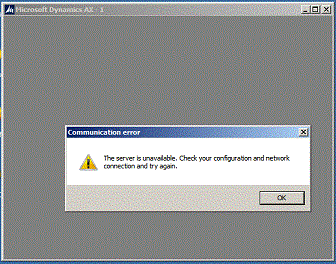
Environment:

1. MS Server  2008 R2

2. MS SQL Server 2008 Express (AVD)

3. SharePoint Foundation 2013

4. MS Office 2013

5. MS Project 2013

*This post is locked for comments

I have the same question (0)
  • Bilal Issa Profile Picture
    4,370 on at

    Hi,

    please make sure the Microsoft Dynamics AOS in administration tools -> services is running, and then open the client configuration utility and check if it pointing to the correct server.

    Regards,

    Bilal

  • fsilva-jr Profile Picture
    20 on at

    The Dynamics AX Service need some time to get started, and depending on your hardware configuration it will take something about a lot of minutes... Open the Windows Services and hit F5 to see if the Microsoft Dynamics AX Service is starting or running...

  • DynamicVision Profile Picture
    555 on at

    @Bilal and Francisco,

    I have checked the AOS service and it was not running. It did not even attempt to start because there is no such event in the Event Viewer-Applications. Even though it is set to Automatic start

    When I tried to Start it manually, it timeout out and now it is on 'permanent' Starting status. All its dependency services (DCOM Server Process Launcher, RPC Endpoint Mapper and SQL Server MSSQLSERVER) are starting automatically and are running.

    I am clueless as to why it won't start.

  • Suggested answer
    Umesh Pandit Profile Picture
    9,315 User Group Leader on at

    please add host entries of the server. Check in SQL DB service account have access, also try if the RAM is enough. Also Check these useful post:  community.dynamics.com/.../144878.aspx

    blog.mohamedaamer.com/.../ms-dynamics-ax-the-server-is-unavailable-message

    dynamicsnavax.blogspot.in/.../how-to-run-ax2012-hyperv-on-virtualbox.html

  • Community Member Profile Picture
    on at

    Hi. You are right. It took my computer atleast 15 mins for the status to appear Running.

    But still when I try to open the AX 2012 application it says the same error " he Server is unavailable. Check your configuration and network connection and try again. " Any idea what I need to do ?

  • Suggested answer
    Iulian Cordobin Profile Picture
    8,201 on at

    Hi Salahz1,

    Make sure the client configuration is pointing to the AOS server (server name, instance name, and port). If you are starting from a .axc config file check the above in it, if you're launching the dynamics client make sure you change them in the Client configuration.

  • Verified answer
    Martin Dráb Profile Picture
    237,880 Most Valuable Professional on at

    Salahz1 already has another thread, where he provided more information about what he did: Error Installing AX2012 R3 - the server is unavailable. check your configuration and network connection DYNAMICS AX 2012 R3.

  • Verified answer
    DynamicVision Profile Picture
    555 on at

    The problem was solved by replacing MS SQL Express with MS SQL Enterprise.

Under review

Thank you for your reply! To ensure a great experience for everyone, your content is awaiting approval by our Community Managers. Please check back later.

Helpful resources

Quick Links

Responsible AI policies

As AI tools become more common, we’re introducing a Responsible AI Use…

Neeraj Kumar – Community Spotlight

We are honored to recognize Neeraj Kumar as our Community Spotlight honoree for…

Leaderboard > 🔒一 Microsoft Dynamics AX (Archived)

#1
Martin Dráb Profile Picture

Martin Dráb 4 Most Valuable Professional

#1
Priya_K Profile Picture

Priya_K 4

#3
MyDynamicsNAV Profile Picture

MyDynamicsNAV 2

Last 30 days Overall leaderboard

Featured topics

Product updates

Dynamics 365 release plans



