web
You’re offline. This is a read only version of the page.
close
Skip to main content

Notifications

Announcements

No record found.

Community site session details

Community site session details

Session Id :
Microsoft Dynamics AX (Archived)

Selection Control through execute query in Form Datasource

(0) ShareShare
ReportReport
Posted on by 125

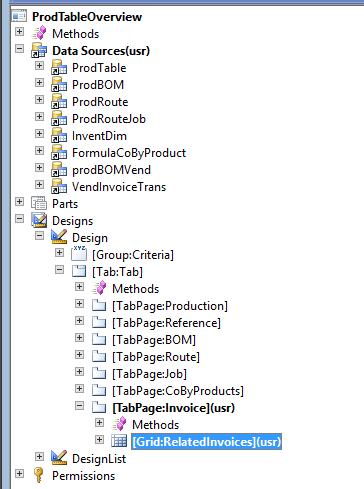
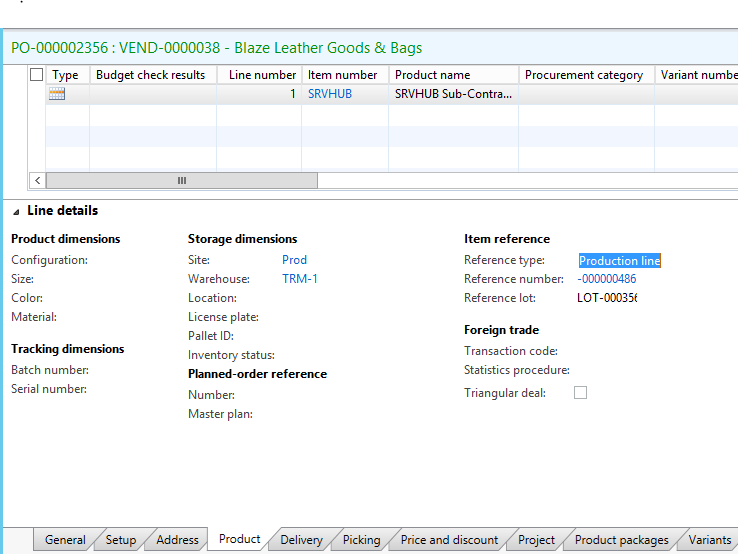
Hi experts,I am implementing a scenario in which i have to show production orders and return orders at the same tab,and both records coming from the same table VendInvoiceTrans,currently i achieved to show production order data in invoice tab against production order PD-00000013 (screen shot 2),but dont know how to populate the return order reference of PO-000000486(as you can see in screen shot 7,i want the result of second select query at the invoice tab too against production order PD-00000013 because it is return of PO-000000486 which is used in production order) ,a new PO "PO-000002356" is generated for the return of  "PO-000000486" (Screen shot 8). Now in the invoice tab,i want a new column named as Return order reference in Grid,under this column i have to show InventRefId "PO-000000486"  from VendInvocieTrans Table(second query result from screen shot 7) but also an issue is that this column is already used as different name "Reference number" in grid (see screen shot 2)

Any one guide me how to achieve this.

 1-0456.prod1.PNG      2-  1732.prod2.PNG       3-  prod3.PNG

         4-    prod7.PNG          5-prod4.PNG     


 6-   prod5.PNG    

 7-1323.prod8.PNG       8-prod8.PNG

*This post is locked for comments

I have the same question (0)
  • Verified answer
    nmaenpaa Profile Picture
    101,162 Moderator on at

    So you need a query that returns

    - VendInvoiceTrans records where VendInvoiceTrans.InventRefId == ProdTable.ProdId (consider adding a range for InventRefType, too)

    - VendInvoiceTrans records where VendInvoiceTrans.OrigPurchId is same than PurchId of VendInvoiceTrans that you found with the first criteria

    Is this correct?

    One solution could be to add a joined data source to your query. Join VendInvoiceTrans with VendInvoiceTrans on PurchId = OrigPurchId. I don't have a system at hand to try it myself but you get the idea.

    Another option (worse for performance) is to first find all PurchIds of VendInvoiceTrans records where InventRefId == ProdTable.ProdId. Gather them in a container.

    Then loop the container and for each Purch Id, add two ranges to your query.

    Range 1: VendInvoiceTrans.PurchId == purch id from container

    Range 2: VendInvoiceTrans.OrigPurchId == purch id from container

  • Faran Baig Profile Picture
    125 on at

    Hi Nikolaos Mäenpää ,

    VendInvoiceTrans records where VendInvoiceTrans.OrigPurchId is same than PurchId of VendInvoiceTrans that you found with the first criteria

    Yes,this is correct.

    but while loop the container and for each Purch Id, range will be that

    Range : VendInvoiceTrans.InventRefId== purch id from container

    ,as the first purch id used in first criteria will become InventRefId (return order reference)as you can see here in query where clause.I have to populate this line also in invoice tab.

    0412.Prod6.PNG


  • Suggested answer
    nmaenpaa Profile Picture
    101,162 Moderator on at

    Do you still have an open question? I'm not sure based on your message.

    About the Invoice tab page, the principle is exactly the same. You need to define a data source for the the grid on that tab page, and define query ranges for that data source which will result in the records that you want to see there.

    If you have problems, I suggest you forget your form for a while, and concentrate only on writing queries that return the data that you need. You can do that by writing jobs. This way you can truly focus on one thing at the time. First handle your data providing logic (query), and when it works, use it in user interface  layer (form).

    Also query.toString() is your friend when you are developing queries - it shows you the select statement of your query, allowing you to see possible flaws in it.

Under review

Thank you for your reply! To ensure a great experience for everyone, your content is awaiting approval by our Community Managers. Please check back later.

Helpful resources

Quick Links

Responsible AI policies

As AI tools become more common, we’re introducing a Responsible AI Use…

Neeraj Kumar – Community Spotlight

We are honored to recognize Neeraj Kumar as our Community Spotlight honoree for…

Leaderboard > 🔒一 Microsoft Dynamics AX (Archived)

#1
Martin Dráb Profile Picture

Martin Dráb 4 Most Valuable Professional

#1
Priya_K Profile Picture

Priya_K 4

#3
MyDynamicsNAV Profile Picture

MyDynamicsNAV 2

Last 30 days Overall leaderboard

Featured topics

Product updates

Dynamics 365 release plans