I developed a plugin in my development environment, and then I deployed the package onto LCS, following the instructions on this link: https://ax.help.dynamics.com/en/wiki/create-and-apply-a-deployable-package/
Then the QA engineers tried to install the deployment onto their testing environment by following the instructions on this link https://ax.help.dynamics.com/en/wiki/apply-a-deployable-package-on-a-dynamics-ax-system/
Step 1 of the install process is a little confusing. Not sure if it is considered a "hotfix" since my solution explorer had completely new classes as well as the plug-in class, which is essentially an event post handler. Regardless, it requires selecting something from the Environments page, which is completely blank when we log into LCS. (The image might be hard to see, but Environments is to the left of the blue boxes).
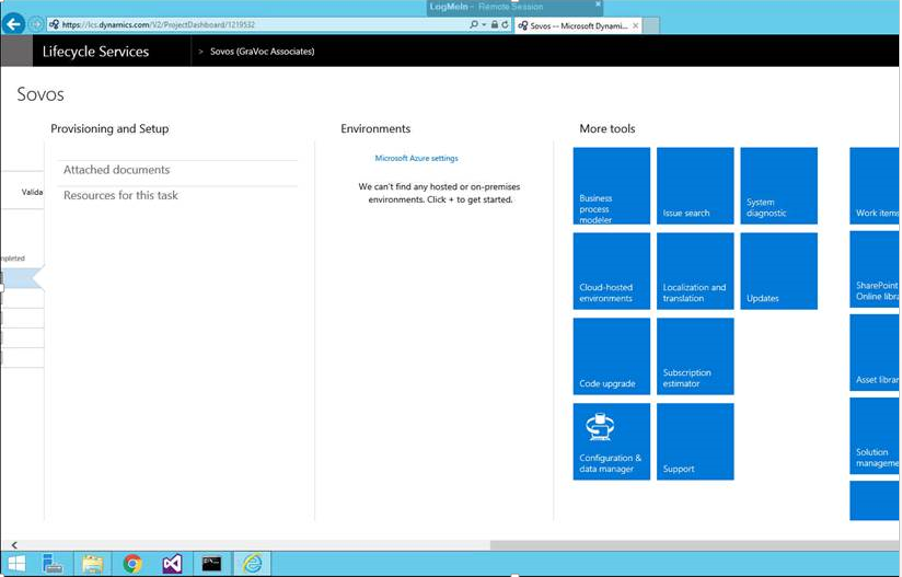
Some information that a person answering this might need:
The development was done in a VM. At the time of deployment, the account on the VM had "contributor" capabilities, however visual studio was "run as admin." The code that was packaged and deploy has not been verified, but I dont think that would prevent it from being installed in a test environment. The QA environment is also in a VM (separate VM). QA accesses their VM through a LogMeIn account. Can anyone help in explaining how to install the code to the QA environment, or maybe explain what we are doing wrong, so that we can follow in install link above. I believe once we get passed the first couple of steps in the process from the link, the rest should be no problem. If more information is required in order for someone to provide a solution, let me know and I'll try to provide that information.


