web
You’re offline. This is a read only version of the page.
close
Skip to main content
Community site session details

Community site session details

Session Id :
Finance | Project Operations, Human Resources, ...
Answered

Default dimension business unit dialog form lookup with range

(0) ShareShare
ReportReport
Posted on by 2

Hi For BankAccountTrans there is a relation defualt dimension , now i am using a query names (CashBook) pastedimage1682053567848v1.png
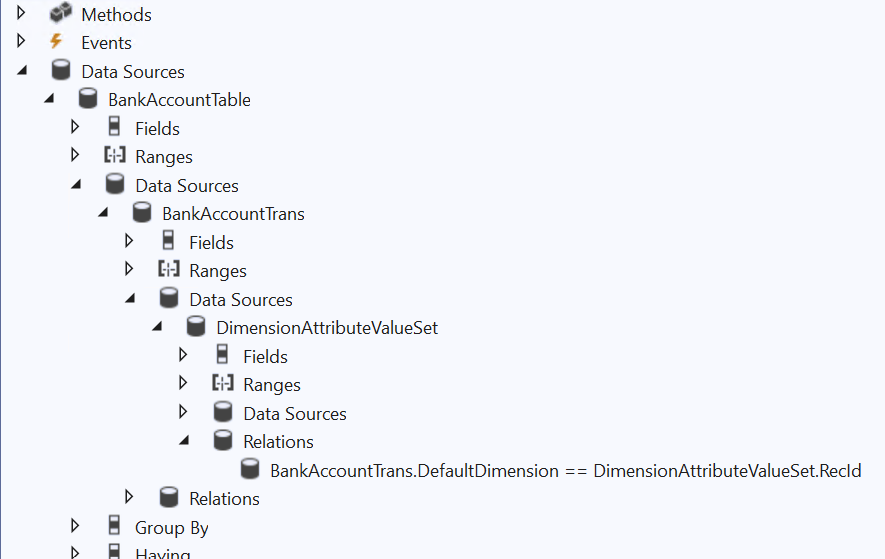
and given relation as well , but dont know howto create lookup for business unit as well as i have to give range in this query for business unit as well . i already have created a dialog for bankaccount code , can i create lookup for business unit using these methods ..please help

 query buildQuery()
    {
       
        QueryBuildDataSource	qbdsBankAccountTable, qbdsBankAccountTrans;
        Query query				= new Query(queryStr(CashBook));
        qbdsBankAccountTable    = query.dataSourceTable(tableNum(BankAccountTable));
        qbdsBankAccountTrans	= query.dataSourceTable(tableNum(BankAccountTrans));
        
        qbdsBankaccountTrans.addRange(fieldNum(BankAccountTrans, TransDate)).value(queryRange(fromDate, toDate));

        //Bank Code
        BankAcc = con2Str(BankAccCon);

        if(BankAcc)
        {
            BankAcc = strReplace(BankAcc,';',',');
            qbdsBankAccountTable.addRange(fieldNum(BankAccountTable, AccountID)).value(BankAcc);
        }
        return query;
    }

    public boolean getFromDialog()
    {
        boolean ret = super();

        fromDate	= dfFromDate.value();
        toDate		= dfToDate.value();

        //Bank Account
        if (multiBankAccCtrl)
        {
            BankAccCon = multiBankAccCtrl.getSelectedFieldValues();
        }
        return ret;
    }

    /// 
    /// dialog
    /// 
    /// dialogLocal
    Object dialog()
    {
        #file

        DialogRunbase dialogLocal ;
        
        dialogLocal = super();
      
        dfFromDate	= dialogLocal.addFieldValue(extendedTypeStr(FromDate), fromDate,"@SYS5209");
        dfToDate	= dialogLocal.addFieldValue(extendedTypeStr(ToDate), toDate,"@SYS14656");

        fbscMultiBankAcc  = dialogLocal.curFormGroup().addControl(FormControlType::String, 'Bank Account');
        fbscMultiBankAcc.label('Bank Account');
       
        return dialogLocal;
    }

    /// 
    /// DialogPostRun
    /// 
    /// Dialog
    public void dialogPostRun(DialogRunbase dialog)
    {
        FormRun						formRun;

        super(dialog);

        formRun = dialog.dialogForm().formRun();

        if (formRun)
        {
            //Bank Account
            fscMultiBankAcc = formRun.design().control(fbscMultiBankAcc.id());
            multiBankAccCtrl = SysLookupMultiSelectCtrl::construct(formRun, fscMultiBankAcc, querystr(OABCashBookBankAcc));
            
        }
    }

I have the same question (0)
  • Suggested answer
    GirishS Profile Picture
    27,827 Moderator on at
    RE: Default dimension business unit dialog form lookup with range

    Hi Sachin Mittal,

    Use DefaultDimensionView view to get the default dimension value. You can add that view to the query and add the range to it.

    Thanks,

    Girish S.

  • Sachin Mittal Profile Picture
    2 on at
    RE: Default dimension business unit dialog form lookup with range

    can you help with code ,it would be very very helpful

  • GirishS Profile Picture
    27,827 Moderator on at
    RE: Default dimension business unit dialog form lookup with range

    Seem you have already added the Lookup for BankAccount. From the code pasted the method name is buildQuery. Is that method name, correct?

    Thanks,

    Girish S.

  • Sachin Mittal Profile Picture
    2 on at
    RE: Default dimension business unit dialog form lookup with range

    yes

  • GirishS Profile Picture
    27,827 Moderator on at
    RE: Default dimension business unit dialog form lookup with range

    I am still not clear.

    Are you asking how to show lookup of business unit as separate control similar to bank account?

    Thanks,

    Girish S.

  • Sachin Mittal Profile Picture
    2 on at
    RE: Default dimension business unit dialog form lookup with range

    yes yes , want it like that

  • Suggested answer
    GirishS Profile Picture
    27,827 Moderator on at
    RE: Default dimension business unit dialog form lookup with range

    Refer to the below code.

    query buildQueryBusinessUnit()
    {
           
        QueryBuildDataSource	qbds;
        Query query				= new Query();
        qbds = query.addDatasource(tablenum(DefaultDimensionView));
        qbds.addRange(fieldnum(DefaultDimensionView, Name)).value(queryvalue("BusinessUnit"));
        return query;
    }

    Thanks,

    Girish S.

  • Sachin Mittal Profile Picture
    2 on at
    RE: Default dimension business unit dialog form lookup with range

    query buildQuery()

       {

           QueryBuildDataSource qbdsBankAccountTable, qbdsBankAccountTrans;

           Query query = new Query(queryStr(CashBook));

           qbdsBankAccountTable    = query.dataSourceTable(tableNum(BankAccountTable));

           qbdsBankAccountTrans = query.dataSourceTable(tableNum(BankAccountTrans));

            i have to add datasource here as well for default dimension view??

  • GirishS Profile Picture
    27,827 Moderator on at
    RE: Default dimension business unit dialog form lookup with range

    If you want to lookup bank account only with default dimension business unit then you can add the DefaultdimensionView in the CashBook query itself. Add the Name as a range under range node and set the value to "BusinessUnit". It will look up only the bank account which is having business unit value.

    Thanks,

    Girish S.

  • Sachin Mittal Profile Picture
    2 on at
    RE: Default dimension business unit dialog form lookup with range

    pastedimage1682061434603v1.png

    busniess unit list is not coming here

    Object dialog()
    {
    #file

    DialogRunbase dialogLocal ;

    dialogLocal = super();

    dfFromDate = dialogLocal.addFieldValue(extendedTypeStr(FromDate), fromDate,"@SYS5209");
    dfToDate = dialogLocal.addFieldValue(extendedTypeStr(ToDate), toDate,"@SYS14656");
    dialogBusinessUnit = dialogLocal.addFieldValue(extendedTypeStr(Str1260), strBusinessUnit, "@OAR:OAR00179");

    fbscMultiBankAcc = dialogLocal.curFormGroup().addControl(FormControlType::String, 'Bank Account');
    fbscMultiBankAcc.label('Bank Account');

    return dialogLocal;
    }

Under review

Thank you for your reply! To ensure a great experience for everyone, your content is awaiting approval by our Community Managers. Please check back later.

Helpful resources

Quick Links

Responsible AI policies

As AI tools become more common, we’re introducing a Responsible AI Use…

Neeraj Kumar – Community Spotlight

We are honored to recognize Neeraj Kumar as our Community Spotlight honoree for…

Leaderboard > Finance | Project Operations, Human Resources, AX, GP, SL

#1
Martin Dráb Profile Picture

Martin Dráb 683 Most Valuable Professional

#2
André Arnaud de Calavon Profile Picture

André Arnaud de Cal... 563 Super User 2025 Season 2

#3
Sohaib Cheema Profile Picture

Sohaib Cheema 398 User Group Leader

Last 30 days Overall leaderboard

Product updates

Dynamics 365 release plans



