web
You’re offline. This is a read only version of the page.
close
Skip to main content

Announcements

No record found.

News and Announcements icon
Community site session details

Community site session details

Session Id :
Microsoft Dynamics CRM (Archived)

workflow issue cannot find record to be updated

(0) ShareShare
ReportReport
Posted on by

Purpose of problem workflow (Account2ProjectHIEPP):

When the option set (HIE PP) in Account changes, the field by the same name (HIE PP) changes in Project.

1. Created 1:N Relationship - Primary (Project) and Related Entity (Account) - named Project_Account.  This Project _Account is also used successfully with 10 additional workflows - when a field changes in Project, the respective field in Account is updated.  Note, the correlation is different than the problem workflow.

2.  Next, the workflow (Account2ProjectHIEPP) is created.  Running this in background will not generate the error that informs of the reason "cannot find record to be updated", so for testing purposes it is run on-demand.
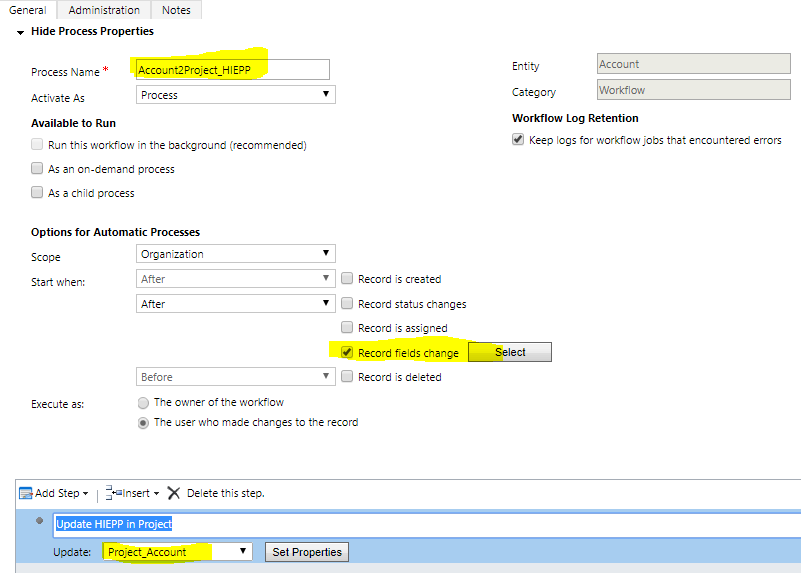
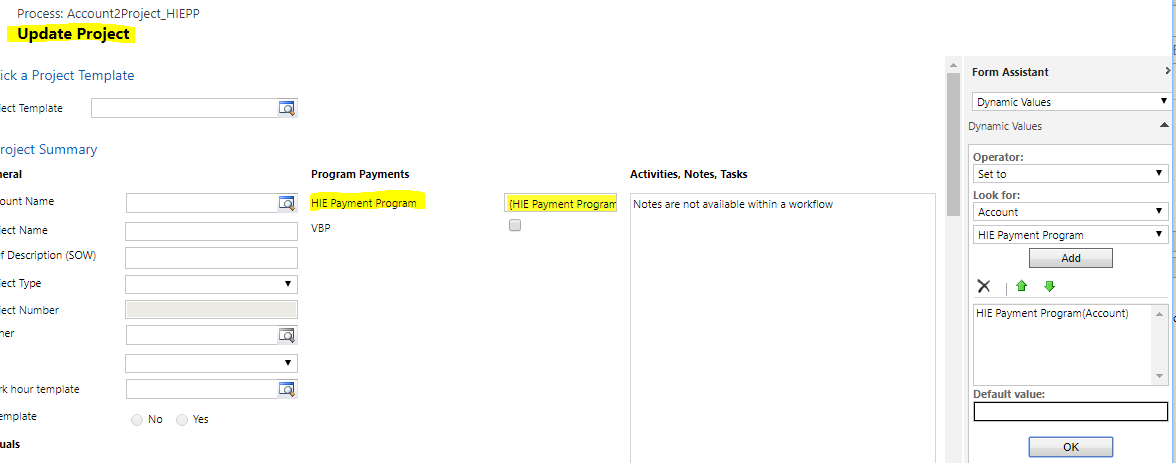
HIEPP1.PNGHIEPP2.PNG

Again, there are 10 workflows that use the 1:N relationship (Project_Account) without problem.  However, they are updating from Project to Account.

I thought the solution was to create a 1:N relationship in Account (Account_Project).  It was created but I could not load it into the solution.

Anyone, seeing the glaring problem?

*This post is locked for comments

I have the same question (0)
  • ScottDurow Profile Picture
    21 on at

    I see that the workflow is running as the user who triggered the workflow - is there any security set that this user can not see the project record?

  • Community Member Profile Picture
    on at

    Thank you for the response Scott.  I am the only user and my role is global system administrator.

  • ScottDurow Profile Picture
    21 on at

    Ah ok -how is the project being related to the account in another workflow or plugin? What happens if you make the workflow run asynchronous (run in background) - sometimes changes made outside of the current transaction are not available to workflows.

  • ashlega Profile Picture
    34,477 on at

    Hi,

      I'm just wondering if the account that workflow is running for is, actually, linked to a project? Maybe the project lookup is empty?

  • Community Member Profile Picture
    on at

    Scott, in answer to Alex's questions and yours...  If I run the workflow asynchronous nothing happens - no error message and the intended field update does not occur.  As to Alex's question, the Account and Project exist.  As a reminder, I have 10 workflows that work properly updating Account fields based on changes in respective Project fields, on-change. 

    The challenge appears to be that I am making changes to Project fields based on changes to respective Account fields, on-change.

    Project2.PNGProject2.PNGProject3.PNG

    Thanks again, for your responses.

  • ashlega Profile Picture
    34,477 on at

    Hi Lan,

     could you clarify this a little bit more..

     If you have 1:N, you can use a workflow on the N side to update the 1 side. But not vice versa.

     I have a feeling you have two different relationships there, that's why it works from projecs to accounts, but not from accounts to projects.

  • ScottDurow Profile Picture
    21 on at

    Hi -so perhaps you are trying to update a N:1 relationship from the account-project when actually you need to update multiple projects over a 1:N relationship? If so then you can't use the standard update step in a workflow because can only update a single record.

    Does that make sense?

  • ScottDurow Profile Picture
    21 on at

    Snap Alex!!!

  • Suggested answer
    Somesh2207 Profile Picture
    1,563 on at

    Hi LanCru5,

    I am referring your workflow screenshot; Is it possible there are 2 relationships with the account and you are using the non-intended one. 

    Can you please check the "look for" dropdown and check if there is another Account lookup there.? 

  • Community Member Profile Picture
    on at

    Thank you Alex,

    I thought that was the problem.  The 1:N that is work is Project_Account, primary and related respectfully.   Working from my solution, DevToProd, if I create a 1:N Account_Project, primary and related respectfully, the 1:N is created and shows in the default solution; but I cannot include it in DevToProd.  Further, when I create the workflow, the Account_Project ,1:N, is not a selectable option.  Is there a restriction of having these two 1:N?

Under review

Thank you for your reply! To ensure a great experience for everyone, your content is awaiting approval by our Community Managers. Please check back later.

Helpful resources

Quick Links

Introducing the 2026 Season 1 community Super Users

Congratulations to our 2026 Super Stars!

Meet the Microsoft Dynamics 365 Contact Center Champions

We are thrilled to have these Champions in our Community!

Congratulations to the March Top 10 Community Leaders

These are the community rock stars!

Leaderboard > 🔒一 Microsoft Dynamics CRM (Archived)

Last 30 days Overall leaderboard

Featured topics

Product updates

Dynamics 365 release plans



