web
You’re offline. This is a read only version of the page.
close
Skip to main content

Notifications

Announcements

No record found.

Community site session details

Community site session details

Session Id :
Finance | Project Operations, Human Resources, ...
Suggested Answer

A call to 'super()' is not allowed here.

(0) ShareShare
ReportReport
Posted on by

Hi, 

On my Development box, I have below application code written in Platform Update 43 (10.0.19).  I have upgraded my dev box to platform 46 (10.0.22) and now I am getting error while doing model build.

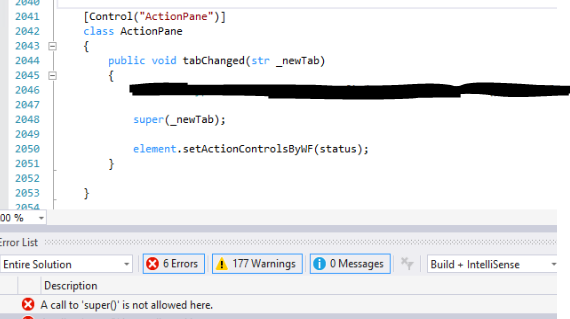
Error :-  A call to Super() is not allowed here.

I have a Form and it has ActionPane tabchanged() method.
pastedimage1635928415372v2.png

As you can see that I want to run a line of code before super() and one line after super().  So not sure how I am going to remove this super() call from here. has this tabchanged() method been deprecated recently?

I have the same question (0)
  • Suggested answer
    nmaenpaa Profile Picture
    101,160 Moderator on at

    According to the documentation, it has been deprecated since the beginning of D365: https://docs.microsoft.com/en-us/dynamics365/fin-ops-core/dev-itpro/migration-upgrade/deprecated-apis#list-of-deprecated-apis

    But until 10.0.21 there was only a compiler warning (so that you have time to adjust your customizations), now MS has changed it to an error.

  • VRD Profile Picture
    on at

    Thanks Nikolaos. I have seen this documentation earlier. but It works fine with 10.0.19 (PU43) version and started throwing compiling issues after upgrade to 10.0.22 (PU46). I need to manage on how I can avoid this call without affecting the functionality we have customized.

  • Suggested answer
    nmaenpaa Profile Picture
    101,160 Moderator on at

    Hi IamWikky, 

    We might be able to help if you let us know what your current code does and what is the business requirement. Right know we only know the part that's not possible anymore, and that's not enough for suggesting alrernatives. 

    The docs give you a hint that you should base your logic on the active record, not changing of the ActionPaneTab. 

  • VRD Profile Picture
    on at

    This is there in ISV code. Now recently, our ISV vendor has stopped support and provided us the source code. We need to go through what exactly the code is doing. It might take some time for us to understand what all things it performs in tabchanged method.

    When the MS documentation says to use 'Active Record', what does that mean exactly? I mean which event/method of the form it is pointing to?  Don't we have at least one record always active on the form and then we try to change the Tabs at the top of the form?

  • Suggested answer
    nmaenpaa Profile Picture
    101,160 Moderator on at

Under review

Thank you for your reply! To ensure a great experience for everyone, your content is awaiting approval by our Community Managers. Please check back later.

Helpful resources

Quick Links

Responsible AI policies

As AI tools become more common, we’re introducing a Responsible AI Use…

Neeraj Kumar – Community Spotlight

We are honored to recognize Neeraj Kumar as our Community Spotlight honoree for…

Leaderboard > Finance | Project Operations, Human Resources, AX, GP, SL

#1
Martin Dráb Profile Picture

Martin Dráb 660 Most Valuable Professional

#2
André Arnaud de Calavon Profile Picture

André Arnaud de Cal... 549 Super User 2025 Season 2

#3
Sohaib Cheema Profile Picture

Sohaib Cheema 307 User Group Leader

Last 30 days Overall leaderboard

Product updates

Dynamics 365 release plans



