web
You’re offline. This is a read only version of the page.
close
Skip to main content

Notifications

Announcements

No record found.

Community site session details

Community site session details

Session Id :
Microsoft Dynamics AX (Archived)
Answered

Unable to proceed with debugging in D365

(0) ShareShare
ReportReport
Posted on by 1,089

Hi Experts,

I have upgraded the code through LCS tool from Ax 2012 R3 model store. Fixing the conflicts and errors. build the project successfully. When I set the form and project set as start of object. I am getting below error message.Unexpected-Error.JPG
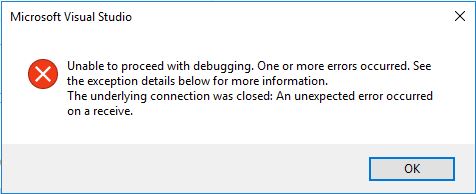
Please any one help me where I can see the exception details, because there is no error in the Error List.

Thank in advance ! 

*This post is locked for comments

I have the same question (0)
  • Hichem.Chekebkeb Profile Picture
    3,371 on at

    Check in the Bulid/General output what errors is showing. In the output panel put Show output from: Build or General

  • Guruprasanna Profile Picture
    1,089 on at

    Hi Hichem,

    Thanks for the quick replay, in output panel solution build successfully.

    It seems wrong mapping of the meta data under trunk node, Please let us know how can remove and remapping.

    Thanks in advance

    Guru

  • Hichem.Chekebkeb Profile Picture
    3,371 on at

    Go to the Team Explorer panel >  Source control explorer > select you metadata folder that has a mapping then right click > Advanced > Remove mapping.

    The same steps you can use for remapping ...Advanced > Map to local folder

  • Verified answer
    Guruprasanna Profile Picture
    1,089 on at

    Thank you Hichem,

    After checking event viewer error if found that with same name one object created under 2 model. This was the reason for the above error.

    Thanks for the help

    Guru

Under review

Thank you for your reply! To ensure a great experience for everyone, your content is awaiting approval by our Community Managers. Please check back later.

Helpful resources

Quick Links

Responsible AI policies

As AI tools become more common, we’re introducing a Responsible AI Use…

Neeraj Kumar – Community Spotlight

We are honored to recognize Neeraj Kumar as our Community Spotlight honoree for…

Leaderboard > 🔒一 Microsoft Dynamics AX (Archived)

#1
Martin Dráb Profile Picture

Martin Dráb 4 Most Valuable Professional

#1
Priya_K Profile Picture

Priya_K 4

#3
MyDynamicsNAV Profile Picture

MyDynamicsNAV 2

Last 30 days Overall leaderboard

Featured topics

Product updates

Dynamics 365 release plans



