web
You’re offline. This is a read only version of the page.
close
Skip to main content

Notifications

Announcements

No record found.

Community site session details

Community site session details

Session Id :
Service | Customer Service, Contact Center, Fie...
Suggested Answer

Filter on active bookable resource booking view for field START TIME is not working

(1) ShareShare
ReportReport
Posted on by 71

Hello,

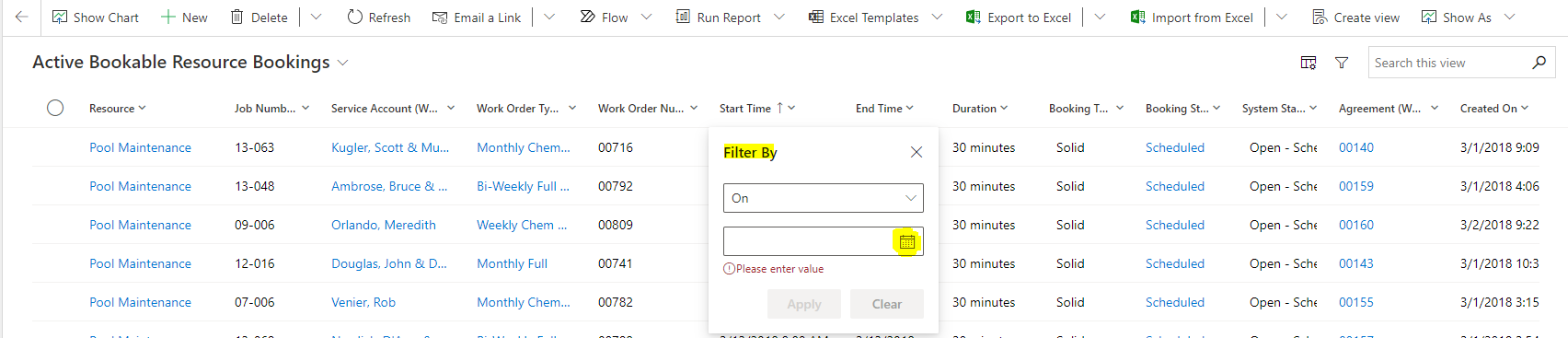
 All of a sudden filter on column "Start Time" in the  "Active Bookable Resource Booking" View from Booking Table is not working when we try to use  Filter By - ON - selecting date from calendar.

Start Time column data type is date & time.

When we use filter on START TIME- using ON  and selecting date from calendar ,below screen shot for reference.
pastedimage1645675214532v2.png

Once we select date and even before we use apply button we get below screen without any records.

pastedimage1645675363976v4.png

Can anyone please share us the solution/steps for troubleshooting.

Thank you in advance.

I have the same question (0)
  • Suggested answer
    Lucky Dog Profile Picture
    670 on at

    Hia

    working fine here. did you select a date and hit apply? Your screenshot suggests you may not have done so.

    pastedimage1645705368012v1.png

  • ekmode8483 Profile Picture
    71 on at

    Hi

    When we are using Filter By = ON & Select the date , we do not get option to hit apply and then it directly shows the window without result. Below screen shot for reference.

    pastedimage1645709029012v1.png

Under review

Thank you for your reply! To ensure a great experience for everyone, your content is awaiting approval by our Community Managers. Please check back later.

Helpful resources

Quick Links

Responsible AI policies

As AI tools become more common, we’re introducing a Responsible AI Use…

Neeraj Kumar – Community Spotlight

We are honored to recognize Neeraj Kumar as our Community Spotlight honoree for…

Leaderboard > Service | Customer Service, Contact Center, Field Service, Guides

#1
Tom_Gioielli Profile Picture

Tom_Gioielli 61 Super User 2025 Season 2

#2
Siv Sagar Profile Picture

Siv Sagar 52 Super User 2025 Season 2

#3
Daniyal Khaleel Profile Picture

Daniyal Khaleel 42 Most Valuable Professional

Last 30 days Overall leaderboard

Featured topics

Product updates

Dynamics 365 release plans



