web
You’re offline. This is a read only version of the page.
close
Skip to main content

Notifications

Announcements

No record found.

Community site session details

Community site session details

Session Id :
Microsoft Dynamics AX (Archived)

Expose properties of AxSalesTable via AIF SalesSalesOrderService

(0) ShareShare
ReportReport
Posted on by

I’m working with AX2012 R2 and would like to expose more AxSalesTable properties via the SalesSalesOrderService AIF.

Currently I have the SalesSalesOrderService exposed as RMPSalesOrder via AX AIF. I have a .net web service called SalesOrderService (SOS) which is my main entry point for all other internal .net applications to push orders into AX.

I’m tasked pushing orders through that will be direct deliveries and programmatically creating purchase orders for those sales orders.

Through my research I found that the AxSalesTable class is where I should be looking to expose an existing or new method.


For instance I’d like to be able to say whether or not it’s a DirectDelivery by exposing the InterCompanyDirectDelivery property.


The parm method is public

3731.Parm.png


The set method is protected

Set.png


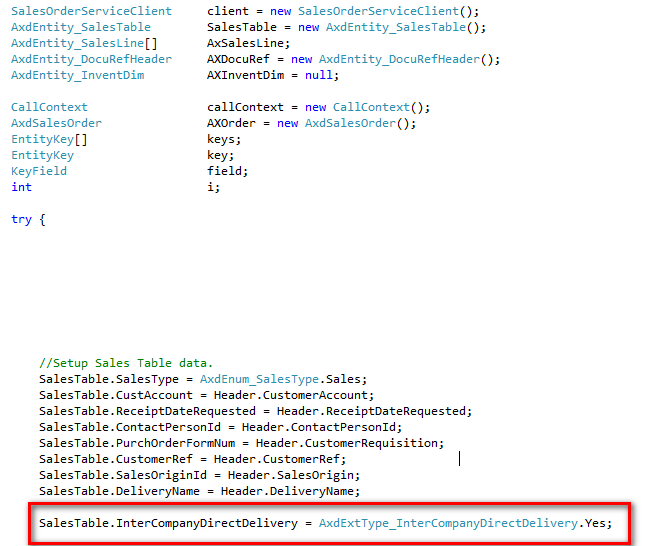
Here is the .net side

Net.png


All of the SalesTable properties are successfully set at this time except the highlighted one. This one is not set and always seems to default at NO.


I’ve attempted to make changes and then refresh the service but once I refresh the service I actually lose all references to the Axd* objects via the AIF web service.


How do I successfully expose the InterCompanyDirectDelivery and have that follow to the .net code so I can mark it on the sales order during creation?


Bonus Question: How do you refresh the AIF without kyboshing the rest of the references?

*This post is locked for comments

I have the same question (0)
  • Verified answer
    Martin Dráb Profile Picture
    237,880 Most Valuable Professional on at

    Try adding SalesTable.InterCompanyDirectDeliverySpecified = true;.

  • Community Member Profile Picture
    on at

    Martin,

    It's not possible to do this, InterCompanyDirectDelivery is an an Enum/EDT object.

    object.png

    Cheers

  • Martin Dráb Profile Picture
    237,880 Most Valuable Professional on at

    That's not what I said; notice the suffix 'Specified'.

  • Community Member Profile Picture
    on at

    Martin,

    My apologies!  I did try that but it didn't update the DirectDelivery and I don't see set or parm methods for that particular field.

    Any other advice?

    Cheers,

    Bob

  • Martin Dráb Profile Picture
    237,880 Most Valuable Professional on at

    Is it a recent change? Make sure services were successfully refreshed (go to AifService form, click Refresh and when it's done, review the Status (and Error message) of your service.

    In past, I've seen issues when some fields were ignored, because the framework used a cached list of fields that didn't contain the new field. You may want to restart the server to clean the cache.

    If everything fails, debug the framework to see where it fails (note that it's not particularly easy).

  • Community Member Profile Picture
    on at

    Martin,

    I've attempted to refresh the service after making changes to the AxSalesTable class but I run into a weird problem.  After using the AifService refresh option the AxSalesTable is not accessible via the SalesSalesOrderService in my .net application.

    This is what I have access to now:

    ObjectBrowser.png

    After I refresh the service the only objects available are Aif* objects. 

    Cheers,

    Bob

  • Martin Dráb Profile Picture
    237,880 Most Valuable Professional on at

    I'm afraid that I don't understand. What do you mean that AxSalesTable is not accessible? When you say Aif* objects, don't you mean Axd* objects?

    Maybe you mean that you used to pass an array of AxSalesTable objects to the service but now it expects an AxdSalesOrder object? Then you just have to assign the array to SalesTable property of AxdSalesOrder.

  • Community Member Profile Picture
    on at

    Martin, after using the refresh option on the AifService form in the AOT I am unable to access any of the axd* or ax* objects from the exposed AIF web service.  I can only access Aif* class objects from the web service.

    I think I'm on to something right now, I'll report back.

  • Martin Dráb Profile Picture
    237,880 Most Valuable Professional on at

    Now it's even more confusing. You gave us a picture with Axd* classes and enums and said "This is what I have access to now". And now you're saying the complete opposite ("I am unable to access any of the axd* objects"). It can't be true at the same time.

    You also haven't explained what you mean by Aif* objects an "unable to access". Please do it now.

  • Community Member Profile Picture
    on at

    Martin,

    Please disregard - Adding both SalesTable.InterCompanyDirectDeliverySpecified = true; AND SalesTable.IntercopmanyDirectDelivery = AxdExtType_InterCompanyDirectDelivery.Yes;

    Seems to solve the problem.

    I was working through refreshing the Query and adding new fields to the AIF yesterday.  All is working.

    Is it worth it to go through the steps to add new fields to AIF for future readers?

    Cheers,

    Bob

Under review

Thank you for your reply! To ensure a great experience for everyone, your content is awaiting approval by our Community Managers. Please check back later.

Helpful resources

Quick Links

Responsible AI policies

As AI tools become more common, we’re introducing a Responsible AI Use…

Neeraj Kumar – Community Spotlight

We are honored to recognize Neeraj Kumar as our Community Spotlight honoree for…

Leaderboard > 🔒一 Microsoft Dynamics AX (Archived)

#1
Martin Dráb Profile Picture

Martin Dráb 4 Most Valuable Professional

#1
Priya_K Profile Picture

Priya_K 4

#3
MyDynamicsNAV Profile Picture

MyDynamicsNAV 2

Last 30 days Overall leaderboard

Featured topics

Product updates

Dynamics 365 release plans