web
You’re offline. This is a read only version of the page.
close
Skip to main content

Notifications

Announcements

No record found.

Community site session details

Community site session details

Session Id :
Microsoft Dynamics NAV (Archived)

Display of different inventory location for NAV

(0) ShareShare
ReportReport
Posted on by

Hi All,

We are a small company that have recently implemented the NAV ERP system and went live for about 6 months. However during this time we found out that there are some issues, in which the company doing our NAV implementation is not able to resolve.

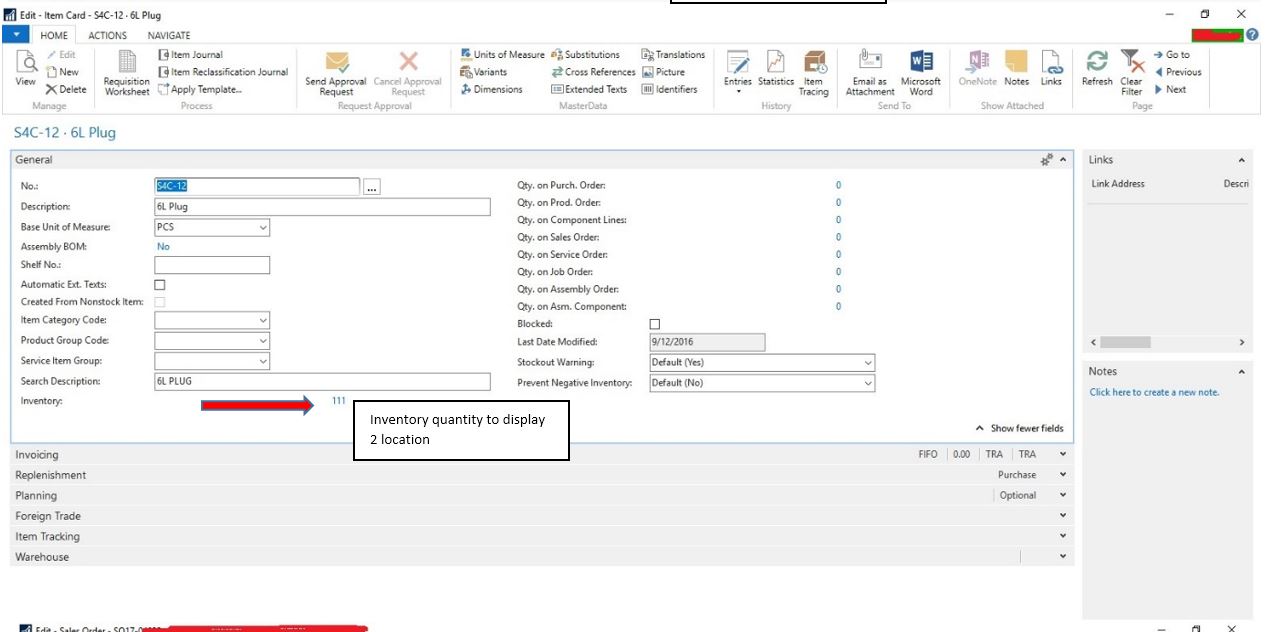
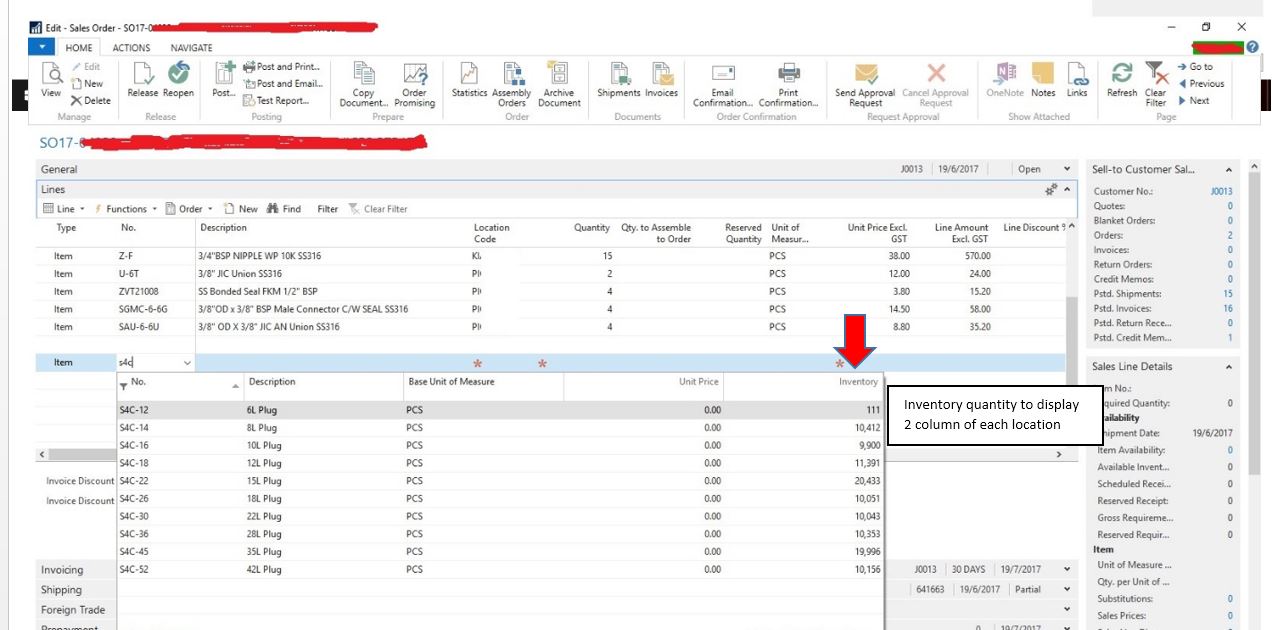
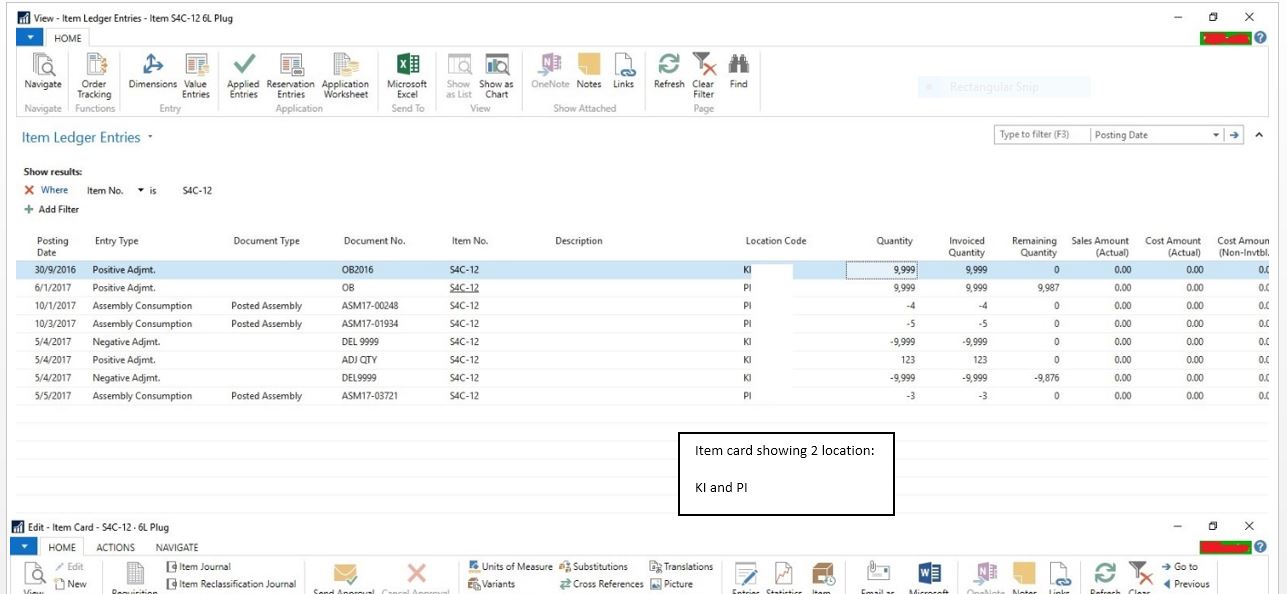
Currently our inventory is located in 2 location, however during item search and individual item card, the inventory quantity is added up to a single line. This have created much problems for our sales staff for our daily operation. We have requested from our NAV consulting company to split the the inventory count line to display 2 location, but they have informed us that this is not possible.

Like to check if there are any creative solutions to our issues. Attached is the screen shot for better illustration.

Many thanks in advance.

Cheers.
item-card1.jpgitem-card2.jpgsales-order1.jpg

*This post is locked for comments

I have the same question (0)
  • Suggested answer
    Community Member Profile Picture
    on at

    Hi Rikobo,

    you have to create location wise quantity fields like below

    locationqty.jpg

    for this above fields you need to declare a flowfields.

    Thank You

    Ramesh

  • Verified answer
    Hasitha Jayasuriya Profile Picture
    645 on at

    Hi Rikobo,

    have you tried using the "Inventory by Location" Report ?

    Regards,

    Hasitha Jayasuriya

    If my response answered your question, please take a minute to verify the answer as it would help other forum members

  • Verified answer
    tpupko Profile Picture
    2,048 on at

    Hi Rikobo,

    I agree with Hasitha Jayasuriya,

    It is better to use standard report for analysis - Items by Location

    Items-by-locations.png

    Tatiana

  • Community Member Profile Picture
    on at

    Thanks for all the reply!

    Is there any way to display the information shown in the matrix to also reflect in item search with individual column while we are doing the our sales order?

    Our developer is not very helpful as they simply told us this is not possible, without proposing any alternative. So right now i am not sure is they are lazy to help or simply a constrain of the system capability.

    Thanks again!

    matrix.JPGmatrix.JPG

  • Suggested answer
    Community Member Profile Picture
    on at

    Hello!

    Yes. it's definitly possible. But it's not recommended desicion. (Imagine that you will want to have 100 locations in the future...) So I think your developer say to you that it not possible. 

  • Suggested answer
    RobertasR Profile Picture
    5,004 on at

    Hi Rikobo,

    I would encourage you to use standard system, rather than changing it, as the changes might turn out to be not future proof.

    I think there are 2 main scenarios when you want to see the available stock. If you just want to check the stock availability, you could use Items By Location matrix, and you can advice customers, or plan purchases.

    If you are entering the sales order and want to check the stock availability in the Location at that point, you could use the Fact Box "Sales Line Details", that shows "Item Availability" and "Available Inventory" for the selected location, after you enter item and location on the sales line.

    I understand this might be different from what you used to have, and there will be a learning curve, or slight change of the process, but definitely worth taking for the future benefits.

    Robertas

  • Suggested answer
    The Simpsoid Profile Picture
    625 on at

    Hi

    You can use NAV's Limit Totals To filters (CTRL+SHIFT+F3) on both the Item Card and the Item List.

    E.g. in CRONUS

    GREEN-Only.JPG

    That lets you see items which have some inventory, though it may already be on a sales demand, etc., of course.

    On a card, filtered to just GREEN Location:

    GREEN-Only.JPG

    (FlowFields for Inventory and also Qty. on Purch. Order, Qty on Sales Order, etc., all now filtered to just GREEN location).

    Having more than one Inventory Field visible on the card is certainly possible but you should refrain from hard-coding any particular Location into a filtered field as that does go against NAV design principles and makes it harder to be future-proofed.

  • Suggested answer
    Community Member Profile Picture
    on at

    Hi Rikobo

    If you have read all the above and assume the risk described yo can do it.

Under review

Thank you for your reply! To ensure a great experience for everyone, your content is awaiting approval by our Community Managers. Please check back later.

Helpful resources

Quick Links

Responsible AI policies

As AI tools become more common, we’re introducing a Responsible AI Use…

Neeraj Kumar – Community Spotlight

We are honored to recognize Neeraj Kumar as our Community Spotlight honoree for…

Leaderboard > 🔒一 Microsoft Dynamics NAV (Archived)

#1
HoangNam Profile Picture

HoangNam 7

Last 30 days Overall leaderboard

Featured topics

Product updates

Dynamics 365 release plans