web
You’re offline. This is a read only version of the page.
close
Skip to main content

Notifications

Announcements

No record found.

Community site session details

Community site session details

Session Id :
Customer experience | Sales, Customer Insights,...
Suggested Answer

'View' columns not visible in chart editor

(0) ShareShare
ReportReport
Posted on by 5

I have built a custom view based on Opportunity lines. The columns include a column for 'Business Unit' coming from the related 'Opportunity'. And a bunch of other columns.

1_2D00_31_2D00_2020-2_2D00_16_2D00_18-PM.png

I want to build a chart, with an X-axis based on "Business Unit", but that columns doesn't appear on the chart ax drop down menu. Why not? 

From what I understand all the columns in the view should appear above the dotted line, but they don't for me. Not below the dots either.  Am I missing anything? 
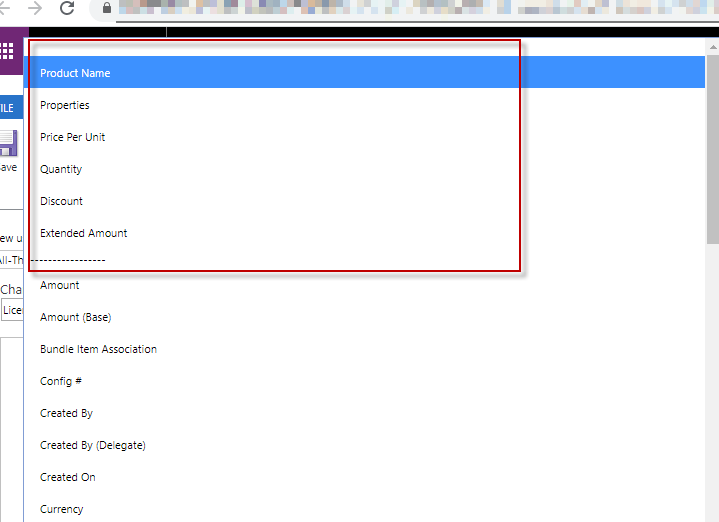
1_2D00_31_2D00_2020-2_2D00_21_2D00_06-PM.png_2D00_750x0.png

I have the same question (0)
  • Suggested answer
    Wouter Madou Profile Picture
    3,392 on at

    Hi, It is not possible to aggregate on a related entity column (by default).

    So either copy over the data from the master (not recommended but easiest if you can't customize charts) or export the chart and edit the XML.

    Remark:

    Charting in D365 works through fetchxml and this has a limit of total number of records that can be processed. If your work with related entities in your chart, this limit can be reached quite quickly..

    Example:

    cloudblogs.microsoft.com/.../

    You could also go to PowerBi (I would go this way if I were you..) and load the both entities, create the relationship (or use the expand query functionality) and you can go nuts with the reporting. (And if you want to to YTD reporting, PowerBi is the way to go for sure! :) )

    docs.microsoft.com/.../use-power-bi

  • Suggested answer
    ba365guy Profile Picture
    2,950 on at

    Only fields in the same entity will be available to choose.

Under review

Thank you for your reply! To ensure a great experience for everyone, your content is awaiting approval by our Community Managers. Please check back later.

Helpful resources

Quick Links

Responsible AI policies

As AI tools become more common, we’re introducing a Responsible AI Use…

Neeraj Kumar – Community Spotlight

We are honored to recognize Neeraj Kumar as our Community Spotlight honoree for…

Leaderboard > Customer experience | Sales, Customer Insights, CRM

#1
Tom_Gioielli Profile Picture

Tom_Gioielli 137 Super User 2025 Season 2

#2
#ManoVerse Profile Picture

#ManoVerse 57

#3
Jimmy Passeti Profile Picture

Jimmy Passeti 50 Most Valuable Professional

Last 30 days Overall leaderboard

Product updates

Dynamics 365 release plans



