web
You’re offline. This is a read only version of the page.
close
Skip to main content

Notifications

Announcements

No record found.

Community site session details

Community site session details

Session Id :
Customer experience | Sales, Customer Insights,...
Suggested Answer

How CRM or CDS entities work with Flow/Process

(0) ShareShare
ReportReport
Posted on by

Hello Folks,

We have got a requirement to update the Employee User Profile Photo along with their approval.

So we have created an app for the user to upload their image and other metadata, in back-end we are using Common Data Services within PowerApps.

Now for updating the User Profile Photo in Office 365, Microsoft has provided a handy connector in Flow named "Update my profile photo" within Office 365 Users.

Therefore in Microsoft Flow, I am using the following actions:

1. A built-in CDS Trigger on which gets fires on Create and Update

2. Store the InternalItemID of the entry in a Variable

3. A built-in CDS Get file or image content

4. The action which update the user profile photo

This works fine when I trigger the flow - my profile photo gets immediately updated, however when another user uses the app - the flow gets trigger however my photo gets updated and not the one who trigger the flow,  (I am assuming the flow runs using my account).

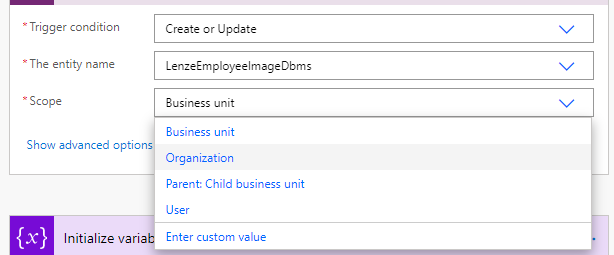
Within the CDS trigger, there is a way to define a scope - I played with all of them however got the same results. (see second picture)

Anyone can enlighten here.

Thanks in advance.

Cheers.

pastedimage1603712337230v1.png

pastedimage1603712944621v2.png

I have the same question (0)
  • Suggested answer
    Fubar Profile Picture
    2,761 on at

    The scope you have showing in the dropdown is the same as in a CRM workflow scope and relates to where the user sits in the business unit structure (and their Security Permissions) compared to the ownership of the current record to determine if the flow will run on that record or not.

    The flow is probably running as the Process Owner - on the first node, click on Show Advanced Options you should see a Run As option where you can change this to run as the user executing the flow.

  • Community Member Profile Picture
    on at

    Hi LA,

    Thanks for your reply.

    I had already tried with Run As: Triggering User and just now Run As: Record Owner

    In both cases, the flow runs however it updates my pic only and not the user who is using the application (I ran the app using an admin account)

    Let me know your views.

    Regards.

    pastedimage1603791572917v1.png

  • Community Member Profile Picture
    on at

    For more info, sharing the connector output after the flow ran successfully.

    The RunAsSystemUserID is taking the correct user which is adminmf in my case, however I am not sure why it is not updating the profile pic accordingly...

    {
    "cr6d3_employeeid": "adminmf@mycompany.com",
    "_owningbusinessunit_value": "9e7bbde8-7f3c-e911-a9a8-000d3ab7810b",
    "_owningbusinessunit_type": "businessunits",
    "modifiedon": "2020-10-27T09:36:33Z",
    "cr6d3_mycompanyemployeeimagedbmsid": "4c84f433-c412-eb11-a813-000d3ab1cb21",
    "_ownerid_value": "09b4cc4a-17fb-e911-a813-000d3ab7543e",
    "_ownerid_type": "systemusers",
    "statuscode": 1,
    "_statuscode_label": "Active",
    "cr6d3_employeename": "Mourtaza F",
    "_createdby_value": "09b4cc4a-17fb-e911-a813-000d3ab7543e",
    "_createdby_type": "systemusers",
    "cr6d3_name": "Mourtaza Fazlehoussen",
    "statecode": 0,
    "_statecode_label": "Active",
    "cr6d3_employeephotoid": "23",
    "cr6d3_employeephotoapproval": 428010000,
    "_cr6d3_employeephotoapproval_label": "Approved",
    "cr6d3_employeephotoasbase64": "appres://blobmanager/99b361fcc8e6429882ebeb7a73ce8b00/1",
    "_modifiedby_value": "09b4cc4a-17fb-e911-a813-000d3ab7543e",
    "_modifiedby_type": "systemusers",
    "createdon": "2020-10-20T11:05:47Z",
    "cr6d3_employeephotoasimageid": "4f84f433-c412-eb11-a813-000d3ab1cb21",
    "ItemInternalId": "4c84f433-c412-eb11-a813-000d3ab1cb21",
    "SdkMessage": "Update",
    "RunAsSystemUserId": "09b4cc4a-17fb-e911-a813-000d3ab7543e",
    "RowVersion": "14482832"
    }

  • Fubar Profile Picture
    2,761 on at

    I don't know if this helps or not (and I haven't done what you are looking for before), did you create the Flow from inside a Solution File or just from the make.powerapps interface?  If I peek the code on the update profile photo node when created outside a Solution it looks different than if the flow is initially created inside a Solution File (sounds crazy, but we have seen other flow components have different settings when created outside vs inside a Solution File also).

Under review

Thank you for your reply! To ensure a great experience for everyone, your content is awaiting approval by our Community Managers. Please check back later.

Helpful resources

Quick Links

Responsible AI policies

As AI tools become more common, we’re introducing a Responsible AI Use…

Neeraj Kumar – Community Spotlight

We are honored to recognize Neeraj Kumar as our Community Spotlight honoree for…

Leaderboard > Customer experience | Sales, Customer Insights, CRM

#1
Tom_Gioielli Profile Picture

Tom_Gioielli 83 Super User 2025 Season 2

#2
Gerardo Rentería García Profile Picture

Gerardo Rentería Ga... 49 Most Valuable Professional

#3
#ManoVerse Profile Picture

#ManoVerse 40

Last 30 days Overall leaderboard

Product updates

Dynamics 365 release plans