web
You’re offline. This is a read only version of the page.
close
Skip to main content

Notifications

Announcements

No record found.

Community site session details

Community site session details

Session Id :
Finance | Project Operations, Human Resources, ...
Suggested Answer

is there any function in Visual studio to HIDE EMPTY COLUMNS

(0) ShareShare
ReportReport
Posted on by 30

hi all,

Can you please let me know, is there any function in Visual studio to HIDE EMPTY COLUMNS ?

3 columns i have in Visual Studio.

SBU,

BRAND,

COST CENTRE

So, in report dialog, if suppose user select Dimension set = Main account+ Brand 

Then in report, COST CENTER AND SBU columns should be hide. Basically the column is hide based on parameters.
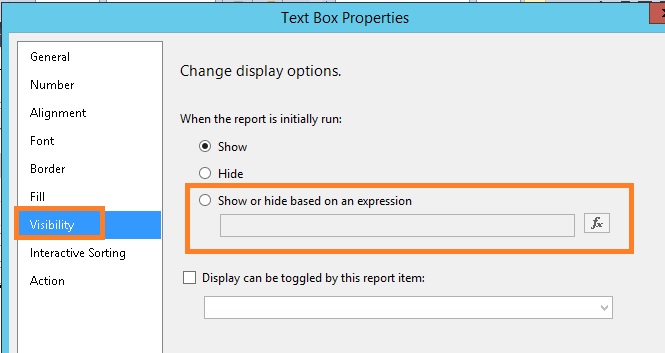
5732.vs.jpg

please let me know what to write on the expression for each 3 columns?

Please give me more shed on this.

Thanks!

I have the same question (0)
  • Suggested answer
    nmaenpaa Profile Picture
    101,162 Moderator on at

    Earlier you wrote that you don't want to use a temp table.

    But if you would use a temp table, you could have separate fields for every dimension in the table. Then, based on the user selection on the dialog, populate only the fields that the user selected.

    And on the report, hide the fields that are empty (no value in temp table).

  • @rp@n Profile Picture
    30 on at

    yes i understand but our solution architect not allows me to create a new field  in standard table "LedgerTransactionListTmp". they told me to create a new 3 columns in Visual studio and make it as hide or unhide based on parameters.

    is it possible?

  • nmaenpaa Profile Picture
    101,162 Moderator on at

    If the solution architect is telling you how to do the technical implementation, perhaps he/she can suggest how to implement it?

    In general you can show/hide columns based on an expression (like we see in your own screenshot). But your current requirement is a bit different. Since you are working with a solution architect, did you discuss with him/her about the possibility of using Management reporter?

  • @rp@n Profile Picture
    30 on at

    not yet, i will

  • Suggested answer
    Sergei Minozhenko Profile Picture
    23,093 on at

    Hi @rp@n,

    The requirement to hide empty columns is a little bit incorrect. What if the brand dimension in case if dimension set Main account+ Brand is empty for all transactions. Column still should be visible as it's part of the dimension set. I guess you still need a pass list of columns to be shown to report (could be a parameter in contract populated after dialog closed) with the list of dimensions from dimension set and based on this value you can hide columns.

Under review

Thank you for your reply! To ensure a great experience for everyone, your content is awaiting approval by our Community Managers. Please check back later.

Helpful resources

Quick Links

Responsible AI policies

As AI tools become more common, we’re introducing a Responsible AI Use…

Neeraj Kumar – Community Spotlight

We are honored to recognize Neeraj Kumar as our Community Spotlight honoree for…

Leaderboard > Finance | Project Operations, Human Resources, AX, GP, SL

#1
Martin Dráb Profile Picture

Martin Dráb 451 Most Valuable Professional

#2
André Arnaud de Calavon Profile Picture

André Arnaud de Cal... 428 Super User 2025 Season 2

#3
BillurSamdancioglu Profile Picture

BillurSamdancioglu 239 Most Valuable Professional

Last 30 days Overall leaderboard

Product updates

Dynamics 365 release plans
