web
You’re offline. This is a read only version of the page.
close
Skip to main content

Notifications

Announcements

No record found.

Community site session details

Community site session details

Session Id :
Finance | Project Operations, Human Resources, ...
Unanswered

How do you manage shared Workspaces (not Views)?

(0) ShareShare
ReportReport
Posted on by 15

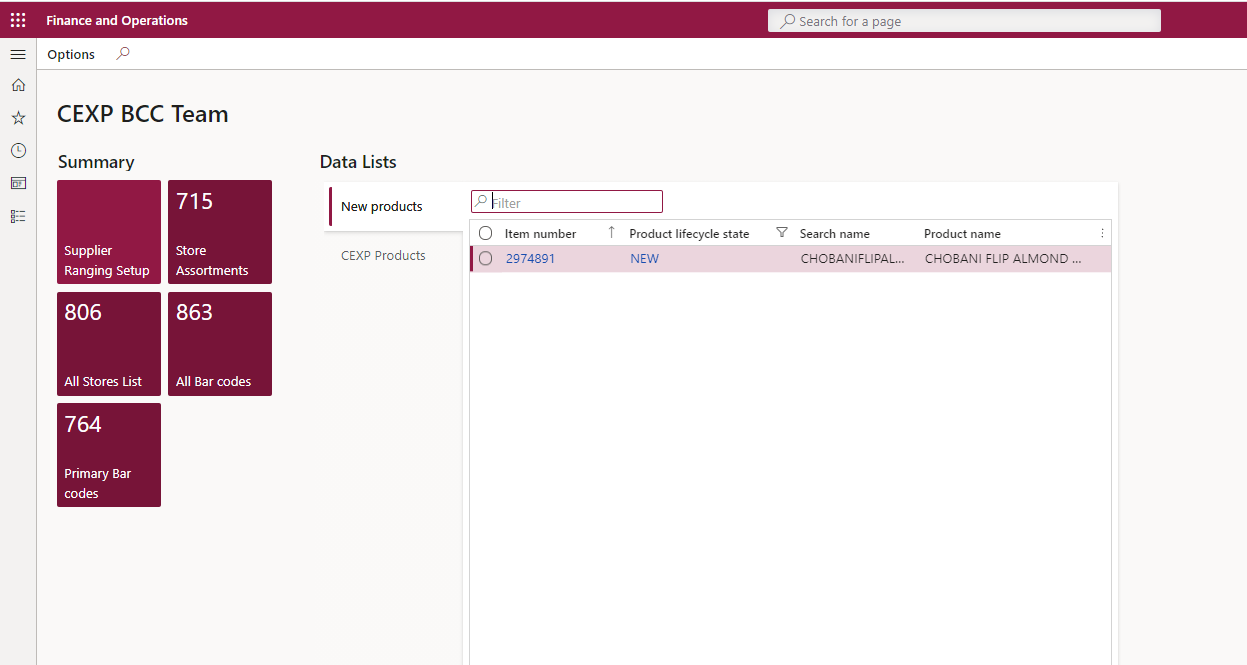
We've successfully created a new Workspace, added Tiles, Lists & Links. We've been able to Copy the Workspace to All Users via User Options > Personalization > Copy to users but when other users edit the Workspace it's updating the original Workspace.


We can't see how to Publish a Workspace via System administration > Setup > Personalization but it sounds like that's what is needed to lock the original Workspace and maintain the source/original Workspace - does anyone know how to do this - what are we missing?


I've googled for quite some time and can clearly see how to manage & publish "Views" but can't see how you are meant to manage "Workspaces" beyond creation & initial copying/sharing - guidance appreciated.
pastedimage1633774078055v1.png

I have the same question (0)
  • André Arnaud de Calavon Profile Picture
    301,035 Super User 2025 Season 2 on at

    Hi Ang,

    Can you share a screenshot of the option 'User Options > Personalization > Copy to users'. I think this might be a customization. Can you verify that? When I open the User Options form, I don't have a 'Personalization' section on that form.

  • Alireza Eshaghzadeh Profile Picture
    14,679 Super User 2025 Season 2 on at

    Hi,

    When you create a new view on a form. you can publish this view for a specific roles or legal entities.

    pastedimage1633709216778v2.png

    Once it has been published,it will be accessible on System administration > Setup > Personalization:

    pastedimage1633709181032v1.png

    You can  create a view on a form and then import this view for another user or for a organization that have access to that form via  System administration > Setup > Personalization > Import views.

    You can also publish a user personal view or copy it for other user:

    pastedimage1633709386863v3.png

    You can take backup of these view by exporting them and assigning security roles that not have access to this form to avoid override any published views for a organizations.

  • Ang_Fitz Profile Picture
    15 on at

    Thank you for your detailed response, we are happy with the way Views are working - it is Workspaces that we are experiencing difficulties with.

  • Ang_Fitz Profile Picture
    15 on at

    Thanks for your response, this is standard D365 as far as I understand. I'm going to try and add a printscreen.

    pastedimage1633744457772v2.png

  • André Arnaud de Calavon Profile Picture
    301,035 Super User 2025 Season 2 on at

    Hi Ang,

    You are correct. I had to enable some new features. I tried to reproduce your issue, but were not able to reproduce it.

    What exact version of Dynamics 365 F&O are you using? There was an issue in the past which got solved initially on 10.0.20 which might be related here: community.dynamics.com/.../tiles-in-custom-workspace-refresh-on-different-users  

  • Ang_Fitz Profile Picture
    15 on at

    Hello Andre, thanks for the information - we're on 10.0.18 but we're about to test and move up to 22.

    We are experiencing similar problems but i'm not running queries with Tiles and everything has been done through the front end - via personalisations.

    I created a Workspace, added Tiles, Lists & Links and copied to all users. My colleague then made some adjustments, removed a tile added some extra Links and my Workspace is now missing most of my tiles and all of my Links along with 1 of my 2 Lists. I've added back the missing details but don't know how to proceed now - do i recopy to all users or will the same happen again which is why i thought i should be able to Publish/Lock the Workspace and then users can make their own Workspace from mine if they want to but they can't update the base one (mine).

    Regards, Angelina

  • André Arnaud de Calavon Profile Picture
    301,035 Super User 2025 Season 2 on at

    Hi Angelina,

    I think that initially only a reference to the new configured workspace was copied instead of also a copy of the workspace itself. That would explain your experiences. After the fix, it might create copies of the workspace, but probably only when you reset some user settings and copy from scratch again. This is a thought on what I read, but I haven't experienced this issue myself. I also don't have an older environment available to be able to check it.

  • ahorrell Profile Picture
    5 on at

    You are correct. The problem is that the current version of D365 does not support publishing personalised Workspaces, as it does support publishing views: Workspaces can only be copied to users. It appears that this does not create separate copies of the workspace for each user but just gives copied users access to the original workspace. The downside is that one user can change the original workspace for everyone else. I think you need to change the copied users' personalisation access to Restricted or even set Personalisation allowed = No.

Under review

Thank you for your reply! To ensure a great experience for everyone, your content is awaiting approval by our Community Managers. Please check back later.

Helpful resources

Quick Links

Responsible AI policies

As AI tools become more common, we’re introducing a Responsible AI Use…

Neeraj Kumar – Community Spotlight

We are honored to recognize Neeraj Kumar as our Community Spotlight honoree for…

Leaderboard > Finance | Project Operations, Human Resources, AX, GP, SL

#1
Martin Dráb Profile Picture

Martin Dráb 584 Most Valuable Professional

#2
André Arnaud de Calavon Profile Picture

André Arnaud de Cal... 499 Super User 2025 Season 2

#3
Sohaib Cheema Profile Picture

Sohaib Cheema 254 User Group Leader

Last 30 days Overall leaderboard

Product updates

Dynamics 365 release plans
