web
You’re offline. This is a read only version of the page.
close
Skip to main content

Notifications

Announcements

No record found.

Community site session details

Community site session details

Session Id :
Customer experience | Sales, Customer Insights,...
Unanswered

Power Automate Flows Get File Properties for SharePoint throws exceeds the list view threshold

(2) ShareShare
ReportReport
Posted on by 9

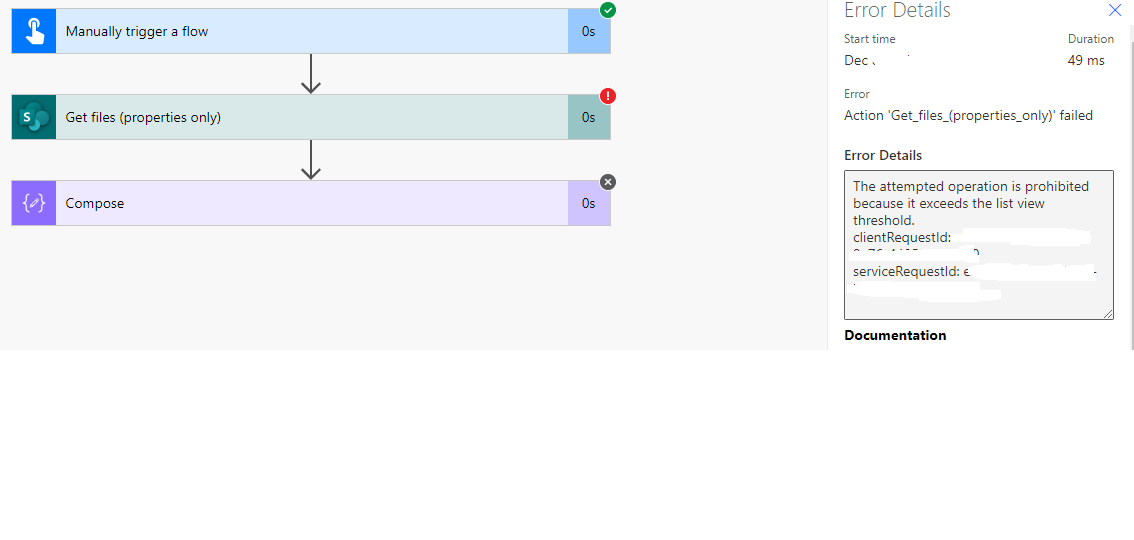
This is purely for informational and learning purposes as we realized that Power Automate flows are relatively new and this problem may be minor but holds significant impact. We are in the Government Servers - cloud 365 V 9.2 UCI and we created a Power Automate flow that utilizes the Get files (Properties only) component which connects to SharePoint (in this case we have SharePoint Online) and retrieves the file properties. We use this so that we can determine the total number of files within said folder within a given Library. We noticed however that if the SharePoint folder (we are trying to retrieve) List exceeds 5000 items (Which is the limit Microsoft has set to any given folder within a library) I've added images below for better descriptions**. If this occurs, then our flow returns an error (The attempted operation is prohibited because it exceeds the list view threshold.) when we execute this component. This is because the total number of items within all nested folders exceeds 5k. 

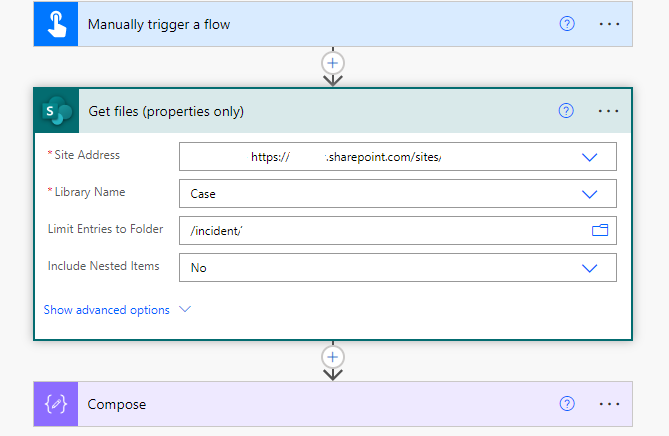
To resolve this, you have to configure the include Nested Items (initially set to = true) to 'No' so that the flow can ignore the number of nested items and focus solely on the Limit entries to folder you are trying to drill down to and retrieve the properties for.

Threshold limit in SharePoint.

 Eceeds-Limit.PNG

Limit error message in Automate Flow

7318.Error1.png

Update the (Include Nested Items) option to No:
pastedimage1670337100979v3.png

Successful outcome after updating the Limt Entries to folder to No:

pastedimage1670337294268v4.png

Hope this helped.

Thanks.

I have the same question (0)
  • Abdul Wahab Profile Picture
    12,119 Moderator on at

    Hi Leron G,

    Interesting one. Thanks for sharing.

  • Leron G Profile Picture
    9 on at

    Glad to add to our knowledge base in any way I can :)

  • nhungle Profile Picture
    3 on at
    Thank you for your solution. It has helped my Flow running again! It's a bit strange because the Get Files (Properties Only) action has been working fine until it suddenly returns empty value. I thought it has hit some API limits. Changing the "Include Nested Items" to "No" seems to get it to return value again. The folder has less than 200 files/subfolders.
  • Jalcock Profile Picture
    2 on at
     
    I was wondering if this would still work if a library has over 300,000 items in it? Would this action still return file(s) even when Limit Entries to Folder is set?
     
    Appreciate your response.
     
    Thanks

Under review

Thank you for your reply! To ensure a great experience for everyone, your content is awaiting approval by our Community Managers. Please check back later.

Helpful resources

Quick Links

Responsible AI policies

As AI tools become more common, we’re introducing a Responsible AI Use…

Neeraj Kumar – Community Spotlight

We are honored to recognize Neeraj Kumar as our Community Spotlight honoree for…

Leaderboard > Customer experience | Sales, Customer Insights, CRM

#1
Tom_Gioielli Profile Picture

Tom_Gioielli 171 Super User 2025 Season 2

#2
#ManoVerse Profile Picture

#ManoVerse 83

#3
Jimmy Passeti Profile Picture

Jimmy Passeti 50 Most Valuable Professional

Last 30 days Overall leaderboard

Product updates

Dynamics 365 release plans