web
You’re offline. This is a read only version of the page.
close
Skip to main content

Notifications

Announcements

No record found.

Community site session details

Community site session details

Session Id :
Finance | Project Operations, Human Resources, ...
Answered

How to create query for tables with ForeignKey relation

(0) ShareShare
ReportReport
Posted on by

Hi guys,

I'm having an issue when creating a Simple Query using this 2 table : ContactPerson and DirPerson

By looking at ContactPerson table, here is the relation :

5228.Capture1.PNG

So when create a simple query, what should I create for the relation ? Because it seems when I relate ContactPerson.Party == DirPerson.Recid, the result is wrong (no record, where actually I have)

3377.Capture.PNG

Some additional property I should set ?

Kindly advice,

Thanks

I have the same question (0)
  • Sergei Minozhenko Profile Picture
    23,093 on at

    Hi Wwong,

    Relation looks correct, but could you, please, provide a screenshot with relation properties?  Are you in the needed company when you test it? You can also check data on SQL side and check if you have all values in place.

  • Blue Wang Profile Picture
    on at

    Hi WWwong,

    Please check this, if you missed something:

    docs.microsoft.com/.../walkthrough-leveraging-foreign-keys-in-query-relations

  • Community Member Profile Picture
    on at

    HI,

    I ran to this docs, especially this section ->

    docs.microsoft.com/.../walkthrough-leveraging-foreign-keys-in-query-relations

    So In my query, Relation property, remove the field and just put the JoinDatasource -> the parent which is ContactPerson and JoinRelation is DirPerson (this is not really understood as in the docs says "MasterParent" which on the step before it, is set in "RelatedTableRole" property, which I found in ContactPerson table - relation to DirPerson -> the RelatedTableRole is DirPerson, so I choose this in my query)

    36322.Capture.PNG

    Anyway, it still give me no record when I ran.

    There is also alternative step, by only specified in DirPerson node UseRelation set to "Yes". In Docs says it will add the relation automatically but it didn't. And when I ran, it sill give me no record. However if I look at the query created (Myquery.tostring()), it seems correct : DirPerson(DirPerson) ON ContactPerson.Party = DirPerson.RecId

    But anyway the docs is on 2015 and it is for AX2012, whether it is change for D365 ?

    Any help would be appreciated.

    Thanks.

  • Community Member Profile Picture
    on at

    Hi Sergei,

    I test it using Runable Class, so what I did is when it breakpoint hit the QUERY = NEW QUERY(QueryStr(…..)), I just change the URL link to my dataarea which is in dev, now I'm using USMF. and let it run again.

    And in my USMF, the record is there, so that's why I think it's the query problem.

    Problem also I don't have access to the SQL it self.

    Nothing much in relation property, this is before I change it after I found some Microsoft docs, so I only specified the fields respectively :

    3146.Capture2.PNG

    But then again, I changed it now, by remove the fields.

    Thanks

  • Sergei Minozhenko Profile Picture
    23,093 on at

    Hi WWwong,

    Would you mind to provide a piece of code on how you use it in a runnable class? You can also try to remove DirPerson and check if it works without joins.

  • Blue Wang Profile Picture
    on at

    HI WWwong,

    It still applies to D365FO.

    I used it and it will show the data if the relationship is created correctly.

    Unless you have no data at all under your relationship, you first need to re-check whether the data is consistent.

  • Community Member Profile Picture
    on at

    Hi Sergei,

    this is my Runable class for testing query :

      Query   query = new query(queryStr(MyQuery));

      QueryRun queryRun = new QueryRun(query);

               CustTable CustTable;

               CustBankAccount CustBankAccount;

               DirPersonName DirPersonName;

               ContactPerson   ContactPerson;


               while(queryRun.next())

               {

                   CustTable  =   queryRun.get(tableNum(CustTable));

                  ContactPerson = queryRun.get(tableNum(ContactPerson));

               }

    I just remove the other tables, so only Custtable to ContactPerson, and turns out it is because of the data. While the relation between this two table is field ContactPersonId in both tables, in CustTable, this field never populated/updated. I checked there is no customisation for this. And the way I add Contacts for Customer is only in Customer form, go to the Top pane and Add Contact.
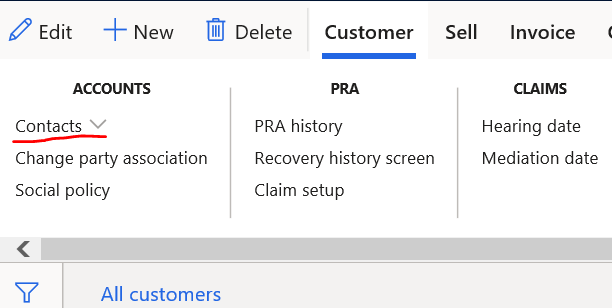
    3108.Capture.PNG

    Is there some step I missed so that the field ContactPersonId not being updated ?

    So basically that is the cause of my query always no record.

    Thanks,

  • Verified answer
    Sergei Minozhenko Profile Picture
    23,093 on at

    Hi WWwong,

    ContactPersonId is "Primary contact" on "Sales demographics" tab. So you can have "Primary contact" for customer and other contact can be added to under mentioned menu item.

  • Community Member Profile Picture
    on at

    I knew there something missing on the setup.

    Alright then, found the culprit.

    So, just curios, and back to the topic, actually there is nothing different on create Relation provided it is said ForeignKey Relation and Normal Relation ?

    Many thanks for your help.

Under review

Thank you for your reply! To ensure a great experience for everyone, your content is awaiting approval by our Community Managers. Please check back later.

Helpful resources

Quick Links

Responsible AI policies

As AI tools become more common, we’re introducing a Responsible AI Use…

Neeraj Kumar – Community Spotlight

We are honored to recognize Neeraj Kumar as our Community Spotlight honoree for…

Leaderboard > Finance | Project Operations, Human Resources, AX, GP, SL

#1
Martin Dráb Profile Picture

Martin Dráb 660 Most Valuable Professional

#2
André Arnaud de Calavon Profile Picture

André Arnaud de Cal... 549 Super User 2025 Season 2

#3
Sohaib Cheema Profile Picture

Sohaib Cheema 307 User Group Leader

Last 30 days Overall leaderboard

Product updates

Dynamics 365 release plans



