web
You’re offline. This is a read only version of the page.
close
Skip to main content
Community site session details

Community site session details

Session Id :
Dynamics 365 Community / Forums / Finance forum / How to config the VSTS...
Finance forum

How to config the VSTS for another developer

(0) ShareShare
ReportReport
Posted on by 90

Hi All,  I am not familar with this VSTS, now I am facing the below problem.

For the developer A, he configed the VSTS and upload the Descriptor file. 

When the developer B login to VSTS and sync the proejct in the new development environment(already rename the machine name), he can not open the extension project.

1. Does this mean he need to manually create the same model name in his environment?

2. Does he need to do the folder mapping setup for the source control?

3. If we have mutiple developer doing the same project, how can we do the setup for individual developer vm machine? Can someone provide the detail step by step? I already read the microsoft document from here:

a. https://docs.microsoft.com/zh-cn/dynamics365/unified-operations/dev-itpro/dev-tools/version-control-metadata-navigation

b. https://docs.microsoft.com/zh-cn/dynamics365/unified-operations/dev-itpro/migration-upgrade/vso-machine-renaming
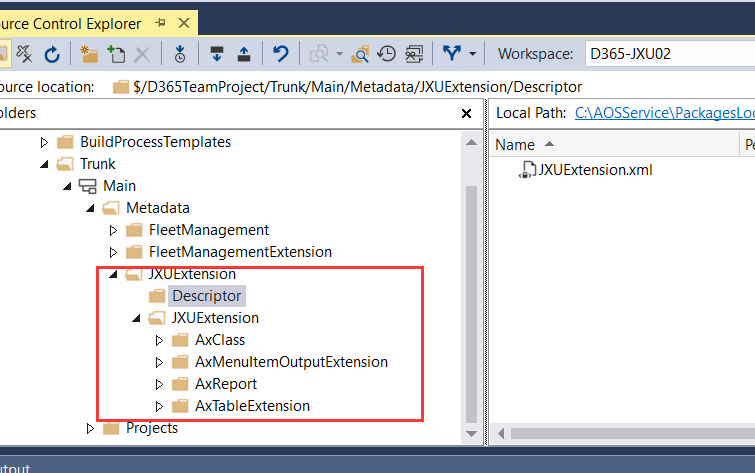
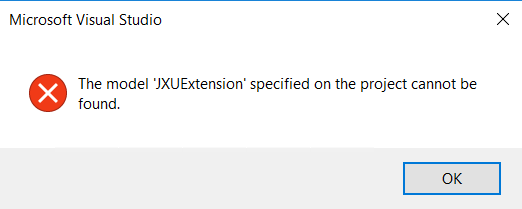
7658.01.png

6545.02.png

I have the same question (0)
  • Suggested answer
    nmaenpaa Profile Picture
    101,160 Moderator on at
    RE: How to config the VSTS for another developer

    It has nothing to do with VS projects.

    It seems developer A did not check in the model descriptor file. That's why developer B doesn't have it.

    It must be added manually to version control.

    In source control explorer of the developer A machine, go to /AOSService/PackagesLocalDirectory/, right click folder Descriptor -> Add items to folder. Locate YourModel.xml in the Descriptor folder and add it to version control. Check in.

  • LiuJie Xu Profile Picture
    90 on at
    RE: How to config the VSTS for another developer

    [quote user="Nikolaos Mäenpää"]

    It has nothing to do with VS projects.

    It seems developer A did not check in the model descriptor file. That's why developer B doesn't have it.

    It must be added manually to version control.

    In source control explorer of the developer A machine, go to /AOSService/PackagesLocalDirectory/, right click folder Descriptor -> Add items to folder. Locate YourModel.xml in the Descriptor folder and add it to version control. Check in.

    [/quote]

    The developer A already check in everything in his machine.

    03.png

  • Suggested answer
    nmaenpaa Profile Picture
    101,160 Moderator on at
    RE: How to config the VSTS for another developer

    Did developer B Refresh models after getting latest?

  • LiuJie Xu Profile Picture
    90 on at
    RE: How to config the VSTS for another developer

    Yes, already did the model refresh but does not work.

  • Suggested answer
    nmaenpaa Profile Picture
    101,160 Moderator on at
    RE: How to config the VSTS for another developer

    Do you see this model in the list of models for the environment?

    And do you still get this error when opening the project?

    Anyway, I don't see why you would even need to share the project.

    If you both associate your check ins with the same VSTS/ADO task, all relevant changes for this task can be found later from the version control. the VS project doesn't add any value in my opinion.

  • LiuJie Xu Profile Picture
    90 on at
    RE: How to config the VSTS for another developer

    After clicked the "Get latest version" from source control explorer, developer B did the "Refresh models" from the menu. He can not see this model from "Update model parameters".

    I am doing this because i am try to understand how multiple developers work toghter for the same project. Because based on the document from microsoft, each developer need to have their own VM, and need to use the TSVS for the version control and project solution control.  It makes me feel that everytime when the developer starts to do some customization, they need to link to the VSTS and get the latest version before they change anything.  After that, they will do the coding in their onw environment and sync to VSTS when they finished. If the developer A create a new model, does the other developer need to manually create the same model in their own environment or they do not need?

    Do I make the misunderstanding for the VSTS?

  • Verified answer
    nmaenpaa Profile Picture
    101,160 Moderator on at
    RE: How to config the VSTS for another developer

    Each model needs to be created only one time. Other developers will get it from the source control. As long as everything is set up correctly!

    Seems your developer B might have misconfigured workspace settings. If that was the case, the code (and descriptor) from version control was downloaded to some other directory than /AOSService/PackagesLocalDirectory. And in that case it will not work.

    Please check if you can see the model JXUExtension as subfolder in /AOSService/PackagesLocalDirectory/ of developer B's dev machine. And also check if the descriptor xml file is there.

    Also please check the workspace mappings of developer B.

  • LiuJie Xu Profile Picture
    90 on at
    RE: How to config the VSTS for another developer

    [quote user="Nikolaos Mäenpää"]

    [/quote]

    Thanks for your advice. looks like when doing the mapping, system auto add the subfolder "Metadata" at behind. After remove it, it works.

    6523.04.png

Under review

Thank you for your reply! To ensure a great experience for everyone, your content is awaiting approval by our Community Managers. Please check back later.

Helpful resources

Quick Links

November Spotlight Star - Khushbu Rajvi

Congratulations to a top community star!

Forum Structure Changes Coming on 11/8!

In our never-ending quest to help the Dynamics 365 Community members get answers faster …

Dynamics 365 Community Platform update – Oct 28

Welcome to the next edition of the Community Platform Update. This is a status …

Leaderboard > Finance

Last 30 days Overall leaderboard

Featured topics

Product updates

Dynamics 365 release plans
