web
You’re offline. This is a read only version of the page.
close
Skip to main content

Notifications

Announcements

No record found.

Community site session details

Community site session details

Session Id :
Finance | Project Operations, Human Resources, ...
Answered

Cannot request Letter of Guarantee

(0) ShareShare
ReportReport
Posted on by 257

Hi all,

I am testing the Letter of guarantee on Sales order. After creating new Sales order and selecting its Bank document type to Letter of guarantee, I opened the Letter of guarantee form from Sales order. However, I cannot see any type in the Create letter of guarantee request form, even though I have set up bank facility types already. The columns says that should be Reason code, which I don't understand.
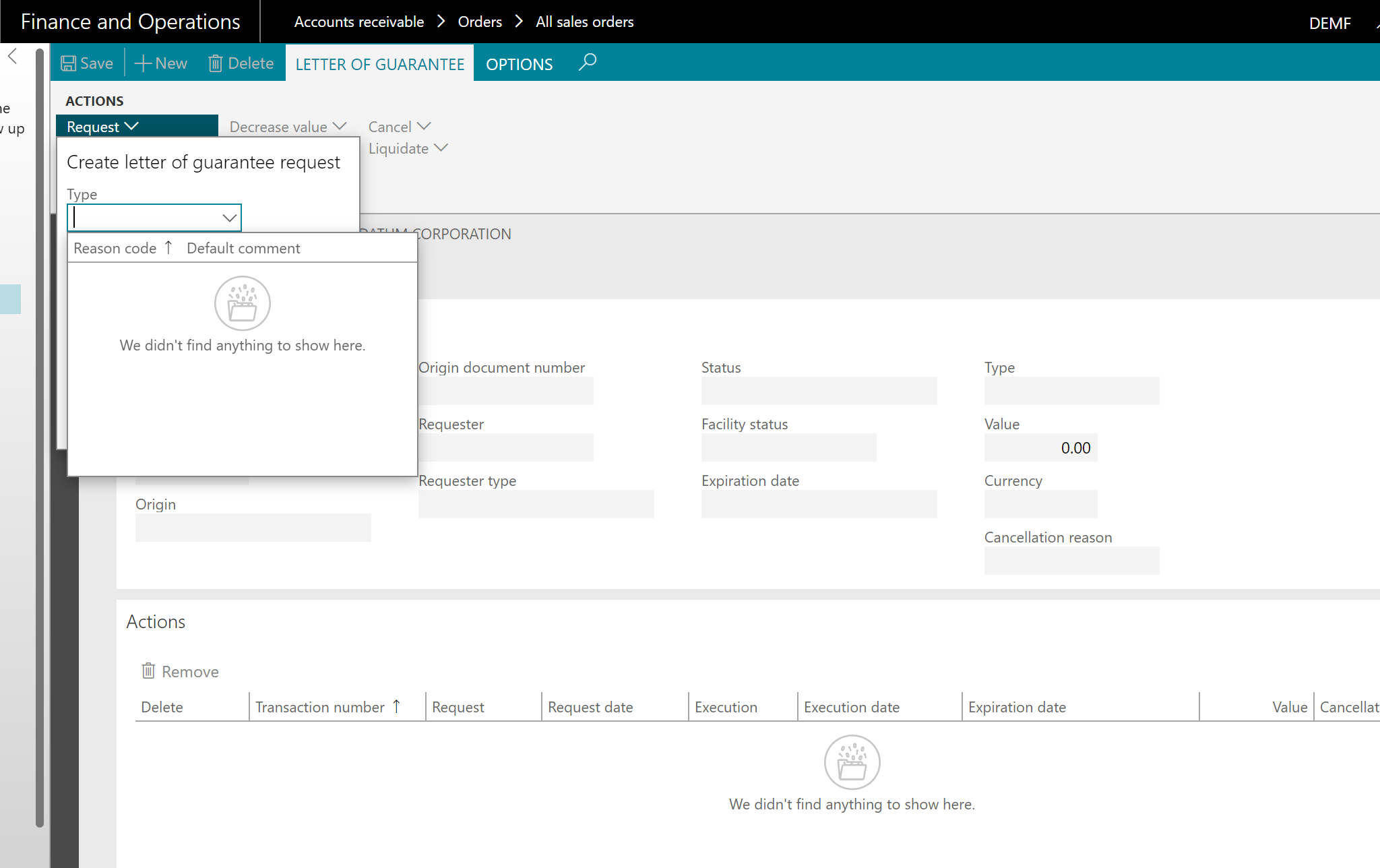
pastedimage1597028203176v1.png

Can anyone tell what might be wrong and what I should do in this case?

Thanks in advance.

I have the same question (0)
  • Suggested answer
    Ludwig Reinhard Profile Picture
    Microsoft Employee on at

    Hi,

    Did you follow these instructions?

    docs.microsoft.com/.../letter-guarantee-transaction

    Have all necessary setups be completed?

    (Please check the related MS docs sites for that)

    Best regards,

    Ludwig

  • fspafj Profile Picture
    257 on at

    Hi Ludwig Reinhard,

    I did follow that instruction for creating Sales order. I selected the Bank document type as Letter of guarantee:

    pastedimage1597034890439v1.png

    Also added Sales order line:

    pastedimage1597034924816v2.png

    Before that I have set up related information:

    1. Enable letter of guarantee parameter

    pastedimage1597034972737v3.png

    2. Set up Bank facility

    pastedimage1597035010800v4.png

    3. Set up Bank document posting profile

    pastedimage1597035053408v5.png

    4. Set up Bank facility agreement

    pastedimage1597035089698v6.png

    But I still could not request a new letter of guarantee.

    Regards,

  • Verified answer
    MATTGUO Profile Picture
    22,349 Moderator on at

    Hi Fspafj,

    Please enable the purpose for reason code in bank reasons: docs.microsoft.com/.../set-up-letter-of-guarantee-cancellation-reasons-and-purpose-code-types

  • Suggested answer
    Ludwig Reinhard Profile Picture
    Microsoft Employee on at

    Hi,

    Once you make all of those setups and created your sales order, confirm the sales order.

    After it is confirmed the request button becomes active.

    Best regards,

    Ludwig

  • fspafj Profile Picture
    257 on at

    Hi MATTGUO,

    I enabled the Purpose code for Bank reason, now I can request Letter of guarantee.

    Thank you!

Under review

Thank you for your reply! To ensure a great experience for everyone, your content is awaiting approval by our Community Managers. Please check back later.

Helpful resources

Quick Links

Responsible AI policies

As AI tools become more common, we’re introducing a Responsible AI Use…

Neeraj Kumar – Community Spotlight

We are honored to recognize Neeraj Kumar as our Community Spotlight honoree for…

Leaderboard > Finance | Project Operations, Human Resources, AX, GP, SL

#1
Martin Dráb Profile Picture

Martin Dráb 565 Most Valuable Professional

#2
André Arnaud de Calavon Profile Picture

André Arnaud de Cal... 450 Super User 2025 Season 2

#3
Sohaib Cheema Profile Picture

Sohaib Cheema 250 User Group Leader

Last 30 days Overall leaderboard

Product updates

Dynamics 365 release plans



