web
You’re offline. This is a read only version of the page.
close
Skip to main content

Notifications

Announcements

No record found.

Community site session details

Community site session details

Session Id :
Customer experience | Sales, Customer Insights,...
Suggested Answer

Is there a way to change the form based on business process flow?

(0) ShareShare
ReportReport
Posted on by

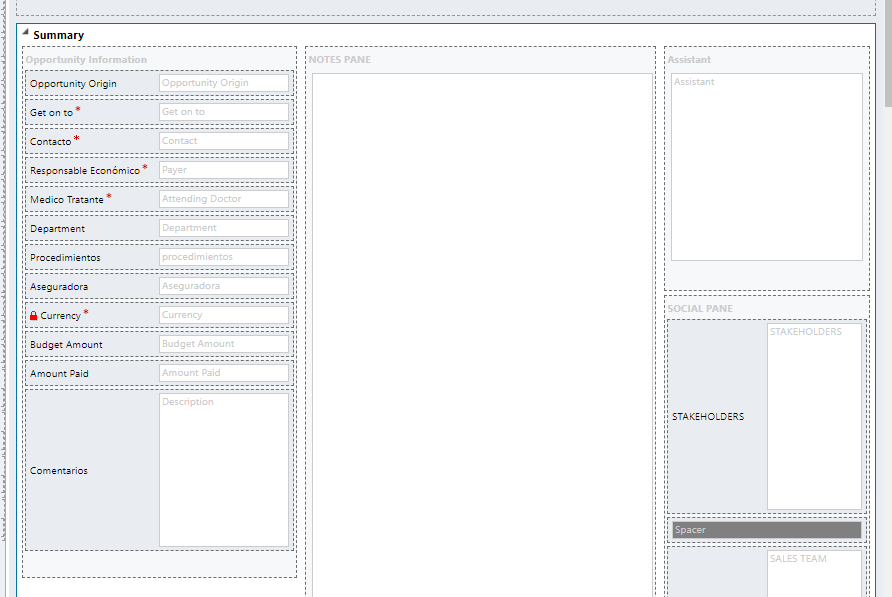
Hi guys, I have a base form in one BPF after I fill this info I hit Saved and the business process flow starts. 
pastedimage1584063804841v1.png

Lets name this process, Process 1, this process is inside one entity named opportunity. 

Inside this entity, I have made a second BPF named Proccess 2, even though it's a new process, it still have the same base form. 

Is there a way to change the based form and to change the fields inside?  

I need to fill a different info but still in the same entity. 

Thanks 

I have the same question (0)
  • Ram2020 Profile Picture
    15 on at

    You can invoke the second form from the plugin.

  • Suggested answer
    Flydancer Profile Picture
    1,332 on at

    @Ram2020 completelly wrong and not even possible

    you could check in which (process) stage you currently are and hide/show fields depending on it

    function getStage()
    {
    var activeStage = Xrm.Page.data.process.getActiveStage();
    var stageId = activeStage.getId();
    var stagename = activeStage.getName();
    }

  • Community Member Profile Picture
    on at

    What plugin?

  • Ram2020 Profile Picture
    15 on at

    sorry i mean programmatically using custom workflow. link will give better understanding. But if you are using 365 make sure you need to modify as the stagedetails are in the bpf_XXX entity

    develop1.net/.../How-to-change-process-and-stage-programmatically

  • Ram2020 Profile Picture
    15 on at

    you can also do it simply using workflow as shown below without using javascript or custom coding

    www.powerobjects.com/.../

Under review

Thank you for your reply! To ensure a great experience for everyone, your content is awaiting approval by our Community Managers. Please check back later.

Helpful resources

Quick Links

Responsible AI policies

As AI tools become more common, we’re introducing a Responsible AI Use…

Neeraj Kumar – Community Spotlight

We are honored to recognize Neeraj Kumar as our Community Spotlight honoree for…

Leaderboard > Customer experience | Sales, Customer Insights, CRM

#1
Tom_Gioielli Profile Picture

Tom_Gioielli 146 Super User 2025 Season 2

#2
#ManoVerse Profile Picture

#ManoVerse 59

#3
Gerardo Rentería García Profile Picture

Gerardo Rentería Ga... 52 Most Valuable Professional

Last 30 days Overall leaderboard

Product updates

Dynamics 365 release plans



