web
You’re offline. This is a read only version of the page.
close
Skip to main content

Notifications

Announcements

No record found.

Community site session details

Community site session details

Session Id :
Finance | Project Operations, Human Resources, ...
Suggested Answer

Visual studio IDE for duplicate editor view of AOT object

(0) ShareShare
ReportReport
Posted on by 901

Hi guys,

It is a bit difficult to explain, but how to open a new window of an object in Visual Studio IDE ? I once did it but now I totally forgot how.

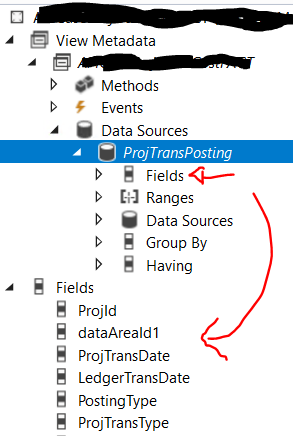
Say for example, I have a View and already open in Editor, obviously it will contain nodes like Datasource then the tables and the fields.

It will also have node for Fields down below for the View's field it self. 

As the fields in Datasource / table / fields might get very long list when it is opened because many many fields on that table, it is difficult for us to drag the field to View's fields node down below.
pastedimage1614674430805v1.png

I know I can just Add -> new fields in View's Field node over there if by dragging the fields from Datasource / table / field is not possible (difficult), but I remembered last time there is a menu for open another window which only contain the datasource / table somewhere, just like an old style MorphX 

Anyone can help me on this ?

Thanks

I have the same question (0)
  • Suggested answer
    nmaenpaa Profile Picture
    101,160 Moderator on at

    You can't open it two times but you can often Copy-Paste (Ctrl-C - Ctrl-V) instead of drag&drop to overcome this problem.

  • Tony zhong Profile Picture
    901 on at

    Hmm.. actually I really do discover that trick (by accident), and if not mistaken it was using Visual Studio 2017. Unfortunately can't remember right now.

    Basically it will open a new window editor, so for example if in editor we already open a View, then we can have a new window "smaller", for the fields of its data source so then we can drag which field we want to the Field's node on the original (1st) window.

  • ToddB Profile Picture
    on at

    Hi Tony,

    Is this what you are referring to?

    How to: Manage editor windows - Visual Studio | Microsoft Docs

Under review

Thank you for your reply! To ensure a great experience for everyone, your content is awaiting approval by our Community Managers. Please check back later.

Helpful resources

Quick Links

Responsible AI policies

As AI tools become more common, we’re introducing a Responsible AI Use…

Neeraj Kumar – Community Spotlight

We are honored to recognize Neeraj Kumar as our Community Spotlight honoree for…

Leaderboard > Finance | Project Operations, Human Resources, AX, GP, SL

#1
Martin Dráb Profile Picture

Martin Dráb 664 Most Valuable Professional

#2
André Arnaud de Calavon Profile Picture

André Arnaud de Cal... 522 Super User 2025 Season 2

#3
Sohaib Cheema Profile Picture

Sohaib Cheema 303 User Group Leader

Last 30 days Overall leaderboard

Product updates

Dynamics 365 release plans



