web
You’re offline. This is a read only version of the page.
close
Skip to main content

Notifications

Announcements

No record found.

Community site session details

Community site session details

Session Id :
Customer experience | Sales, Customer Insights,...
Suggested Answer

Dynamics 365 Ribbon customisation - copy OOB Mark complete button

(0) ShareShare
ReportReport
Posted on by 180

Hi,

Mark Complete button is viewable in activities grid.

For my client's requirement, I just want this to be visible for "Task" activity only when selecting tasks from activity gird. I tried displayrule on this "Mark complete" button with "select entity" as "Task" but not luck. I also tried enable rule but no luck.   I have also tried calling Javascript as a custom rule just to check selected entitylogicalname and what i found the name was always returned "activitypointer" which makes me think given this selection is always happening from activity view so regardless of the activity been selected it will always be the underline activitypointer table.

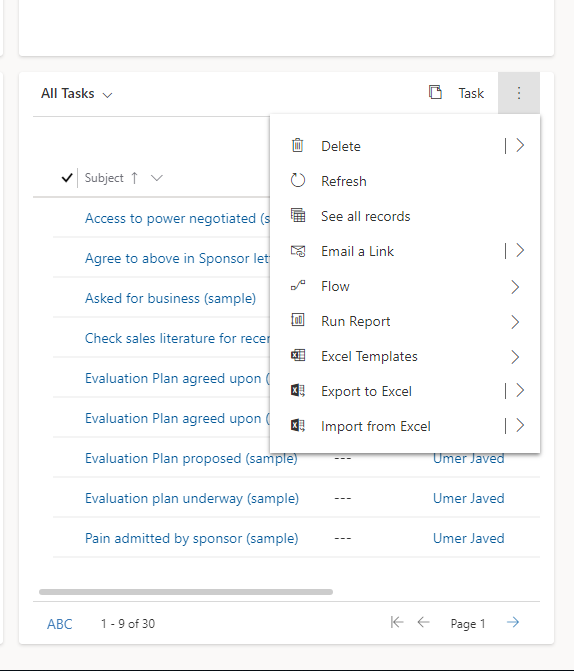
So as an alternative, the other area business are asking to make it work  is to provide "Mark Complete" button on the dashboard against tasks view....I am wondering if we could somehow add/copy "Mark Complete "button into the view below. Business users do not want to click on "See all records" and then go into that view to mark the activity as completed given it is multiple clicks for them.

Is there a way to copy the same button from home page grid of task and apply in the subgrid below? essentially it seems to be a subrid view of task in the dashboard.

Thanks
pastedimage1633849726402v1.png

I have the same question (0)
  • Suggested answer
    Community Member Profile Picture
    on at

    Hi Umer Powerapps,

    You can create custom rule and pass SelectedControlSelectedItemReference as parameter to achieve this. SelectedControlSelectedItemReference parameter is an array which each item has a TypeName property.

    You can use it to check it's task or not.

    pastedimage1633931142082v1.png

    This is my test code:

    function hideMarkCompleteButton(selectedItems){
        console.log(selectedItems);
    	var bool = true;
    	if(selectedItems != null && selectedItems.length > 0){
    		for(var x in selectedItems){
    			if(selectedItems[x].TypeName !== "task"){
    				bool = false;
    				break;
    			}
    			
    		}
    	}
    	return bool;
    }

    Result:

    When only select task, the button will show.

    pastedimage1633931469266v2.png

    Then select task and phone call, it will be hidden.

    pastedimage1633931500520v3.png

  • Umer Javed Profile Picture
    180 on at

    Hi Steve, This is great. I'll try this out. In the meantime what I have done is copied the "Mark Complete" button button from activities grid and used it on the Task entity to "Mark Complete" the tasks explicitly.

    pastedimage1633950492156v1.png

Under review

Thank you for your reply! To ensure a great experience for everyone, your content is awaiting approval by our Community Managers. Please check back later.

Helpful resources

Quick Links

Responsible AI policies

As AI tools become more common, we’re introducing a Responsible AI Use…

Neeraj Kumar – Community Spotlight

We are honored to recognize Neeraj Kumar as our Community Spotlight honoree for…

Leaderboard > Customer experience | Sales, Customer Insights, CRM

#1
Tom_Gioielli Profile Picture

Tom_Gioielli 108 Super User 2025 Season 2

#2
Jimmy Passeti Profile Picture

Jimmy Passeti 50 Most Valuable Professional

#3
Gerardo Rentería García Profile Picture

Gerardo Rentería Ga... 49 Most Valuable Professional

Last 30 days Overall leaderboard

Product updates

Dynamics 365 release plans



