web
You’re offline. This is a read only version of the page.
close
Skip to main content

Notifications

Announcements

No record found.

Community site session details

Community site session details

Session Id :
Small and medium business | Business Central, N...
Suggested Answer

After Reverse Transaction, Currency Amount TCY turns out to be 0, is it correct? in Navision 2018

(0) ShareShare
ReportReport
Posted on by 4,971

Hi Community,

Can anyone help me understand how system debit and credit this amount in general ledger entries.

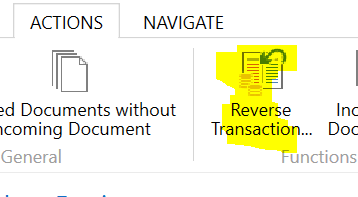
My account was making payment, but she accidentally key in the wrong amount and did a reversal Trasnaction.
pastedimage1641871755614v2.png

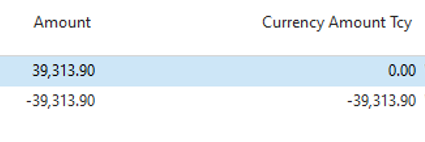
In the end the amount can be seen as reverse, however, at the General Ledger Entries > Currency Amount TCY, it shows as 0. Is this correct?

When I do a navigate  all the GST, Vendor, Detailed ledger entries and Bank account ledger entries, all seems to be correct.
pastedimage1641871810119v3.png

Thank you

I have the same question (0)
  • Suggested answer
    Community Member Profile Picture
    on at

    Josh,

    What are you reversing? A Payment made to a Vendor that has a foreign currency (TCY is the Vendor Currency, not LCY).

    Thanks,

    Steve

  • joshtechsolutions Profile Picture
    4,971 on at

    My accounts is reversing a payroll input which she key in the wrongly

  • Suggested answer
    Community Member Profile Picture
    on at

    Josh,

    Can you copy the original entry to Excel and then the Reversing Entry, all from the General Ledger Entry table.

    Thanks,

    Steve

  • joshtechsolutions Profile Picture
    4,971 on at

    Hi Steve,

    What would you like me to do with the excel?

  • Suggested answer
    Community Member Profile Picture
    on at

    Josh,

    What I want to do is see thee Debit and Credit entries and GL Accounts. Whether the entry was an LCY or FX Currency so I can recreate the Payroll entry in my database. Also, have you tried recreating the entry in your CRONUS database? Send me the actual entry so I can try.

    Thanks,

    Steve

Under review

Thank you for your reply! To ensure a great experience for everyone, your content is awaiting approval by our Community Managers. Please check back later.

Helpful resources

Quick Links

Responsible AI policies

As AI tools become more common, we’re introducing a Responsible AI Use…

Neeraj Kumar – Community Spotlight

We are honored to recognize Neeraj Kumar as our Community Spotlight honoree for…

Leaderboard > Small and medium business | Business Central, NAV, RMS

#1
OussamaSabbouh Profile Picture

OussamaSabbouh 3,143

#2
Jainam M. Kothari Profile Picture

Jainam M. Kothari 1,694 Super User 2025 Season 2

#3
YUN ZHU Profile Picture

YUN ZHU 1,067 Super User 2025 Season 2

Last 30 days Overall leaderboard

Featured topics

Product updates

Dynamics 365 release plans



