web
You’re offline. This is a read only version of the page.
close
Skip to main content

Announcements

No record found.

News and Announcements icon
Community site session details

Community site session details

Session Id :
Microsoft Dynamics AX (Archived)

Term of payment is not being taken by due date

(0) ShareShare
ReportReport
Posted on by 3,124

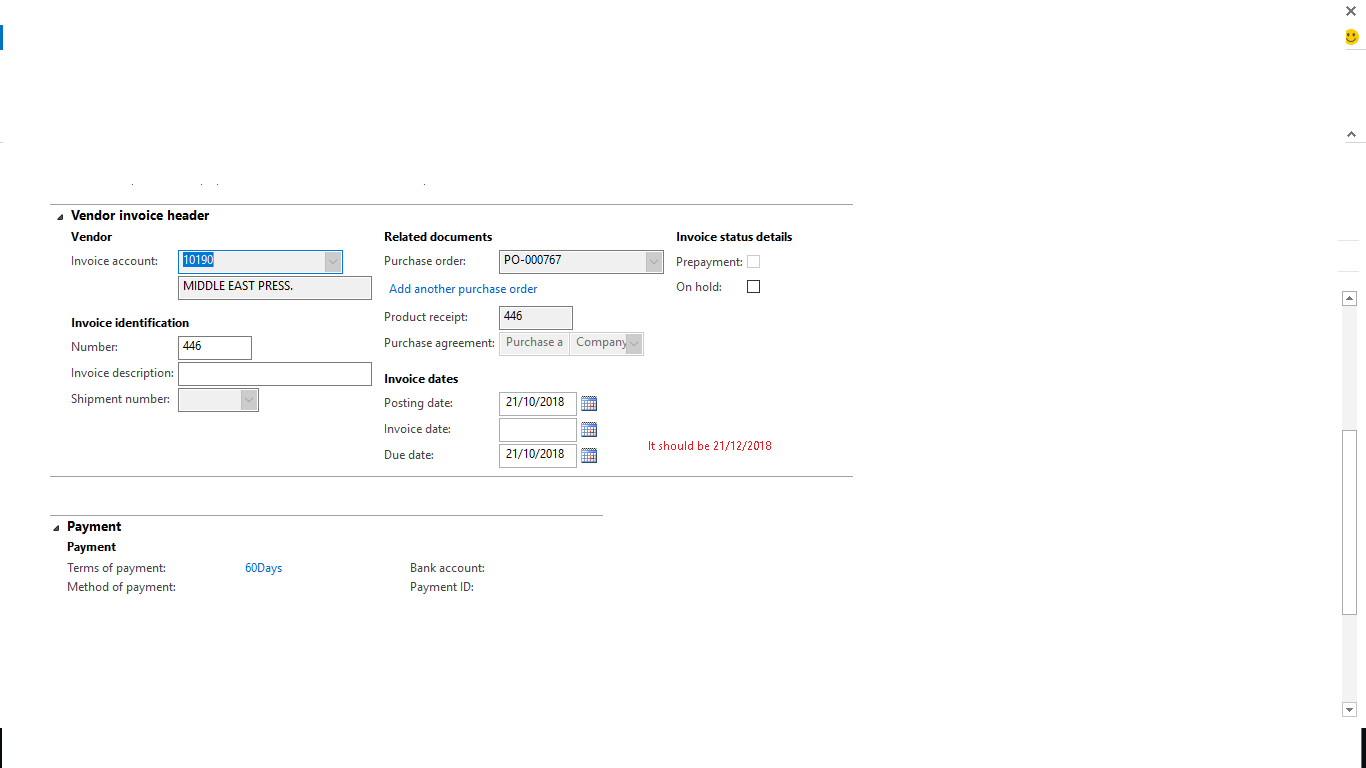
8475.vendor-payment.png

Dear Experts,

As shown in the image that term of payment is not being updated in due date feild on invoice header view.

Example, term of payment on master vendor form is 60. If posting date is 21/10/2018. Due date should automatically be 21/12/2018. 

Need your help!

Thanks and Regards,

Shabir Ahmad

*This post is locked for comments

I have the same question (0)
  • Giorgio Bonacorsi Profile Picture
    3,271 on at

    Hi Sabir,

    Can I have the configuration that you have set at your payment terms?

    Normally you should to put the days' number (or months' number) calculate  by the system for your first due date.

    Kind regard,

    Giorgio

  • Ludwig Reinhard Profile Picture
    Microsoft Employee on at

    Hi Shabir,

    You used the SDK tag.

    Does that mean that some modifications in regards to the due date have been made already?

    Best regards

    Ludwig

  • Shabir Ahmad Profile Picture
    3,124 on at

    Thanks to both of you for your replies

    Doctor,

    Can  you tell me what is SDK tag, please??

    Thanks and Regards,

    Shabir Ahmad

  • Ludwig Reinhard Profile Picture
    Microsoft Employee on at

    Hello Shabir,

    I saw that you used the 'development/customization/sdk' tag for classifying this thread and was wondering whether some system modifications have been made.

    Beat regards

    Ludwig

  • Shabir Ahmad Profile Picture
    3,124 on at

    Doctor,

    Please show me in image so that i understand, it means from the development side??

    Also show that tag, which  you are talking about?

    Thanks and Regards,

    Shabir Ahmad

  • Giorgio Bonacorsi Profile Picture
    3,271 on at

    Dear Shabir,

    Check in your payment term if the fields

       - payment method="net";

       - day = 60;

    After put again the "invoice data" and "payment term". I suggest also to updating the information in your header order and remaking a confirmation.

    Refresh the form and try to see if the system has been correctly make the calculation.

    Best regard,

    Giorgio

  • Ludwig Reinhard Profile Picture
    Microsoft Employee on at

    Hi,

    I was referring to the following tag that made me wonder...

    for.png

  • Shabir Ahmad Profile Picture
    3,124 on at

    Thanks to all for their prompt response,

    For, all of the vendor of invoices are ok, just for this vendor's invoice is issue, means doesn't update the due date as it shoud have been.

    Thanks and regards,

    Shabir Ahmad

Under review

Thank you for your reply! To ensure a great experience for everyone, your content is awaiting approval by our Community Managers. Please check back later.

Helpful resources

Quick Links

Introducing the 2026 Season 1 community Super Users

Congratulations to our 2026 Super Stars!

Meet the Microsoft Dynamics 365 Contact Center Champions

We are thrilled to have these Champions in our Community!

Congratulations to the April Top 10 Community Leaders

These are the community rock stars!

Leaderboard > 🔒一 Microsoft Dynamics AX (Archived)

#1
CP04-islander Profile Picture

CP04-islander 24

#2
Michel ROY Profile Picture

Michel ROY 14

#3
Jagadabi Profile Picture

Jagadabi 6

Last 30 days Overall leaderboard

Featured topics

Product updates

Dynamics 365 release plans
