web
You’re offline. This is a read only version of the page.
close
Skip to main content

Notifications

Announcements

No record found.

Community site session details

Community site session details

Session Id :
Microsoft Dynamics NAV (Archived)

SMTP MAIL SET UP ON NAV 2009

(0) ShareShare
ReportReport
Posted on by

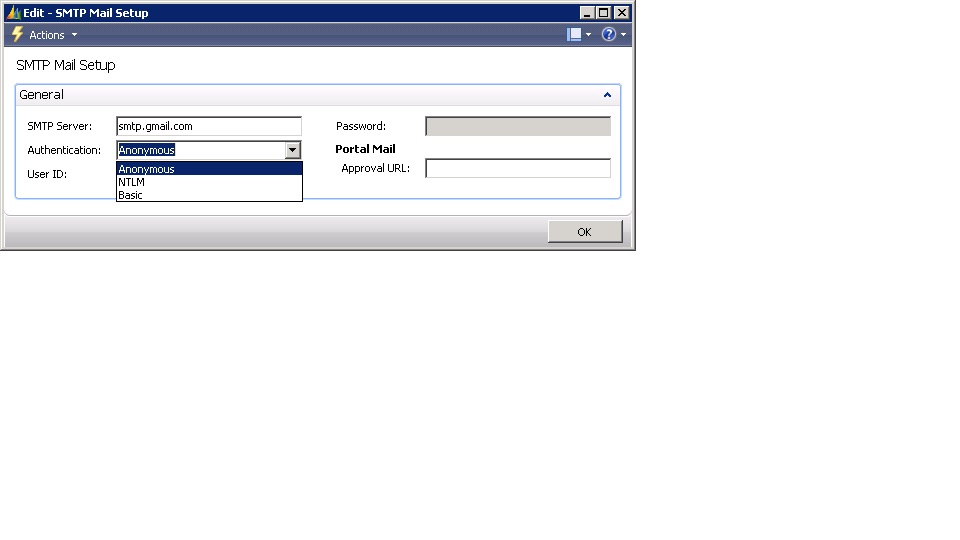
We are running Microsoft NAV 2009 and had set up SMTP server as aspmx.l.google.com which has since stopped working. I need to configure smtp.gmail.com but cant seem to find a place to input the port details.
SMTP-Settings.jpg

*This post is locked for comments

I have the same question (0)
  • Verified answer
    Nareshwar Raju Vaneshwar Profile Picture
    5,596 on at

    Hi,

    Did you check this link: forum.mibuso.com/.../smtp-gmail-com-nav-2009

    Hope it helps.

  • Verified answer
    Community Member Profile Picture
    on at

    You need to open table 'SMTP Mail Setup' and input the required details over there.

  • Verified answer
    Binesh Profile Picture
    7,885 on at

    Hello fkirui,

    From SMTP Mail Setup Table take values:

    SMTP Server,Authentication,User ID,Password

    And remaining field you have to assign manually or update the Table 409 with two fields i.e.

     Port And EnableSsl

    See the bellow screenshot. of function to send mail.

    7140.mail.png

Under review

Thank you for your reply! To ensure a great experience for everyone, your content is awaiting approval by our Community Managers. Please check back later.

Helpful resources

Quick Links

Responsible AI policies

As AI tools become more common, we’re introducing a Responsible AI Use…

Neeraj Kumar – Community Spotlight

We are honored to recognize Neeraj Kumar as our Community Spotlight honoree for…

Leaderboard > 🔒一 Microsoft Dynamics NAV (Archived)

Last 30 days Overall leaderboard

Featured topics

Product updates

Dynamics 365 release plans



