web
You’re offline. This is a read only version of the page.
close
Skip to main content

Notifications

Announcements

No record found.

Community site session details

Community site session details

Session Id :
Customer experience | Sales, Customer Insights,...
Suggested Answer

Hierarchy icon is not visible at a search result view

(0) ShareShare
ReportReport
Posted on by 5

Hi,

One of my clients are using the hierarchy at the account entity. When opening a view of the accounts the hierarchy icon is visible next to the accounts who actually do have a hierarchy build.

However if I make a search for one of those accounts the icon is not visible at the results view (The quick search view).

Is that by default that the icon is not visible at that view? Does anyone have experirnced the same or know how I can fix it?
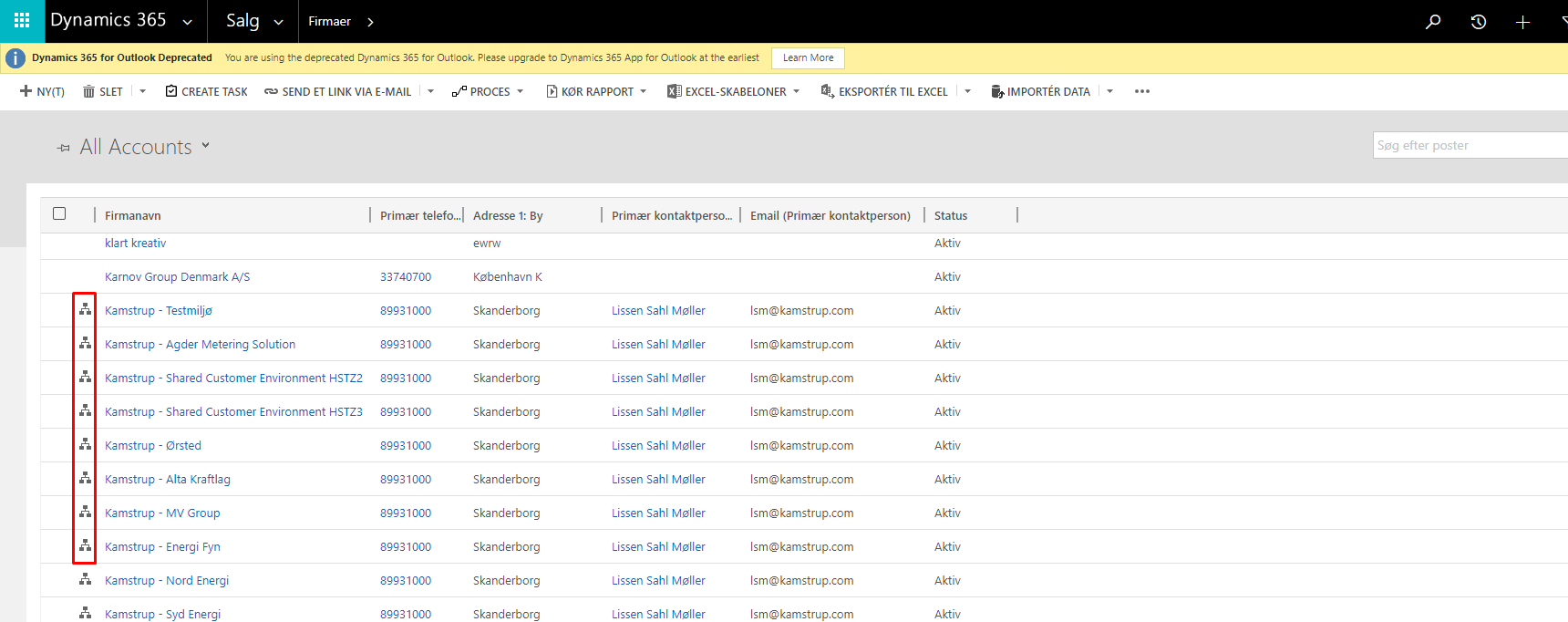
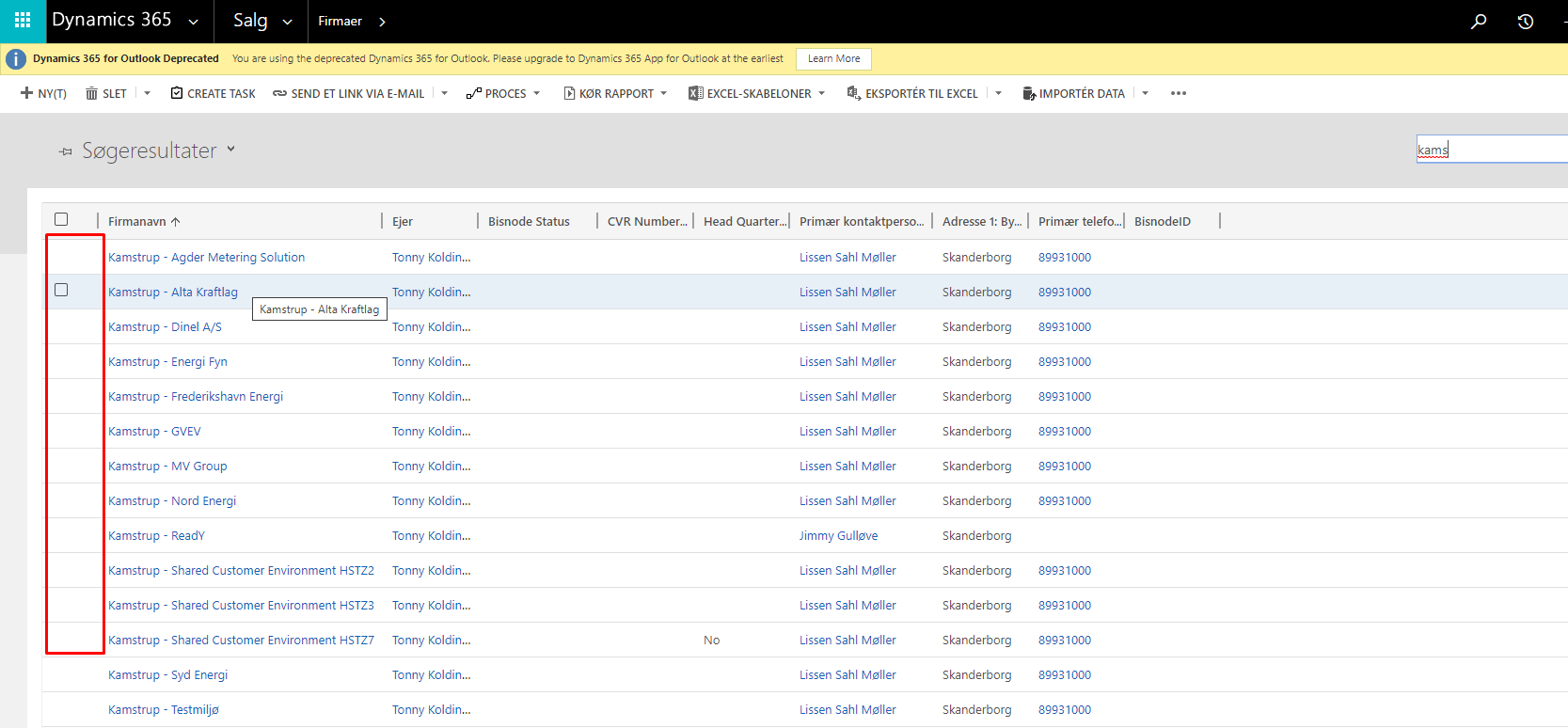
8611.Screenshot_5F00_1.png2781.Screenshot_5F00_2.png

I have the same question (0)
  • LuHao Profile Picture
    40,892 on at

    Hi Joakim,

    This is a limitation of the web client, and there is no such problem in UCI.

    0407.pastedimage1589535880552v1.png        7215.pastedimage1589535911590v2.png

    Are you using D365 online?

    If so, the web client will be completely deprecated in October this year. So I recommend you to use UCI app.

  • Joakim Glerup Profile Picture
    5 on at

    Hi Hao,

    Yes we are using D365 online and they are currently using the legacy app and will start using the UCI later this year.

    But I do not experience this issue in another environment. Here the icon does show at the quick search view.

    So I'm wondering if there is any settings missing to have the icon showing at my clients environment?

  • Suggested answer
    RakeshJ Profile Picture
    on at

    Hi Joakim,

    Its working fine for me in Classic Web Client and UCI 

    Before Quick Find : 

    pastedimage1589566244285v1.png

    After Quick Find :

    pastedimage1589566276908v2.png

    1. Since when are you facing this issue ? 

    2. Is this happening to other entities as well ?

    3. Is this happening in UCI as well ?

    4. Compare the Quick Find View property from working org with Quick Find Property from non-working org and confirm if you see any differences.

Under review

Thank you for your reply! To ensure a great experience for everyone, your content is awaiting approval by our Community Managers. Please check back later.

Helpful resources

Quick Links

Responsible AI policies

As AI tools become more common, we’re introducing a Responsible AI Use…

Neeraj Kumar – Community Spotlight

We are honored to recognize Neeraj Kumar as our Community Spotlight honoree for…

Leaderboard > Customer experience | Sales, Customer Insights, CRM

#1
Tom_Gioielli Profile Picture

Tom_Gioielli 170 Super User 2025 Season 2

#2
#ManoVerse Profile Picture

#ManoVerse 61

#3
Gerardo Rentería García Profile Picture

Gerardo Rentería Ga... 52 Most Valuable Professional

Last 30 days Overall leaderboard

Product updates

Dynamics 365 release plans
