web
You’re offline. This is a read only version of the page.
close
Skip to main content

Notifications

Announcements

No record found.

Community site session details

Community site session details

Session Id :
Finance | Project Operations, Human Resources, ...
Answered

how to filter grid based data in different data source

(0) ShareShare
ReportReport
Posted on by

Hi brothers,

I'm just confused about this, how to filter the data in grid by in different datasource ranges, i would like to give example

In form using more than one datasources, in one datasource i did set range by date(from_date and to_date), it's good working and i got filtered data in grid super.

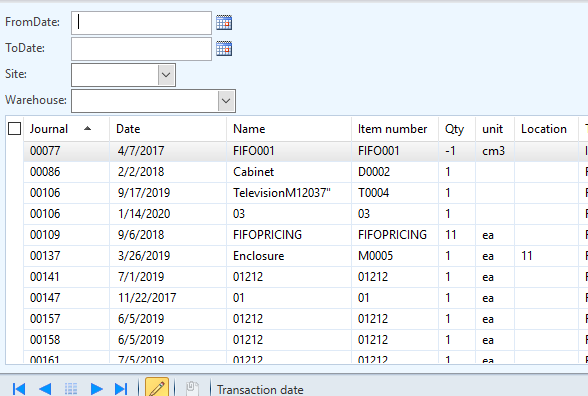
Now i want to use another filter, that filter want to do filter the already filtered data by date in grid, but that field not in same table. i did attached the some pic about my question.overview1.PNG3107.form3.PNG
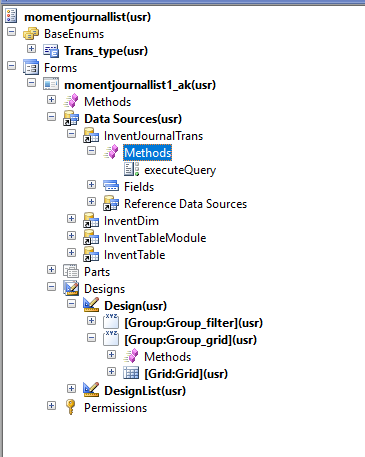
In this form first i will give from_date and to_date so the data filtered in grid it's working properly, than when i select site and warehouse(it's optional) ,again filter the data from grid. how to do this brothers.

I have the same question (0)
  • Verified answer
    Mea_ Profile Picture
    60,284 on at

    If InventDim is joined with outerJoin then queryRange won't work, try queryFIlter instead. Here is documentation with examples docs.microsoft.com/.../how-to-use-the-queryfilter-class-with-outer-joins

  • Verified answer
    Hariharans87 Profile Picture
    3 on at

    I guess you already having code for date range filter. So adding site and warehouse filter would be same. Share us your code.

    Please refer into this link simple filter example, dynamicsaxhari.blogspot.com/.../filtering-records_15.html

  • Community Member Profile Picture
    on at

    Thank for your response brother,

    i attached the code in this below, i wrote code in inventjournaltrans (table) executequery for from and to date filter.

    Now i again i want filter already filtered record by site and warehouse this fields are here in inventdim (table) this two table already relation with "inventdimid" .

    i wrote code inventjournaltrans table  executequery for date filter and inventdim table executequery for site and ware house.

    -----------------------------------------------code-------------------------------------------------------------------------------------------------------

    public void executequery()   //inventjournaltrans(table)        it's working
    {
        querybuilddatasource    qbds1,qbds2;
        
        qbds1    =    this.query().datasourcetable(tablenum(InventJournalTrans));
        qbds1.addRange(fieldNum(InventJournalTrans,Transdate)).value(queryRange
                                    (Fromdate.dateValue(),ToDate.dateValue()));
        
    }

    public void executequery()    //invedntdim             it's not working
    {
        
        qbds2    =    qbds1.adddatasource(tablenum(Inventdim));
        qbds2.Addlink(fieldnum(InventJournalTrans,inventdimid),fieldNum(invedntdim,inventdimid));
        qbds2.Addrange(fieldname(Inventdim,wmssiteid)).value(strcontrol_name1.value());
        qbds2.Addrange(fieldNum(Inventdim,wmslocationid)).value(strcontrol_name2.value());
    }

    ""i'm not sure fieldname correct, now labtop not here so you just skip validate fieldname(i wrote correct fieldname in my labtop)""

  • Verified answer
    Mea_ Profile Picture
    60,284 on at

    Do you completely ignored my previous post, instead addRange try addQueryFilter when you filter inventdim.

  • Community Member Profile Picture
    on at

    Sorry brother i'm not ignore your post , i will try and also i have another one doubt in a inventable module, how to get unit id by itemid i did try by this code, in this code info get correct matched unit id displayed but form displayed value is wrong like what stored in table order how to display correct item id's unitid, i already try display method

    7384.inv.PNG

  • Verified answer
    Hariharans87 Profile Picture
    3 on at

    You have not shared your code fully. Anyway try to call the main datasource execute query method. Try to call InventTable_ds.executequery() or InventJournalTrans_ds.executequery() in the control value change method.

Under review

Thank you for your reply! To ensure a great experience for everyone, your content is awaiting approval by our Community Managers. Please check back later.

Helpful resources

Quick Links

Responsible AI policies

As AI tools become more common, we’re introducing a Responsible AI Use…

Neeraj Kumar – Community Spotlight

We are honored to recognize Neeraj Kumar as our Community Spotlight honoree for…

Leaderboard > Finance | Project Operations, Human Resources, AX, GP, SL

#1
Martin Dráb Profile Picture

Martin Dráb 660 Most Valuable Professional

#2
André Arnaud de Calavon Profile Picture

André Arnaud de Cal... 549 Super User 2025 Season 2

#3
Sohaib Cheema Profile Picture

Sohaib Cheema 307 User Group Leader

Last 30 days Overall leaderboard

Product updates

Dynamics 365 release plans