web
You’re offline. This is a read only version of the page.
close
Skip to main content

Notifications

Announcements

No record found.

Community site session details

Community site session details

Session Id :
Customer experience | Sales, Customer Insights,...
Unanswered

Lead Qualification Issue

(0) ShareShare
ReportReport
Posted on by 40

Hi,

I am facing this strange issue on the lead qualification.

Scenario 1: When  i open any lead record and fill all the data and qualifies the record. The lead gets qualified without any issue.

Scenaio 2 : When i open any lead record and qualify it directly. It gives me the business process error asking me to fill certain mandatory details before qualifying.

After that if i select any of the field which has java scripts written on change of it, it starts to throw error which says that "Reference Error : Function abc is not defined at the eval". Moreover the ribbon above also gets hanged. Even if try to save the for by pressing CTRL+S using keyboard then all the java script functions written on OnSave of the form throws the reference error.

But later if i try to refresh the page and try to fill all the details, it works fine and the form also gets qualified without any issue.

Conclusion : Error occurs only when i click on Qualify button when all the mandatory details for qualification are not filled.

Also i tried disabling all the plugins that was on create and update of the Lead, but it works the same.

Similarly when i try to import the lead solution to check if there is other validations written on qualify button in Ribbon workbench, then i could not see the qualify button in the Bar as shown below.
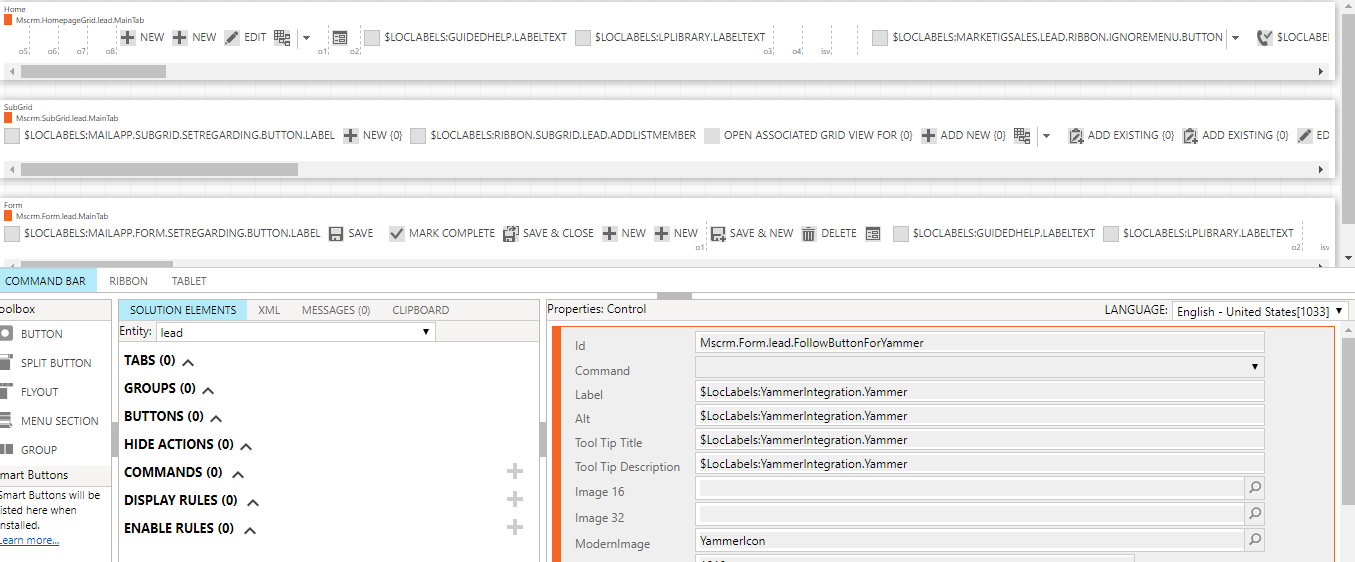
pastedimage1585812040975v1.png

This seems to be really strange and i dont know how to proceed further. Please help me with some suggestions.

Thank you.

I have the same question (0)
  • LeoAlt Profile Picture
    16,331 Moderator on at

    Hi partner,

    The Qualify ribbon in Ribbon workbench is named as "ConvertLeadQuick".

    We could find its ID in F12 develop tools in browser.

    pastedimage1585821104020v2.png

    pastedimage1585821041743v1.png

    Regards,

    Leo

  • Learner001 Profile Picture
    40 on at

    Hi Leo,

    That was really helpful and i could locate my Qualify button on the Ribbon now. I could actually see 2 Qualify button (ConvertLeadQuick and ConvertLeadQuick.Web) performing the same set of work in my instance.

    There is no custom javascript written on the button. It just has Mscrm inbuilt rules.

    Still this issue persist.

    Once i qualify, the entire scripts starts throwing error and the ribbon also hangs and i could then see 2 Disqualify button.

  • LeoAlt Profile Picture
    16,331 Moderator on at

    Hi partner,

    It's really strange.

    I created a lead in my instance with only 2 required fields and qualified it directly, and it worked successfully.

    Please check if there is any business rules , required fields in BPF or plug-ins which may effect this function.

    If this issue still exists, I recommend you to raise a ticket to Microsoft Support Team to let the engineers help you remotely.

    Regards,

    Leo

  • Learner001 Profile Picture
    40 on at

    Hi Leo,

    Thank you for your quick response.

    I had disabled the Plugin, no workflows,no business rules, removed the javascript as well but it still works the same.

    I even tried to create a trial instance to compare and check if Qualify has all the inbuilt Mscrm rules in it and it is all the same. I would do a little more trouble shooting before raising a ticket to Microsoft.

    Let me know if you get any further ideas for troubleshooting :)

    Thank you.

  • Inogic Profile Picture
    703 on at

    Hi,

    In order to qualify the lead, you need to verify that there should be two buttons to Qualify - ConvertLeadQuick, ConvertLeadQuick.Web.


    1. ConvertLeadQuick : This Qualify button has Enable Rule as Mscrm.Form.Lead.IsUCI which shows the button on UCI form of lead.
    2. Web : This Qualify button has Enable Rule as Mscrm.Form.Lead.IsNotUCI which shows the button on classic Web  form of lead.


    Both the buttons should have script ‘MarketingSales/Lead/Lead_main_system_library.js’ with function as ‘Mscrm.LeadCommandActions.qualifyLeadQuick’. But if you are missing this script within the command for Qualify button then you should raise a Microsoft Ticket for this issue. Since it is an OOB ribbon button on Lead entity, they would assist you in order to resolve the issue.


    Also, if in your CRM, Project Service Automation(PSA) is installed then refer the below link:

    https://community.dynamics.com/365/projectserviceautomation/f/dynamics-365-for-project-service-automation/258558/psa-qualify-lead-into-opportunity/790794

    Thanks!

  • Learner001 Profile Picture
    40 on at

    That is a great information.

    I was verifying the same in the ribbon workbench.

    Currently the instance what i am using is not UCI enabled according to your information i have these functions on both buttons.

    1. ConvertLeadQuick

    This Qualify button has Enable Rule as Mscrm.Form.Lead.IsNotUCI and have script ‘MarketingSales/Lead/Lead_main_system_library.js’ but with function as Mscrm.LeadCommandActions.qualifyLeadQuick

    2. ConvertLeadQuick.Web

    This Qualify button has Enable Rule as Mscrm.Form.lead.IsNotUCI and have script ‘MarketingSales/Lead/Lead_main_system_library.js’ but with function as Mscrm.LeadCommandActions.qualifyLeadQuick

    The function on both the button is same as you have mentioned but if i notice i could see both the qualify button has same enable rule i.e. IsNotUCI.

    I tried to check the same with my Trial instance which has the enable rules of IsUCI and IsNotUCI as the way you mentioned  above. I could see this discrepancy here.

    Thank you.

  • Learner001 Profile Picture
    40 on at

    Hi,

    The lead gets qualified when there is no customization. It causes issue only when i impose plugin customization to it.

    I am writing a plugin to restrict the user from qualifying a lead without filling 2 fields. I tried to use the same plugin for my trial instance and it works as expected but when i register the same plugin in my development instance it hangs the form.

    Will be because of anything else that i couldn't notice? I feel microsoft wont help me in this as their buttons work when customization are removed.

    Kindly help me out with any perspective for testing or troubleshooting.

    Thank You.

Under review

Thank you for your reply! To ensure a great experience for everyone, your content is awaiting approval by our Community Managers. Please check back later.

Helpful resources

Quick Links

Responsible AI policies

As AI tools become more common, we’re introducing a Responsible AI Use…

Neeraj Kumar – Community Spotlight

We are honored to recognize Neeraj Kumar as our Community Spotlight honoree for…

Leaderboard > Customer experience | Sales, Customer Insights, CRM

#1
Tom_Gioielli Profile Picture

Tom_Gioielli 137 Super User 2025 Season 2

#2
#ManoVerse Profile Picture

#ManoVerse 57

#3
Jimmy Passeti Profile Picture

Jimmy Passeti 50 Most Valuable Professional

Last 30 days Overall leaderboard

Product updates

Dynamics 365 release plans
