Hello,
I try to update the buttons inside the Quick-View-Form which is shown in the Outlook-App for Dynamics 354 Sales.
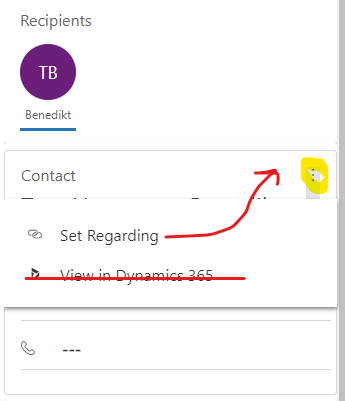
Currently, there are three dots. After the user clicks on them, a dropdown menu opens, and shows two buttons. Because we don't use the button "View in Dynamics 365", we want to disable/hide it. And then the button "Set Regarding" should be visible without clicking on the three dots.
Is there a way to solve this? In the past, I customize the ribbon-interface with the ribbon-workbench. But I think there is no possibility to use this ribbon-workbench in this case, isn't it?