web
You’re offline. This is a read only version of the page.
close
Skip to main content

Notifications

Announcements

No record found.

Community site session details

Community site session details

Session Id :
Customer experience | Sales, Customer Insights,...
Suggested Answer

How to restrict duplicate user while register  in MS CRM Portal?

(0) ShareShare
ReportReport
Posted on by 20

In Power App portal, I need to find whether user is already registered or not? if user is already register then ask to sign-in else Register. Wanted to remove duplicate sign-in user. How can I achieve this in MS CRM portal using Jquery or liquid?

I have the same question (0)
  • Power Portal Profile Picture
    20 on at

    In Power App portal, I need to find whether user is already registered or not? if user is already register then ask to sign-in else Register. Wanted to remove duplicate sign-in user. How can I achieve this in MS CRM portal using Jquery or liquid?

  • Suggested answer
    Abdul Wahab Profile Picture
    12,119 Moderator on at

    Hi Radhika,

    Please avoid duplicates; community.dynamics.com/.../how-to-restrict-duplicate-user-while-register-in-ms-crm-portal. 

  • Suggested answer
    Abdul Wahab Profile Picture
    12,119 Moderator on at

    Hi Radhika,

    Please avoid duplicates; community.dynamics.com/.../1303006

  • Power Portal Profile Picture
    20 on at

    Hi, my mistake I opened two thread, I will delete one.  Can you please tell me how to restrict duplicate user in CRM Power Portal.

  • Inogic Profile Picture
    709 on at

    You can restrict user in following two ways:

    1) Navigate to Site Settings à Search for Site/EnableCustomPluginError

    If it is not present, add this site setting, name as Site/EnableCustomPluginError and set value to true.

    This will restrict duplicate user while register.

    7178.1portal.jpg

    2) Create an alternate key in your environment for email attribute.

    For creating an alternate key you can follow blog :  https://docs.microsoft.com/en-us/previous-versions/dynamicscrm-2016/administering-dynamics-365/dn949335(v=crm.8)?redirectedfrom=MSDN

    By adding alternate key for email attribute the CRM itself will not allow you to create another contact with same email.


    Hope this helps.

    Thanks!

  • Power Portal Profile Picture
    20 on at

    In Portal registration form I need to add two custom fields

    1. Date of Birth
    2. SSN Number

    Note :- I have added two fields using content Snippet also added fields on contact database.
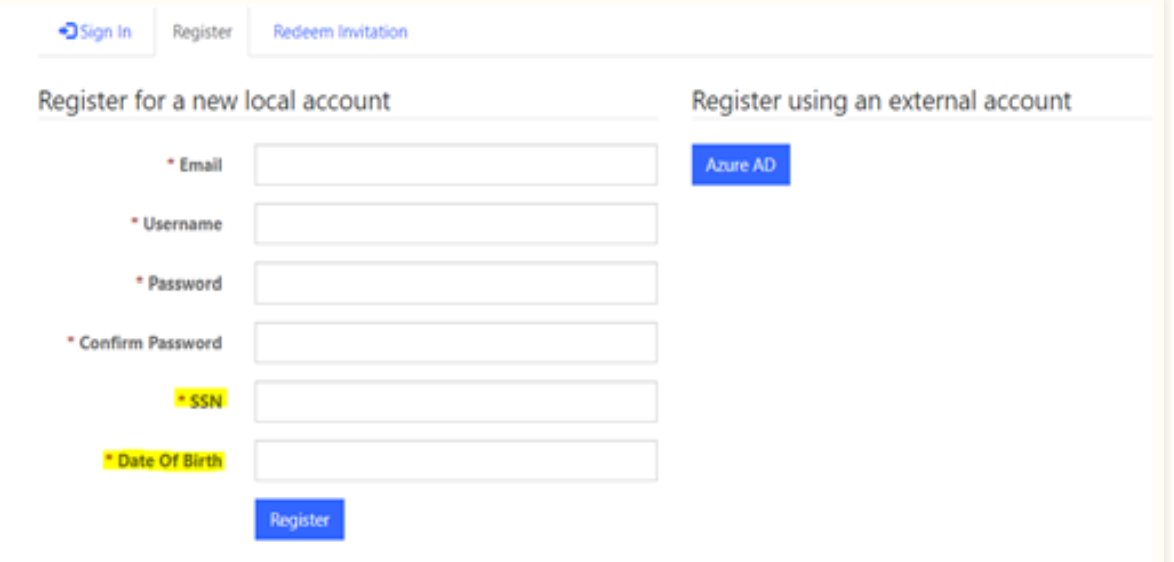
    pastedimage1672349588963v1.png

    Now, I want to restrict users from creating duplicate records of Date of Birth and SSN Number. 

    If a user is trying to insert an "SSN" and "Date Of Birth" which already exists in the database, then to show a message pop up “User already register”. This is my requirement.

    To achieve this,I have tried using an alternate key applied on two fields but I don’t want to use it as it's a direct operation on the database side.

    Can you please suggest the best approach to handle the above requirement? 

    Also, can I handle using plugins? If the answer is Yes, How can plugin run on the register button of the portal page. 

    Regards,

    Pauravi

Under review

Thank you for your reply! To ensure a great experience for everyone, your content is awaiting approval by our Community Managers. Please check back later.

Helpful resources

Quick Links

Responsible AI policies

As AI tools become more common, we’re introducing a Responsible AI Use…

Neeraj Kumar – Community Spotlight

We are honored to recognize Neeraj Kumar as our Community Spotlight honoree for…

Leaderboard > Customer experience | Sales, Customer Insights, CRM

#1
Tom_Gioielli Profile Picture

Tom_Gioielli 70 Super User 2025 Season 2

#2
Gerardo Rentería García Profile Picture

Gerardo Rentería Ga... 33 Most Valuable Professional

#3
Daniyal Khaleel Profile Picture

Daniyal Khaleel 32 Most Valuable Professional

Last 30 days Overall leaderboard

Product updates

Dynamics 365 release plans



