web
You’re offline. This is a read only version of the page.
close
Skip to main content

Notifications

Announcements

No record found.

Community site session details

Community site session details

Session Id :
Microsoft Dynamics AX (Archived)

Field 'Shipment' must be filled in.

(0) ShareShare
ReportReport
Posted on by 1,214

Hi. I did customize the data sources on WMSSHIPMENT form. I added two views into the datasource in addition to the original datasource WMSShipment & WMSShipmentExt Table:
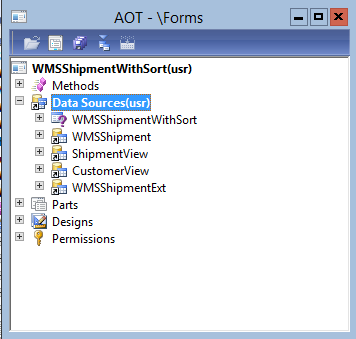
shipmentedit.png

But since then, we got this error whenever users want to update any field in the form. The error is appearing even when Shipment field is already filled as shown in below image. I checked the Shipment field mandatory property on the form, and it's set to No. I even try to catch the Shipment field value on infolog to see if the value is there, and it's there.
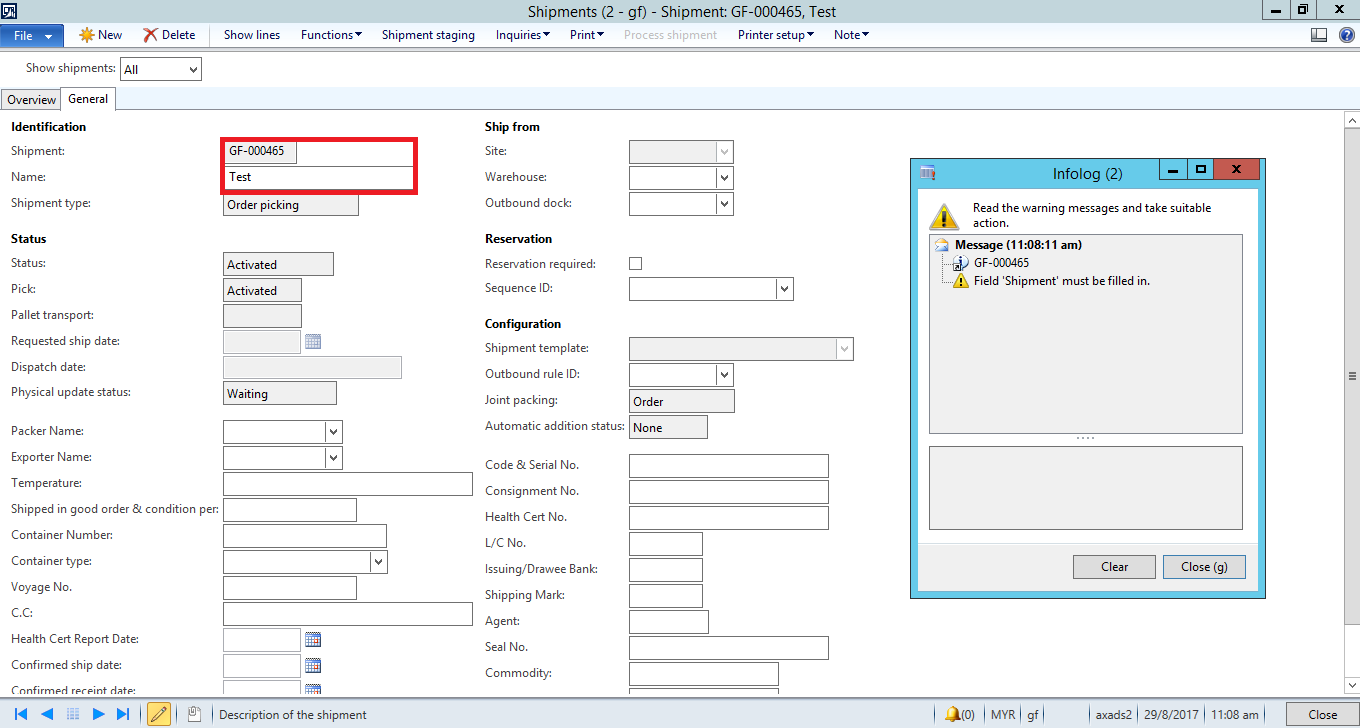
3022.shipment.png

So I'm at lost here what would probably the other cause. Please help. Thank you.

*This post is locked for comments

I have the same question (0)
  • Suggested answer
    Mahmoud Hakim Profile Picture
    17,887 on at

    check allow add property, it may be restricted

  • HAIRUL HAZRI Profile Picture
    1,214 on at

    Hi Mahmoud, thanks for replying. Can you show me where this allow add property is? I checked the Shipment field property, but there's no allow add property.

    Thanks.

  • Suggested answer
    Mahmoud Hakim Profile Picture
    17,887 on at

    go to your field on data source for this form

  • HAIRUL HAZRI Profile Picture
    1,214 on at

    Hi Mahmoud, I changed the AllowAdd property to Yes for the ShipmentID in all related tables in the datasource, but still no luck. Any other way to work around this? Or do I need to change the allowAdd property for every single field in the datasource?

    Thanks.

  • HAIRUL HAZRI Profile Picture
    1,214 on at

    Hi Sukrut,

    yes, this is customized standard AX form. I simply duplicate the whole form, then I

    1. add two views, Customer View(standard AX view) and Shipment View(custom view) to the datasource.

    2. Modify datasource for two fields in the form, each one getting from these new views.

    As far as I remember I didn't have any validation on any of the view, and on the form, I didn't touch anything other than these two steps I describe above. So can you guide me more on this validation?

    Thanks.

  • Verified answer
    HAIRUL HAZRI Profile Picture
    1,214 on at

    Hi Sukrut,

    I found this solution here. It's kind of usable

    67571.Capture.PNG

    So I tried to overwrite the validateWrite() and write() methods on the data source & I comment out the super() call. Fortunately the validation message is gone. 

    However, I cannot close the form. There's this close() method & I tried commenting out the super() call here but it's not working.

    You have any idea what other methods could cause this? Thank You.

  • HAIRUL HAZRI Profile Picture
    1,214 on at

    Whether super of close method commented out or not, result is the same.

    Apparently, I fixed this issue by setting the validateWrite() methods to always return true.

    Is this a good idea? It works but what could be the potential harm?

    I found out about the canClose() method. But I dont really understand how this method actually operates. Can you explain the differences between validateWrite() and canClose()?

    Thank You.

Under review

Thank you for your reply! To ensure a great experience for everyone, your content is awaiting approval by our Community Managers. Please check back later.

Helpful resources

Quick Links

Responsible AI policies

As AI tools become more common, we’re introducing a Responsible AI Use…

Neeraj Kumar – Community Spotlight

We are honored to recognize Neeraj Kumar as our Community Spotlight honoree for…

Leaderboard > 🔒一 Microsoft Dynamics AX (Archived)

#1
Martin Dráb Profile Picture

Martin Dráb 4 Most Valuable Professional

#1
Priya_K Profile Picture

Priya_K 4

#3
MyDynamicsNAV Profile Picture

MyDynamicsNAV 2

Last 30 days Overall leaderboard

Featured topics

Product updates

Dynamics 365 release plans
