web
You’re offline. This is a read only version of the page.
close
Skip to main content

Notifications

Announcements

No record found.

Community site session details

Community site session details

Session Id :
Customer experience | Sales, Customer Insights,...
Suggested Answer

We disabled one of the admin account on crm 2016, getting user ID belongs to this is disabled error

(0) ShareShare
ReportReport
Posted on by 651

Hi All,

We have some customization developed on our CRM, to update the contact through other additional form using java scripts updates upon the form save. However no where in this java scripts, we can find the traces of one of the system account (system1) we recently disabled on our environment.

But when we disabled this system account(system1), during the contact update etc, We are facing below error. How to know, what is the reason for this. Is it possible to find this error information further.
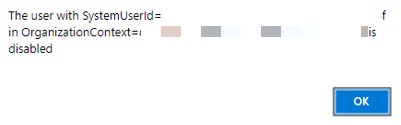
systemid.jpg

example of JS been used is as below.

var entity = {};
entity.subject = "test";
entity["regardingobjectid_contact@odata.bind"] = "/contact(9CFBD4BD-CD4F-E811-A95A-000D3A1A9407)";
entity.responsecode = 3;

var req = new XMLHttpRequest();
req.open("POST", Xrm.Page.context.getClientUrl() + "/api/data/v8.2/contact", true);
req.setRequestHeader("OData-MaxVersion", "4.0");
req.setRequestHeader("OData-Version", "4.0");
req.setRequestHeader("Accept", "application/json");
req.setRequestHeader("Content-Type", "application/json; charset=utf-8");
req.onreadystatechange = function() {
    if (this.readyState === 4) {
        req.onreadystatechange = null;
        if (this.status === 204) {
            var uri = this.getResponseHeader("OData-EntityId");
            var regExp = /\(([^)]+)\)/;
            var matches = regExp.exec(uri);
            var newEntityId = matches[1];
        } else {
            Xrm.Utility.alertDialog(this.statusText);
        }
    }
};
req.send(JSON.stringify(entity));
I have the same question (0)
  • Suggested answer
    RodRodriguez Profile Picture
    on at

    Howdy!

    Take a look at this article that goes over the issue you may be facing:

    https://d365demystified.com/2018/11/15/d365-quick-tip-why-should-you-reassign-records-to-another-user/

    Also, you might need to have that JavaScript deleted and replaced with a duplicate copy by a different (preferably a system user) account

  • Integration Profile Picture
    651 on at

    Hi Rod Rodriguez,

    Thanks for the response.

    I have updated all the workflows and custom actions where the old system account is owner to the new one. Still i was getting the error.

    For java script files and other web resources related to the customization done, are not showing any place to find the owner. Do we still require this file to re-upload with new system account.

  • Suggested answer
    Bipin D365 Profile Picture
    28,983 Moderator on at

    Hi,

    Have you updated plugin steps from plugin registration tool ?

  • Integration Profile Picture
    651 on at

    Hi Bipin,

    Our related plugins are running calling user context. Do we still need to update anything in this plugins.

    640868.Capture.PNG

Under review

Thank you for your reply! To ensure a great experience for everyone, your content is awaiting approval by our Community Managers. Please check back later.

Helpful resources

Quick Links

Responsible AI policies

As AI tools become more common, we’re introducing a Responsible AI Use…

Neeraj Kumar – Community Spotlight

We are honored to recognize Neeraj Kumar as our Community Spotlight honoree for…

Leaderboard > Customer experience | Sales, Customer Insights, CRM

#1
Pallavi Phade Profile Picture

Pallavi Phade 98

#2
Tom_Gioielli Profile Picture

Tom_Gioielli 60 Super User 2025 Season 2

#3
Gerardo Rentería García Profile Picture

Gerardo Rentería Ga... 43 Most Valuable Professional

Last 30 days Overall leaderboard

Product updates

Dynamics 365 release plans



