Dynamics AX 2012 R2 CU7
I am trying to install below hotfix
KB Article Number(s): 2901696
Language: All (Global)
Platform: i386
Location: (http://hotfixv4.microsoft.com/Microsoft%20Dynamics%20AX%202012/nosp/KB2901696/6.0.1108.5855/free/469832_intl_i386_zip.exe)
Error encountered
is this right to see only database?

Error message selecting database without "_model" as database name
"an unexpected error occurred during setup. see the log file "directory" for details.
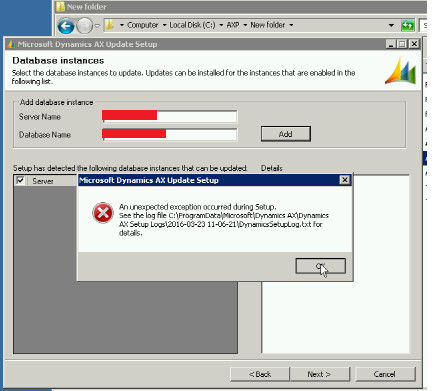
Error message selecting database with "_model" as database name

The provided database instances doesnt meet the applicability requirements for this update. For more information, refer to the setup logs.
Logs error for database without "_model"
| === Loading parameters from the command line or a parameter file === |
|
|
|
|
|
| Initializing log file: C:\ProgramData\Microsoft\Dynamics AX\Dynamics AX Setup Logs\2016-03-23 11-06-21\DynamicsSetupLog.txt |
|
|
|
|
|
|
|
|
|
|
|
|
| === Starting evaluation of existing installation state === |
|
|
|
|
|
|
| Evaluating installation state of Application Object Server instance 00. |
|
|
|
|
|
| MSI file: ObjectServer64.msi Installed: False |
|
|
|
|
|
|
|
| Evaluating installation state of Application Object Server instance 01. |
|
|
|
|
|
| MSI file: ObjectServer64.msi Installed: True |
|
|
|
|
|
|
|
| Application Object Server instance 1 has been installed with the name 01-OMGAX2012DEV. |
|
|
|
| Evaluating installation state of Application Object Server instance 02. |
|
|
|
|
|
| MSI file: ObjectServer64.msi Installed: True |
|
|
|
|
|
|
|
| Application Object Server instance 2 has been installed with the name 02-OMGAX2012UAT. |
|
|
|
Evaluating installation state of Application Object Server instance 03-99. Installed: all FALSE
MSI file: RetailSaltUtility64.msi Installed: False
MSI file: RetailStoreConnect64.msi Installed: False
MSI file: RetailDatabaseUtility.msi Installed: False
MSI file: RetailTransactionService.msi Installed: False
Getting known model databases from AOS configuration.
Using AxUtil to connect to database "OMGAX2012DEV" on server "OMEGADBPRD".
AxUtil.exe has issued the following errors:
The model store schema was not found in the database OMGAX2012DEV.
Using AxUtil to connect to database "OMGAX2012UAT" on server "OMEGADBPRD".
AxUtil.exe has issued the following errors:
The model store schema was not found in the database OMGAX2012UAT.
Previously Installed Component: Application Object Server (AOS) (01-OMGAX2012DEV)
Previously Installed Component: Application Object Server (AOS) (02-OMGAX2012UAT)
Previously Installed Component: Client
Previously Installed Component: Enterprise Portal (EP)
Previously Installed Component: .NET Business Connector
Previously Installed Component: Debugger
Previously Installed Component: Enterprise Portal developer tools
Previously Installed Component: Reporting tools
=== Checking parameters ===
Property InstallPath set to: 'C:\Program Files\Microsoft Dynamics AX\60'
Property InstallPath32Bit set to: 'C:\Program Files (x86)\Microsoft Dynamics AX\60'
=== Starting UI phase ===
Property AcceptLicenseTerms set to: '1'
Property InstallOtherModelDatabase set to: '0'
Property InstallOtherModelDatabase set to: '1'
Calling AxUtil to get list of installed models.
Using AxUtil to connect to database "OMGAX2012UAT" on server "OMEGADBPRD".
Exception: System.ArgumentNullException
Message: Value cannot be null.
Parameter name: collection
FullText: System.ArgumentNullException: Value cannot be null.
Parameter name: collection
at System.ThrowHelper.ThrowArgumentNullException(ExceptionArgument argument)
at System.Collections.Generic.List`1..ctor(IEnumerable`1 collection)
at Microsoft.Dynamics.Setup.DatabaseSqlModel.DatabaseSqlModelInstanceCommon.GetInstalledModels()
at Microsoft.Dynamics.Setup.DatabaseSqlModel.DatabaseSqlModelInstanceUpdate.GetApplicableModels()
at Microsoft.Dynamics.Setup.DatabaseSqlModel.DatabaseSqlModelInstanceUpdate.IsUpgradeable()
at Microsoft.Dynamics.Setup.Pages.S1050SelectDatabaseInstances.AddDatabaseInstance(String server, String database)
at System.Windows.Forms.Control.OnClick(EventArgs e)
at System.Windows.Forms.Button.OnMouseUp(MouseEventArgs mevent)
at System.Windows.Forms.Control.WmMouseUp(Message& m, MouseButtons button, Int32 clicks)
at System.Windows.Forms.Control.WndProc(Message& m)
at System.Windows.Forms.ButtonBase.WndProc(Message& m)
at System.Windows.Forms.Button.WndProc(Message& m)
at System.Windows.Forms.Control.ControlNativeWindow.WndProc(Message& m)
at System.Windows.Forms.NativeWindow.Callback(IntPtr hWnd, Int32 msg, IntPtr wparam, IntPtr lparam)
==== Setup encountered an unhandled exception and could not be completed. For details see the previous messages in the log.







