web
You’re offline. This is a read only version of the page.
close
Skip to main content

Notifications

Announcements

No record found.

Community site session details

Community site session details

Session Id :
Microsoft Dynamics AX (Archived)

Installation on distributed environment & prerequisites validations

(0) ShareShare
ReportReport
Posted on by

Hi Experts,

Since this is the first time that I am going to install AX 2012 R3(CU11) on distributed environment which is not single computer installation where SQL Server is hosted on different server, I need your help to resolve the prerequisite validations.

when I am running the AX 2012 R3 setup on application server(AX), system raised prerequisites validations as shown below(screenshots) which mostly related to SQL Server components.

Some of the prerequisites are Microsoft SQL Server management studio,Microsoft SQL Server native client and reporting services etc.

So do I need to install SQL Server on AX application server as well?

please guide me which components need to be installed on which server and which are on both servers if any.

what about ax component reporting services extensions installation i.e.which server it should be installed on database server or application server or both.

screenshot 1.
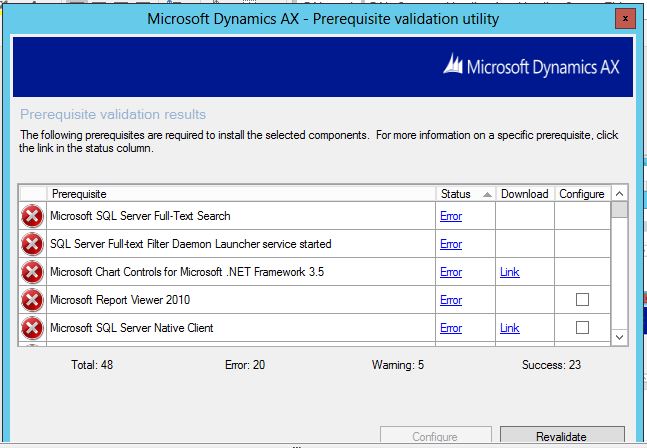
AXError01.JPG

screenshot 2.

AXError02.JPG

screenshot 3.

AXError03.JPG

many thanks.

*This post is locked for comments

I have the same question (0)
  • Suggested answer
    Vilmos Kintera Profile Picture
    46,149 on at

    Can you please confirm what environment are you deploying exactly? Dev, Test, Production?

    I believe you have ticked checkboxes for components that you do not actually need, that is why you are getting such an exhaustive list of prerequisites. You could check the System requirements document to see what component has which prerequisite:

    www.microsoft.com/.../details.aspx

    Also with a standard deployment of Windows Server the Firewall is enabled for the Domain profile, which could prevent AX from communicating with your SQL Server instance where the database is hosted and flagging components as not installed, even though you have it available. Make sure you either open the ports required for the communication, or disable firewall entirely in the Domain profile (coordinate with your system administrators/network infrastructure team/security officer for this).

    Also make sure you execute the setup with elevated access (right click, run as administrator) if UAC is enabled.

    Just for the AX AOS and Database components all you need is a couple of Visual Studio runtime libraries, SQL Clr Types, Report Viewer, SQL Server Native Client, AS AMO. Most of them could be deployed via the Configure checkbox, or following the download link in the message.

    And finally no, you obviously do not need SQL Server next to AX AOS.

  • Community Member Profile Picture
    on at

    Hi Vilmos,

    This is on the Production environment.

    components that I  marked - Databases,AOS,HelpServer,Reporting services extensions,client,office-addins,business connector,management uitilities,data import&export framework.

    I will check with firewall,UAC related things, meanwhile can you tell me which server I need to install reporting services extensions on.

    Thanks

  • Suggested answer
    Vilmos Kintera Profile Picture
    46,149 on at

    Then that is the problem. You do not need Reporting Services extensions, because you will not deploy reports on a Prod AX AOS instance, but where SSRS is running.

    You also should not have Office product and the AX Office add-ins on a live AOS, that is for your local computer where the AX client will run, or for your terminal server.

    DIXF does require SQL Server Integration Services, but on a different server, which the installer will ask. Here you only need the DIXF AOS (and maybe the client component), and the DIXF service should go next to your SSIS instance. I put that next to the SQL Server Reporting Service (different, dedicated server) in my environment.

    If you deploy the Database component from your AOS, make sure the firewall ports that SQL uses is open on the other side, default installation uses port 1433. AX might also require remote registry, please check the installation guide available on MSDN for security and port requirements.

  • Community Member Profile Picture
    on at

    Thanks a lot for your valuable inputs.

    don't need to install reporting services extensions even on the SQL server hosting machine, then how to configure and deploy the ssrs reports on report server, please guide me.

    Thanks

  • Suggested answer
    Vilmos Kintera Profile Picture
    46,149 on at

    Reporting services extensions goes on the SSRS instance indeed, but not on your AX AOS. That is how the reporting server knows where the AX AOS is to connect to when requesting data, or sending back a response message/rendered report.

Under review

Thank you for your reply! To ensure a great experience for everyone, your content is awaiting approval by our Community Managers. Please check back later.

Helpful resources

Quick Links

Responsible AI policies

As AI tools become more common, we’re introducing a Responsible AI Use…

Neeraj Kumar – Community Spotlight

We are honored to recognize Neeraj Kumar as our Community Spotlight honoree for…

Leaderboard > 🔒一 Microsoft Dynamics AX (Archived)

#1
Martin Dráb Profile Picture

Martin Dráb 4 Most Valuable Professional

#1
Priya_K Profile Picture

Priya_K 4

#3
MyDynamicsNAV Profile Picture

MyDynamicsNAV 2

Last 30 days Overall leaderboard

Featured topics

Product updates

Dynamics 365 release plans



