web
You’re offline. This is a read only version of the page.
close
Skip to main content

Notifications

Announcements

No record found.

Community site session details

Community site session details

Session Id :
Finance | Project Operations, Human Resources, ...
Answered

How to create new data entity with possibility to import and export data via excel?

(0) ShareShare
ReportReport
Posted on by 843

Hello colleagues,

I would like to create an additional data entity to import and export data using excel.

I mean data from Inventory management->Journal entries->Items->Bills of materials.

1880852.png

For movements such entity is created and available in the system.

eee.png

How to create the same for BOM? And for it to be available for download via excel, the same as the entity "Inventory movement journal headres and lines v4"

Thanks.

I have the same question (0)
  • BillurSamdancioglu Profile Picture
    19,703 Most Valuable Professional on at

    You may check this link to proceed.

    docs.microsoft.com/.../build-consuming-data-entities

    docs.microsoft.com/.../office-integration

  • Verified answer
    Gunjan Bhattachayya Profile Picture
    35,423 on at

    Hi Shooowtek,

    You can create your entity using the data entity using the Data entity wizard and follow the same structure as InventInventoryMovementJournalEntryEntityV2. Please check this link to see how you can create new data entities. You could also duplicate one one of the existing data entities. and change the properties - Label, Data Management Staging Table, Public Collection Name and Public Entity Name -

    pastedimage1651833481495v1.png

    For the staging table, you could copy the existing table and rename it. In your case, since this will be catering to Bills of Material, you will need to change the range of the JournalType field.

    pastedimage1651833596880v2.png

    In case you are duplicating the existing entity, you will need to create security privileges and add the new entity under these privileges. You can check the existing privileges for the entity shown above by using "Find references"

  • Shooowtek Profile Picture
    843 on at

    Hello Gunjan,

    Thank you for your suggestion. I think it works for me.
    However, I have a problem with allowing the new entity to download via excel. I am trying to put it in the "open in excel" list but with no result..

    8082812.png

    I used the code below (the source of the code is InventJournalMovement form) and put it in the InventJournalBOM form extension.
    Interestingly, the entity appears when I create it with the wizard and select the InventJournalTable data source.
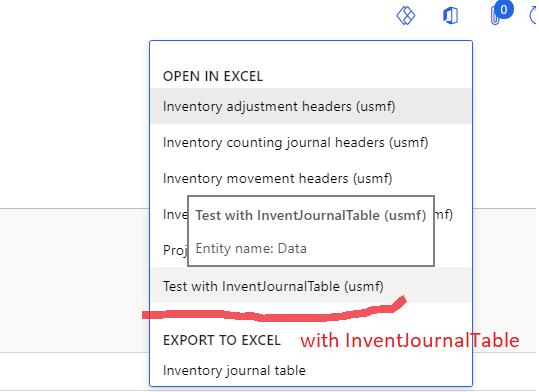
    4437672.png
    However, in order for this entity to work properly, I need to use the InventJournalTrans datasource - unfortunately with this datasource, the downloadable menuitem does not appear.. (It doesn't matter if I create a new one with wizard or duplicate e.g. InventInventoryMovementJournalEntryEntityV2)
    What is the reason for this? I cannot find a solution to this problem.

     public const str CustomExportLinesToExcelOptionId = 'LinesCustom';
    
        public void customizeMenuOptions(OfficeMenuOptions _menuOptions)
        {
            TableName BOMEntry = tableStr(FmTestEntity);
            List exportOptions = _menuOptions.customMenuItems();
    
            var exportOptionBOM = OfficeGeneratedExportMenuItem::construct(BOMEntry, CustomExportLinesToExcelOptionId);
            exportOptionBOM.setDisplayNameWithDataEntity();
    
            exportOptions.addEnd(exportOptionBOM);
        }
    
        public ExportToExcelDataEntityContext getDataEntityContext(OfficeGeneratedExportMenuItem _menuItem)
        {
            ExportToExcelDataEntityContext  context = null;
            TableName                       entityName;
            FieldName                       filterField;
            IdentifierName                  fieldGroupName;
    
            entityName = tableStr(FmTestEntity);
            fieldGroupName = tableFieldGroupStr(FmTestEntity, AutoReport);
            filterField = fieldStr(FmTestEntity, JournalNumber);
            
            if (entityName && fieldGroupName && filterField)
            {
                context = ExportToExcelDataEntityContext::construct(entityName, fieldGroupName);
                ExportToExcelDataEntityInfo entity = context.findEntityByName(entityName);
                if (entity)
                {
                    ExportToExcelFilterTreeBuilder filterBuilder = new ExportToExcelFilterTreeBuilder(entityName);
    
                    var filter = filterBuilder.and(
                        filterBuilder.companyFilter(),
                        filterBuilder.areEqual(filterField, InventJournalTable.JournalId));
    
                    entity.filter(filter);
                }
            }
    
            return context;
        }

  • Shooowtek Profile Picture
    843 on at

Under review

Thank you for your reply! To ensure a great experience for everyone, your content is awaiting approval by our Community Managers. Please check back later.

Helpful resources

Quick Links

Responsible AI policies

As AI tools become more common, we’re introducing a Responsible AI Use…

Neeraj Kumar – Community Spotlight

We are honored to recognize Neeraj Kumar as our Community Spotlight honoree for…

Leaderboard > Finance | Project Operations, Human Resources, AX, GP, SL

#1
Martin Dráb Profile Picture

Martin Dráb 660 Most Valuable Professional

#2
André Arnaud de Calavon Profile Picture

André Arnaud de Cal... 512 Super User 2025 Season 2

#3
Sohaib Cheema Profile Picture

Sohaib Cheema 291 User Group Leader

Last 30 days Overall leaderboard

Product updates

Dynamics 365 release plans
