web
You’re offline. This is a read only version of the page.
close
Skip to main content

Notifications

Announcements

No record found.

Community site session details

Community site session details

Session Id :
Customer experience | Sales, Customer Insights,...
Answered

Teams download option not showing up

(0) ShareShare
ReportReport
Posted on by 105

The download option for teams event is not showing up.

pastedimage1604132535678v1.png

I have the same question (0)
  • cloflyMao Profile Picture
    25,210 on at

    Hi Tez,

    It will just show the streaming options when enabling Teams for webinar.

    Do you mean downloading Teams? If so, open Attendee URL in a new tab, then it will ask if we open Teams, and there will be a button for download.

    pastedimage1604282362262v1.png

    After configuring the event, we should send the registrants an email to provide the attendee URL:

    https://docs.microsoft.com/en-us/dynamics365/marketing/teams-webinar#inviting-registrants-to-attend-the-live-event-through-email

    Regards,

    Clofly

  • Tez Profile Picture
    105 on at

    Hi Clofly,

    Thanks for your response. I want to download the teams recording. But the option does not show up. As per this link  i can enable the recording options but i dont see the options.

    https://docs.microsoft.com/en-us/dynamics365/marketing/teams-webinar

    I will have to give a download url for the event recording to the attendees in the email template. How is this achievable.

  • cloflyMao Profile Picture
    25,210 on at

    Hi Tez,

    From your screenshot, it seems that you were using "Teams Meetings".

    If you want to record the event, please switch to "Teams Live Events" instead.

    (Do you mean that the "Recording available to producers and presenters" option is not available?)

    Regards,

    Clofly

  • Tez Profile Picture
    105 on at

    Do you mean that the "Recording available to producers and presenters" option is not available? -

    - Yes Clofly

  • Verified answer
    cloflyMao Profile Picture
    25,210 on at

    Hi Tez,

    I also encountered the issue as yours: the field is somehow hidden, I am not sure whether the functionality is still under development so it was set to be hidden by system.

    In form editor, you could display the field by default.
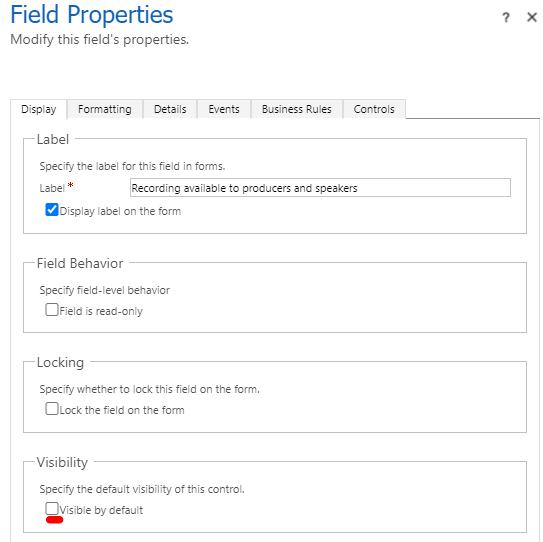
    pastedimage1604307213218v1.png

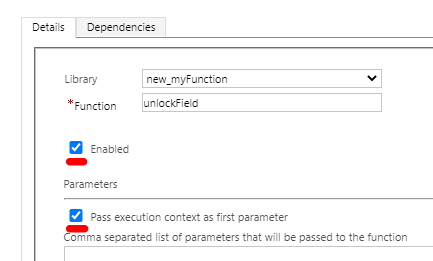
    Or run custom function at OnChange event of "Do you want to stream this event":

    if the field value equals to true, set the hidden field to be visible with code;

    if the field value equals to false, hide the field again.
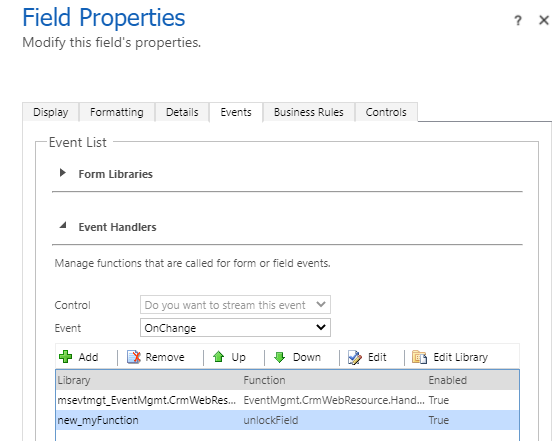
    pastedimage1604307369525v2.png

    pastedimage1604307409464v3.png

    function unlockField(executionContext) {
        var formContext = executionContext.getFormContext();
        var isTeamEnabled = formContext.getAttribute("msevtmgt_streamingenabled").getValue();
        if (isTeamEnabled === true) {
            formContext.getControl("msevtmgt_recordingforproducersandspeakers").setVisible(true);
        } else {
            formContext.getControl("msevtmgt_recordingforproducersandspeakers").setVisible(false);
        }
    }

    (If necessary, please add run the function at OnLoad event of form.)

    Result:
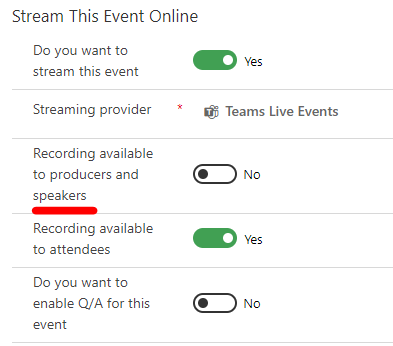
    pastedimage1604307672406v4.png

    Regards,

    Clofly

Under review

Thank you for your reply! To ensure a great experience for everyone, your content is awaiting approval by our Community Managers. Please check back later.

Helpful resources

Quick Links

Responsible AI policies

As AI tools become more common, we’re introducing a Responsible AI Use…

Neeraj Kumar – Community Spotlight

We are honored to recognize Neeraj Kumar as our Community Spotlight honoree for…

Leaderboard > Customer experience | Sales, Customer Insights, CRM

#1
Tom_Gioielli Profile Picture

Tom_Gioielli 170 Super User 2025 Season 2

#2
#ManoVerse Profile Picture

#ManoVerse 61

#3
Gerardo Rentería García Profile Picture

Gerardo Rentería Ga... 52 Most Valuable Professional

Last 30 days Overall leaderboard

Product updates

Dynamics 365 release plans