web
You’re offline. This is a read only version of the page.
close
Skip to main content

Notifications

Announcements

No record found.

Community site session details

Community site session details

Session Id :
Finance | Project Operations, Human Resources, ...
Suggested Answer

Warning BP Rule: [DataEntityPublicFieldEdtMatchOnStagingTableCheck]:

(0) ShareShare
ReportReport
Posted on by 1,552

Hi.

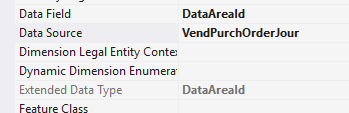
So i added a dataAreaId from my entity with dataSource VendPurchOrderJour and called it DataArea.
pastedimage1606649600192v1.png

Also i added this dataArea field to the staging table with EDT DataAreaId as well

but i'm getting this BP warning: The data entity 'Entity' has public field 'DataArea' with EDT '', but corresponding field in the staging table 'TableStaging' has EDT 'DataAreaId

how come the entity EDT field is empty even though the screenShot says it's filled. Also if i try to empty the staging table edt, then i'll get a BP warning that EDT should be filled. So i'm not sure what's the solution for this case?

I have the same question (0)
  • Blue Wang Profile Picture
    on at

    Hi Junior,

    Is it your custom entity? When you created it, you added DataAreaId when selecting the field?

    Try full build.

  • Suggested answer
    Sergei Minozhenko Profile Picture
    23,093 on at

    Hi JuniorAX,

    There is some kind of a bug with system fields in this BP check, it doesn't work for DataAreaId, Created\ModifiedDateTime, RecId fields and always shows a warning. I suggest suppressing the warning until the issue will be fixed.

  • junior AX Profile Picture
    1,552 on at

    Hi Sergie,

    I also thought that it might be a bug. But what is the difference between suppressing the warning or just ignoring it. Does it make a difference?

    Hi Blue,

    Yes it's mine, i added it and named it DataArea. i tried full sync with building the model only but it didn't work but i'll try full build and let u know.

  • Suggested answer
    Sergei Minozhenko Profile Picture
    23,093 on at

    Hi JuniorAX,

    By suppressing the warning you provide the reason why it was suppressed and it gives better visibility for the development team overall about code quality. Also, not all BP should be fixed as some of them are recommendations, but not "must to do" thing and your code could not work in another way.

    Also, If you don't suppress the warning, it will be in the list of warnings and you can miss other important warnings because of that.

  • junior AX Profile Picture
    1,552 on at

    Hi Sergie,

    How do i distinguish between must to do warnings and recommended ones?

    Also there are warnings that are not BP, are these mandatory? and can those be suppressed as well?

  • Sergei Minozhenko Profile Picture
    23,093 on at

    Hi Junior,

    I don't have an answer to how you can distinguish "must to do" warnings, for example, DataEntityPublicFieldEdtMatchOnStagingTableCheck rule, in my opinion, is a must to do as EDT on real and staging table should match to avoid surprises with, for example, cut string values in the future (but in the case of system fields the rule doesn't work properly).

    If we take the rule about XML documentation, in my opinion, it's nice to have, but not a must to do.

    If you take a look at standard modules you will see that a lot of warnings are suppressed, some of them can be suppressed because of legacy code (usually, you don't want to touch old code that works fine), some of them suppressed because of other reasons.

Under review

Thank you for your reply! To ensure a great experience for everyone, your content is awaiting approval by our Community Managers. Please check back later.

Helpful resources

Quick Links

Responsible AI policies

As AI tools become more common, we’re introducing a Responsible AI Use…

Neeraj Kumar – Community Spotlight

We are honored to recognize Neeraj Kumar as our Community Spotlight honoree for…

Leaderboard > Finance | Project Operations, Human Resources, AX, GP, SL

#1
André Arnaud de Calavon Profile Picture

André Arnaud de Cal... 449 Super User 2025 Season 2

#2
Martin Dráb Profile Picture

Martin Dráb 422 Most Valuable Professional

#3
BillurSamdancioglu Profile Picture

BillurSamdancioglu 239 Most Valuable Professional

Last 30 days Overall leaderboard

Product updates

Dynamics 365 release plans



