web
You’re offline. This is a read only version of the page.
close
Skip to main content

Notifications

Announcements

No record found.

Community site session details

Community site session details

Session Id :
Customer experience | Sales, Customer Insights,...
Suggested Answer

Corrupt entities for import data and "Include all" flag

(0) ShareShare
ReportReport
Posted on by 20

Hi all,
I'd like to better understand how does corrupt entities work and how does "Include all records" flag work in step Match in the Unify process.

About corrupt entities.
We did more than one data import form different data source and we can see corrupt entity for each import source.
In corrupt entity, we found some "strange" records:

- for some records data stored in the ID column does not match to an ID, but we find other data (please see in screenshot below, for example first record) and it's complicated identify which record affected.

- for other record, data stored in the ID column actually match IDs, but I don't understand how to identify which field generated the record log tracking.


About "Include All Records" flag, we did some documentation research and some tests but we cannot understand which is the difference usign it or not. Anyone has tested that flag and can help me please?

Thank you in advance.
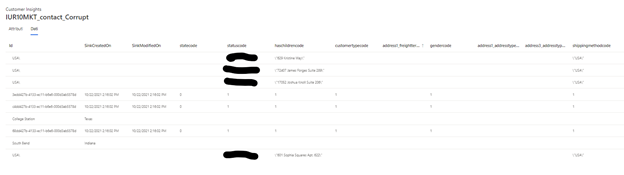

MicrosoftTeams_2D00_image.png

I have the same question (0)
  • Suggested answer
    FrancisRomstad Profile Picture
    205 on at

    Hi,

    Corrupt Entities

    I'm not sure you get much info on what is wrong with your records. What is typically wrong are new line characters. I have had succes cleaning data in the transformation in Power Query. Use the Clean function on text columns like name, addresses etc. 

    "Include All Records"-flag

    In our case, we have a primary customer base. In 3M we include all these, with the flag on. The rest of the sources are enrichments of these customer. Therefore the flag is off for these sources. We dont want to create additional customers from these sources.

    Hope it makes sense.

  • Suggested answer
    John Wiese Profile Picture
    on at

    Hello,

    With respect to the Dataverse data there are a number of posts with information about this, and I see Francis has replied with some info.  I am hoping to get a blog post up in the CI blog soon with more details around dealing with Dataverse data in CI.

    For the "Include all Records" ask, here is what that flag does:

    • Let's assume you have DataSource1 and DataSource2. 
    • In Datasource1 you have contacts A, B, C, D, E
    • Datasource2 you have contacts A, B, D, F, G, H
    • During MATCH you set Datasource1 as the primary entity
    • During MATCH you set Datasource2 as the secondary entity

    Now, for Datasource2 you have 2 options when setting up in match, you can either check or uncheck the "Include all records".  

    • Unchecked:  When leaving unchecked then only the records in Datasource2 that match Datasource 1 will be combined and no new entries will be created.  Essentially you will have no records for F, G & H in the final combined profiles (Customer entity). So you will have records in the end for A, B, C, D, E.
    • Checked:  When checked then any records that do not match those in Datasource1 will get a new record created in the final combined profiles (Customer entity).  So you will have records in the end for A, B, C, D, E, F, G & H

    Hope this makes sense.

    John

  • John Wiese Profile Picture
    on at

    Here is a visual which may help.  Not that the bottom shows which records end up in the unified profiles, the "include all records" ones will only show if checked.

    pastedimage1637773508671v1.png

  • Mrlyn2 Profile Picture
    20 on at

    Thank you to all for your answers.

    Corrupt Entity --> ok thank you we'll try the Francis suggestion.

    Include All Records-flag --> thank you, your explanations are clear but we did some tests as you described and it seems does not work as expected. Sure we'll double-check.

    I'll let you know.

    Best Regards

  • Mrlyn2 Profile Picture
    20 on at

    Hi all

    I have some trouble with Power Query.

    Corrupt Entity and Power Query --> I used Power Query on Dyn365 contacts and (it would seem) that I removed all the new line characters. As a matter of fact the warning related to the new lines does not appear anymore after I imported the data on CI, the corrupt entity is "Not Avalilable" but the records are still not considered in the unification process.

    Do you have any other suggestions please? Is there anything else I can check?

    "Include All Records" Flag --> works fine as you explained

    Thank you and best regards

  • FrancisRomstad Profile Picture
    205 on at

    Hi

    Just a thought.

    Did you change the entity going into the 3M proces from the raw D365 CE (the one with new line characters) to the cleaned one?

    Regards

  • Mrlyn2 Profile Picture
    20 on at

    Hi Francis 

    Thank you, your doubt is probably correct :)

    Actually, the first time, I used Power Query with D365 contact records and the cleaned data I uploaded back to D365. According to what you say, I understand that I need to clean the data after it has been imported to Customer Insights.

    So I will summarize the steps performed:

    1) Opened Excel and selected the contacts table from the data source.

    2) Clean data

    3) Saving the cleaned data on excel file on my PC

    4) Create a new Power Query data source to import the cleaned data on CI from excel.

    5) Replacing the table in the 3M process

    We are wondering how this process can be scheduled so that D365 data is loaded directly into CI without manual intervention.

    Thank you very much and regards.

  • Suggested answer
    John Wiese Profile Picture
    on at

    Seems like you are taking more steps than you need to.  You can start from step 4 and use Power Query and the Dataverse connector, clean the data in Power Query, which is what it is meant for, and then use that output in your M3 process.  This would then allow it to run without any manual steps.

  • Suggested answer
    John Wiese Profile Picture
    on at

    With all the confusion around this I am going to post a video talking through this setup on YouTube as part of my CI In Under 5 series at https://aka.ms/CIUnder5

    S
    hould have the video up this morning with the details you can view there.

  • Mrlyn2 Profile Picture
    20 on at

    Hi John,

    thank you for you suggestion. We've seen your video and it is very useful, only the last question please: do you confirm that you use Dataverse data lake connector (as specified in this other thread: invalid-credentials---authentication-to-dataverse-connectors-power-query-import-mode)?

    Thank you and best regards

Under review

Thank you for your reply! To ensure a great experience for everyone, your content is awaiting approval by our Community Managers. Please check back later.

Helpful resources

Quick Links

Responsible AI policies

As AI tools become more common, we’re introducing a Responsible AI Use…

Neeraj Kumar – Community Spotlight

We are honored to recognize Neeraj Kumar as our Community Spotlight honoree for…

Leaderboard > Customer experience | Sales, Customer Insights, CRM

#1
Tom_Gioielli Profile Picture

Tom_Gioielli 170 Super User 2025 Season 2

#2
#ManoVerse Profile Picture

#ManoVerse 70

#3
Jimmy Passeti Profile Picture

Jimmy Passeti 50 Most Valuable Professional

Last 30 days Overall leaderboard

Product updates

Dynamics 365 release plans
