web
You’re offline. This is a read only version of the page.
close
Skip to main content

Notifications

Announcements

No record found.

Community site session details

Community site session details

Session Id :
Microsoft Dynamics AX (Archived)

Rename product number issue

(0) ShareShare
ReportReport
Posted on by 347

Dear All,

I try to rename product number in all products and product masters form.

when i click on rename button one pop will be opened.

but in that original product number filed is empty and disable mode.

am unable to change product number.
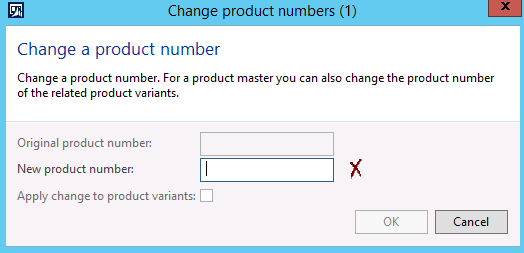
product_5F00_no_5F00_rename.png

please provide me any solution.

Thanks,

Ashok

*This post is locked for comments

I have the same question (0)
  • Ludwig Reinhard Profile Picture
    Microsoft Employee on at

    Hi Ashok R,

    Where and how did you click on the rename button?

    What AX2012 version do you use?

    Best regards,

    Ludwig

  • ASHOK.MBA18 Profile Picture
    347 on at

    Hi Ludwig,

    in product information management\all products and product master

    select item \click on edit \then i click on rename button.

    am using ax 2012 R3

    Thanks

  • Suggested answer
    Pravasti AK Profile Picture
    2,985 on at

    Hi,

    Go to a product, and edit it and you can rename it.

  • ASHOK.MBA18 Profile Picture
    347 on at

    hi Kavitha,

    same thing i did once i click rename one form opened .in that original product number filed empty and disabled .

    please see screen shot in my first post.

    Thanks

  • Suggested answer
    Ludwig Reinhard Profile Picture
    Microsoft Employee on at

    Hi Ashok R,

    Can you try to do the renaming through the released products page?

    Do a right-click, select record info and then select rename.

    Does this workout in your Environment?

    (Please test in a demo/test version first before trying to do this in a live environment).

    Best regards,

    Ludwig

  • ASHOK.MBA18 Profile Picture
    347 on at

    I tried the above process also i am able to rename item number but not product number.

    Thanks

  • Suggested answer
    TheAXEffect Profile Picture
    575 on at

    Hi Ashok,

    I thing this might be the refresh problem as the steps you are following are correct.

    Try to close and reopen you ax session and also check with your technical if problem persist.

  • Pravasti AK Profile Picture
    2,985 on at

    3577066.Untitled.png

  • ASHOK.MBA18 Profile Picture
    347 on at

    yes you are right but see my first post screen shot   original product number showing empty  

  • Suggested answer
    TheAXEffect Profile Picture
    575 on at

    Hi Ashok,

    Please ask your technical to check as system is not puling the data in that field from database. I think its just a display issue.

    Also check if any modification in the form.  

Under review

Thank you for your reply! To ensure a great experience for everyone, your content is awaiting approval by our Community Managers. Please check back later.

Helpful resources

Quick Links

Responsible AI policies

As AI tools become more common, we’re introducing a Responsible AI Use…

Neeraj Kumar – Community Spotlight

We are honored to recognize Neeraj Kumar as our Community Spotlight honoree for…

Leaderboard > 🔒一 Microsoft Dynamics AX (Archived)

#1
Martin Dráb Profile Picture

Martin Dráb 4 Most Valuable Professional

#1
Priya_K Profile Picture

Priya_K 4

#3
MyDynamicsNAV Profile Picture

MyDynamicsNAV 2

Last 30 days Overall leaderboard

Featured topics

Product updates

Dynamics 365 release plans



