web
You’re offline. This is a read only version of the page.
close
Skip to main content

Notifications

Announcements

No record found.

Community site session details

Community site session details

Session Id :
Microsoft Dynamics AX (Archived)

remove " " from the text when exporting into .TXT format in ax 2012 using x++

(0) ShareShare
ReportReport
Posted on by 516

Dear all,

i have to export data from ax to .txt form , everything is working but i want output like given screen without " "

static void askexportfile(Args _args)
{

CommaIO CommaIo;
FileName fileName;
;

fileName = @'D:\Support\akshay\' + custinvoicejour.InvoiceId + ".txt";//".csv";

CommaIo = new CommaIO(fileName,'W');
 CommaIo.write('Name','ItemName,','Qty');

CommaIo.outRecordDelimiter(" ");


CommaIo.write("akshay","10001",6 );


}

WINAPI::shellExecute(fileName);
}

Output
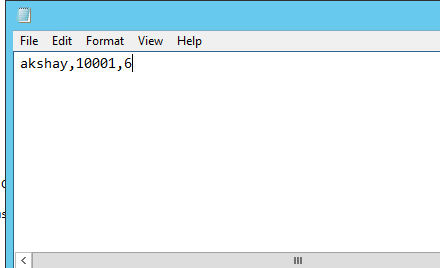
28832.Capture.PNG

how do i get file without " " this. Like

28832.Capture.PNG

Please provide me solution on this how do i achieve this.

Thanks

Akshay

*This post is locked for comments

I have the same question (0)
  • Martin Dráb Profile Picture
    237,978 Most Valuable Professional on at

    The picture looks the same. Can you upload the right one?

    I assume you get quotation marks around text values, right? That's the usual way in CSV; it makes sure that the file isn't interpreted incorrectly if a text field contain a comma. Why is it a problem for you? All tools should understand it.

  • Verified answer
    Mea_ Profile Picture
    60,284 on at

    It's cause by CommaIo.outRecordDelimiter(" "); so remove it and replace with #delimiterCRLF for example from [tag:File] macro

  • akshaykupra Profile Picture
    516 on at

    hi Martin,

    actually i want  Remove Double quote from string, client want that. generally it comes with string. but i want when data export it should be without double quotes

  • akshaykupra Profile Picture
    516 on at

    Hi ievgen,

    could you please be more specific, i mean like code. please it would be helpful

  • Martin Dráb Profile Picture
    237,978 Most Valuable Professional on at

    You should ask them why they want it. Maybe you would be merely hiding a bug in their processing of CSV format.

    Also, you would have to decide what do if a string contains a comma and you would have to add code to handle this situation, if you explicitly reject the usual solution.

  • Mea_ Profile Picture
    60,284 on at

    Sorry but now I'm not sure what do you want because you have 2 identical pictures in your original question, so it's hard to understand what do you want to change.

  • akshaykupra Profile Picture
    516 on at

    hello ievgen,

    this is my fault i have not notice

    this actually image

    7607.Untitled.png

  • Verified answer
    Martin Dráb Profile Picture
    237,978 Most Valuable Professional on at

    If I was, I would first find out why they want it. They may actually need help somewhere else and this requirement may be a result of a wrong decision.

    But if you want, you can write any text you like through TextIo class.

  • Verified answer
    akshaykupra Profile Picture
    516 on at

    Hi Martin and ievgen,

    Problem solved by TextIo Class as you suggest by Martin. they want to upload this file to there software where they want formate like this.

    Now Output is : removed double quotes 

    54285.2.PNG

    i used in sample code, problem is solved thank you for your support

    static void Job29(Args _args)

    {

       container c;

       TextIO myfile;

       FileIoPermission perm;

       str message;

       #define.ExampleFile(@"D:\myfile.txt")

       #define.ExampleOpenMode("w")

       // Set code access permission to help protect the use

       // of CommaIO.new

       perm = new FileIoPermission(#ExampleFile, #ExampleOpenMode);

       perm.assert();

       myfile = new TextIO(#ExampleFile, #ExampleOpenMode);

       c = [1,"aks",1.324,"Last field"];

       myfile.outFieldDelimiter(",");

       myfile.writeExp(c);

       // Close the code access permission.

       CodeAccessPermission::revertAssert();

    }

Under review

Thank you for your reply! To ensure a great experience for everyone, your content is awaiting approval by our Community Managers. Please check back later.

Helpful resources

Quick Links

Responsible AI policies

As AI tools become more common, we’re introducing a Responsible AI Use…

Neeraj Kumar – Community Spotlight

We are honored to recognize Neeraj Kumar as our Community Spotlight honoree for…

Leaderboard > 🔒一 Microsoft Dynamics AX (Archived)

#1
Martin Dráb Profile Picture

Martin Dráb 4 Most Valuable Professional

#1
Priya_K Profile Picture

Priya_K 4

#3
MyDynamicsNAV Profile Picture

MyDynamicsNAV 2

Last 30 days Overall leaderboard

Featured topics

Product updates

Dynamics 365 release plans



