web
You’re offline. This is a read only version of the page.
close
Skip to main content

Notifications

Announcements

No record found.

Community site session details

Community site session details

Session Id :
Finance | Project Operations, Human Resources, ...
Answered

Security Privilege : Buttons are grayed out and missing

(0) ShareShare
ReportReport
Posted on by 35

I have asked to create security privileges for a ISV module in D365. In that I'm facing two issues in maintain privilege(access level set as delete)

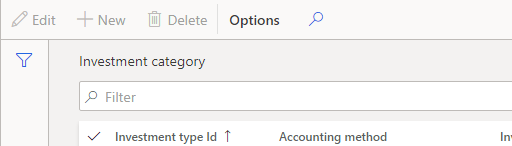
1. Setup Form new,edit,delete buttons(system predefined) are grayed out.
pastedimage1589441426776v1.png

I tried checking the code and properties and i tried adding the respective table to the permissions of security privilege and set the property as create but nothing seems to work. Am i missing anything? How to overcome this issue?

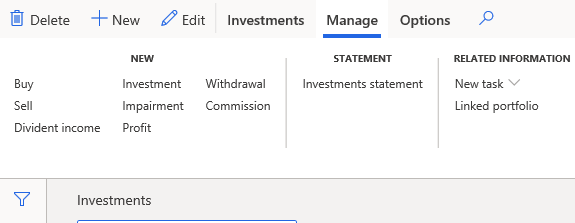
2.List page --> edit and a button group is missing for maintain privilege(access level set as delete) The list page form is shown below
pastedimage1589441477106v2.png

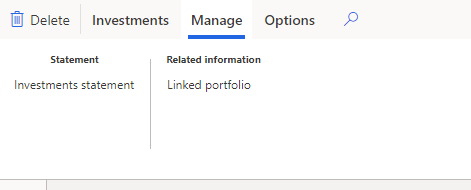
After security privilege, the Edit button and in maintain tab,New button group is missing which is shown below
pastedimage1589441620005v3.png

First i tried to set the menu item buttons needed permission as delete and tried to add it in the control of the list page menu item in the security privilege and access level as delete then i tried to add the form design in the form control permissions and assigned the buttons in the new control and set the access level as delete but nothing works. Any solution for this issue?

I have the same question (0)
  • Blue Wang Profile Picture
    on at

    Hi Alison,

    Have you found a solution? Please share it with us, thanks.

    community.dynamics.com/.../security-privilege

  • Verified answer
    Alison leslena Profile Picture
    35 on at

    Hi, 

            I have just created a new security privilege for these two issues and it's working fine.

    Regards,

    Alison.

Under review

Thank you for your reply! To ensure a great experience for everyone, your content is awaiting approval by our Community Managers. Please check back later.

Helpful resources

Quick Links

Responsible AI policies

As AI tools become more common, we’re introducing a Responsible AI Use…

Neeraj Kumar – Community Spotlight

We are honored to recognize Neeraj Kumar as our Community Spotlight honoree for…

Leaderboard > Finance | Project Operations, Human Resources, AX, GP, SL

#1
Martin Dráb Profile Picture

Martin Dráb 660 Most Valuable Professional

#2
André Arnaud de Calavon Profile Picture

André Arnaud de Cal... 549 Super User 2025 Season 2

#3
Sohaib Cheema Profile Picture

Sohaib Cheema 307 User Group Leader

Last 30 days Overall leaderboard

Product updates

Dynamics 365 release plans



