web
You’re offline. This is a read only version of the page.
close
Skip to main content

Notifications

Announcements

No record found.

Community site session details

Community site session details

Session Id :
Customer experience | Sales, Customer Insights,...
Answered

Bulk edit process stage in opportunities?

(0) ShareShare
ReportReport
Posted on by

Hello, 

We have 3 process stages in opportunities, is it possible to bulk change the process stage they are in for sevral opportunities? I tried to use Excel online and change pipeline phase but it didn't work. 

Thank you!

Best Regards,

Emma

I have the same question (0)
  • LuHao Profile Picture
    40,892 on at

    Hi partner,

    This is achievable. 

    There are two simple ways, 1. export and modify the data and then import it, 2. use an on-demand workflow.

    Here I introduce the first way, export and import data. We need to batch modify the "Sales Stage" field in Excel.

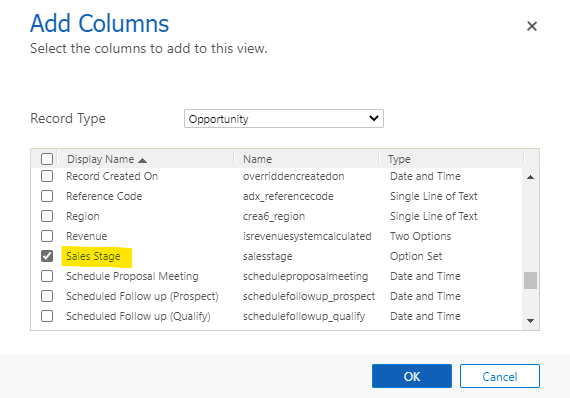
    1) If you already have a personal view showing the opportunity records to be modified, open Advanced Find, use this view, click Edit Columns, and add the "Sales Stage" field.

    pastedimage1581928840992v2.png    pastedimage1581928862416v3.png    pastedimage1581928918142v4.png

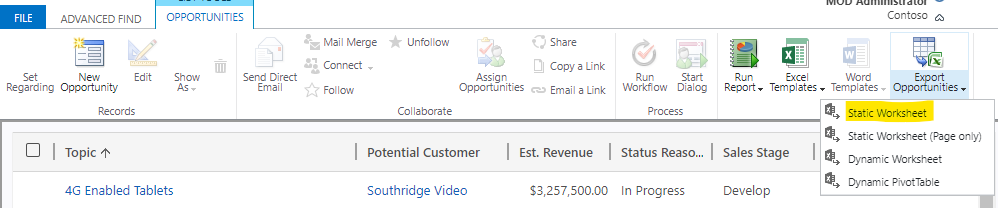
    Click Result, then click Export Opportunities > Static Worksheet. The Excel file will be downloaded.

    pastedimage1581929033356v5.png    pastedimage1581929047983v6.png

    If you don't have a personal view showing the opportunity record you want to modify, create this view first and then add the "Sales Stage" field.

    2) Open the Excel file and change the value of the "Sales Stage" column.
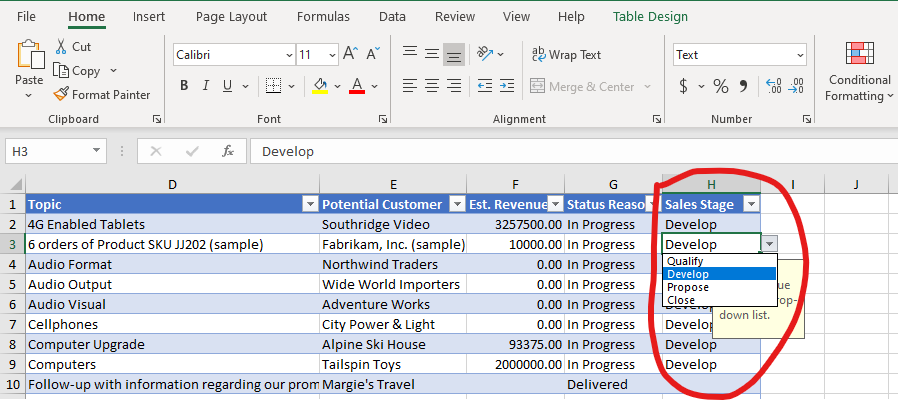
    pastedimage1581929215493v7.png

    3) Open an Opportunity view, click Import form Excel. Upload the modified file.

    pastedimage1581929284192v8.png

    After finishing import, go to Advanced Settings > Data Management > Imports to see the import result.

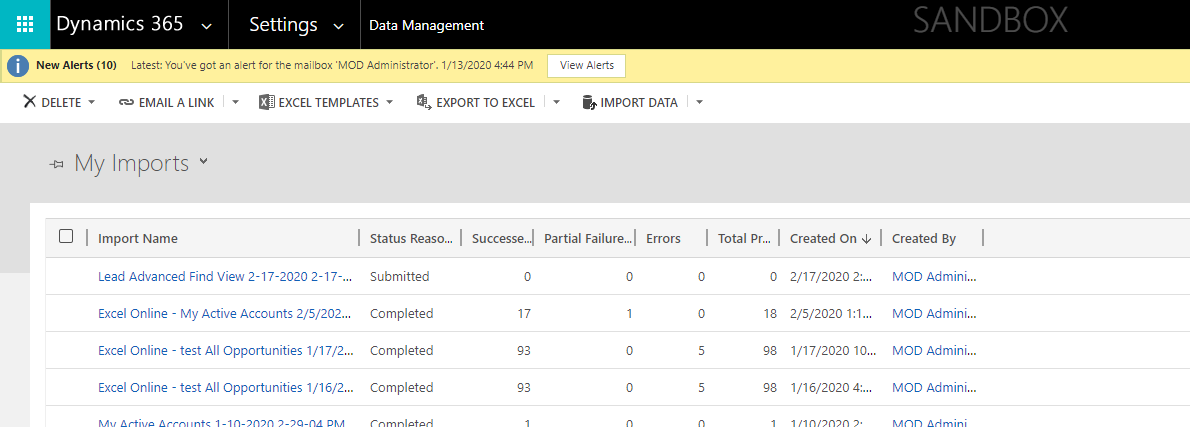
    pastedimage1581929295659v9.png    pastedimage1581929302676v10.png

  • Verified answer
    meelamri Profile Picture
    13,216 User Group Leader on at

    hello,

    You can use on demand workflow. Choose the Bpf Entity, then you can update the activestage.

    In XrmToolBox, search Bulk Workflow Execution Tool. You can use fetchXml to filter the Bpf Instances related to your opportunities. Then you can execute your Workflow.

Under review

Thank you for your reply! To ensure a great experience for everyone, your content is awaiting approval by our Community Managers. Please check back later.

Helpful resources

Quick Links

Responsible AI policies

As AI tools become more common, we’re introducing a Responsible AI Use…

Neeraj Kumar – Community Spotlight

We are honored to recognize Neeraj Kumar as our Community Spotlight honoree for…

Leaderboard > Customer experience | Sales, Customer Insights, CRM

#1
Tom_Gioielli Profile Picture

Tom_Gioielli 70 Super User 2025 Season 2

#2
Gerardo Rentería García Profile Picture

Gerardo Rentería Ga... 33 Most Valuable Professional

#3
Daniyal Khaleel Profile Picture

Daniyal Khaleel 32 Most Valuable Professional

Last 30 days Overall leaderboard

Product updates

Dynamics 365 release plans