web
You’re offline. This is a read only version of the page.
close
Skip to main content

Notifications

Announcements

No record found.

Community site session details

Community site session details

Session Id :
Customer experience | Sales, Customer Insights,...
Unanswered

Export to PDF project quote line details.

(0) ShareShare
ReportReport
Posted on by 10

Hi, we have been working with Sales Hub for some time now and now looking at implementing PSA however stuck with something that seems like a quite basic requirement.

We need to be able to export each of the Quote Line Details of the Project-based Quote Line to the PDF template so our customers can understand what items contribute to the Quoted Project-based lines.

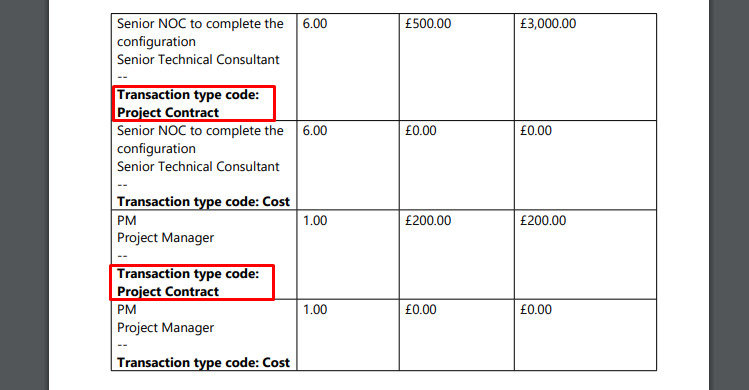
By adding the Quote Line Details to the PDF export we end up with duplicated rows for each Quote Line Detail, one for the Cost and another for Project Contract. Obviously no business would not want to expose the Cost to the customer on the PDF Quote thus my question is how we can only export the Project Contract type lines:
pastedimage1615290387966v1.png

I have the same question (0)
  • LuHao Profile Picture
    40,892 on at

    Hi Mati,

    The PDF template is actually a Word template, so we need to edit the Word template of Quote Line Details to remove the cost part.

    Open Advanced Find, search for Document Templates, in the result, find the Word template of Quote Line Details, edit it.

    pastedimage1615344494508v1.png

    Then download it.

    pastedimage1615344555491v2.png

    In the Word, remove the cost part.

    Finally go to Settings > Templates > Document Templates, select the Word template of Quote Line Details, click UPLOAD TEMPLATE and upload the edited Word.

    pastedimage1615344627993v3.png

  • Mati Profile Picture
    10 on at

    Hi Hao, Thank for reply.

    Your solution would work great if we wanted to export only a single Quote Line Detail, however we are trying to create an export on the Quote entity.

    Screenshot_5F00_2.png

    What we want to end up with is a Quote PDF export that includes all the Quote Line Details for a quoted Project-Based Line .

    Thanks,

    Mati

  • LuHao Profile Picture
    40,892 on at

    Hi Mati,

    You mean you want to add a filter to the Quote Line Details tabel in the word template to hide the data where the "Transaction Type Code" is Cost, right?

    If so, unfortunately, currently word template of D365 does not have the function to filter data.

    I would recommend you use power automate to generate the pdf.

    Please refer to flow.microsoft.com/.../

    flow.microsoft.com/.../

Under review

Thank you for your reply! To ensure a great experience for everyone, your content is awaiting approval by our Community Managers. Please check back later.

Helpful resources

Quick Links

Responsible AI policies

As AI tools become more common, we’re introducing a Responsible AI Use…

Neeraj Kumar – Community Spotlight

We are honored to recognize Neeraj Kumar as our Community Spotlight honoree for…

Leaderboard > Customer experience | Sales, Customer Insights, CRM

#1
Tom_Gioielli Profile Picture

Tom_Gioielli 70 Super User 2025 Season 2

#2
Gerardo Rentería García Profile Picture

Gerardo Rentería Ga... 33 Most Valuable Professional

#3
Daniyal Khaleel Profile Picture

Daniyal Khaleel 32 Most Valuable Professional

Last 30 days Overall leaderboard

Product updates

Dynamics 365 release plans



