web
You’re offline. This is a read only version of the page.
close
Skip to main content

Notifications

Announcements

No record found.

Community site session details

Community site session details

Session Id :
Microsoft Dynamics AX (Archived)

Kernel version after upgrade

(0) ShareShare
ReportReport
Posted on by 30

Dear All,

We have already installed AX 2012 R3 RTM. We are planning to do upgrade in to MS Dynamics AX R3 CU8.
So, we do the following process :
CU8 dowmload link :

(http://hotfixv4.microsoft.com/Microsoft%20Dynamics%20AX%202012%20R3/nosp/DynamicsAX2012R3CU8/6.3.1000.309/free/480148_intl_i386_zip.exe)
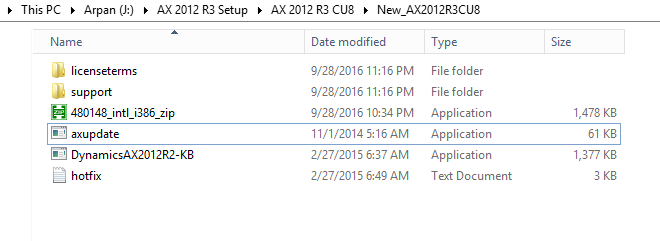
70150.P1.png

Then select AXUpdate – Run as administrator
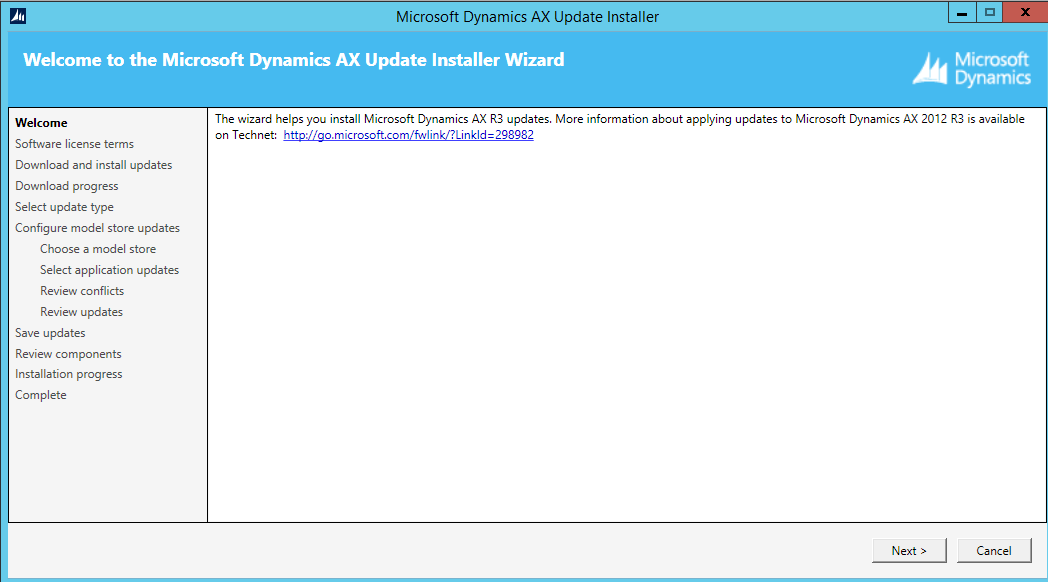
2671.P2.png

5305.P3.png

7462.p5.png

6813.p6.png

2604.p7.png

5327.p8.png

p9.png

7484.p10.png

p11.png

8551.p12.png

p13.png

p14.png

p15.png

p16.png

p17.png

p18.png

p19.png

p20.png

Open AX 2012 R3

p21.png

Now only above checklists are pending. I will do.

Question :

Before that i checked Karnel version and Application version. Both are different. Still Karnel version is showing RTM.
It will change after when all above checklist are done? Or i did any mistake?

Note : We not did any modification in to application. It's contoso demo data.

Karnel.png

Could you please give me more shed on this.

Thanks!

Arpan Sen

*This post is locked for comments

I have the same question (0)
  • @rp@n Profile Picture
    30 on at

    Dear All,

    Could you please any one give me more shed on this.

    It's urgent.

    Thanks!

    Arpan Sen

  • Martin Dráb Profile Picture
    237,882 Most Valuable Professional on at

    Kernel version changes when you upgrade client binaries. It's not related to the modelstore upgrade dialog.

  • @rp@n Profile Picture
    30 on at

    Thanks Martin,

    As per model store upgrade dialog i have to complete all steps right?

    Please let me know what is client binaries?

    Thanks!

    Arpan Sen

  • AX Techie Profile Picture
    995 on at

    msdaxavinash.blogspot.in/.../updating-to-ax-2012-r3-cu9-step-by-step.html

    Find the last step(i.e.,12)...

  • @rp@n Profile Picture
    30 on at

    Thanks Avinash,

    What is client binaries?

    Thanks!

    Arpan Sen

  • AX Techie Profile Picture
    995 on at

    Jus re-run the CU9 setup... There only binary updates will be checked.... That will update your kernal version... Same thing you need to perform in client system to update kernal version....

  • @rp@n Profile Picture
    30 on at

    Thanks Avinash,

    I am doing CU8. I already done Binary update in above screen shot.

    Could you please let me know the next process.

    Thanks!

    Arpan Sen

  • AX Techie Profile Picture
    995 on at

    First run the checklist. Still, it has the same problem,Thenrun the CU8 setup again. That worked for me.

  • @rp@n Profile Picture
    30 on at

    Thanks Avinash.

    So, first i am going to run model store upgrade dialog where all checklists are there and then i will run again CU8 upgrade setup or CU8 setup?

    Please confirm.

    Thanks!

    Arpan Sen

  • AX Techie Profile Picture
    995 on at

    s

Under review

Thank you for your reply! To ensure a great experience for everyone, your content is awaiting approval by our Community Managers. Please check back later.

Helpful resources

Quick Links

Responsible AI policies

As AI tools become more common, we’re introducing a Responsible AI Use…

Neeraj Kumar – Community Spotlight

We are honored to recognize Neeraj Kumar as our Community Spotlight honoree for…

Leaderboard > 🔒一 Microsoft Dynamics AX (Archived)

#1
Martin Dráb Profile Picture

Martin Dráb 4 Most Valuable Professional

#1
Priya_K Profile Picture

Priya_K 4

#3
MyDynamicsNAV Profile Picture

MyDynamicsNAV 2

Last 30 days Overall leaderboard

Featured topics

Product updates

Dynamics 365 release plans