web
You’re offline. This is a read only version of the page.
close
Skip to main content

Notifications

Announcements

No record found.

Community site session details

Community site session details

Session Id :
Customer experience | Sales, Customer Insights,...
Answered

Portal : Display Account Entity Form related to logged in Contact when a web link is clicked

(0) ShareShare
ReportReport
Posted on by 15

Hi all,

I would like to display the account entity form related to the logged in contact after clicking a web link on the primary navigation bar.

I am struggling on this point and I didn't find much details about using "source type of record" option.

I have created an entity form on Account, then created web page, associated it to entity form and added a web link on primary navigation bar. It ended with that error " An unknown error has occured. Error ID #[eb6028f2-a593-43b9-bd2b-d25cd4f7a90a]"

Can someone help on this issue ?

I have the same question (0)
  • Suggested answer
    cloflyMao Profile Picture
    25,210 on at

    Hi gullivereu,

    As per my understanding, would you like to show parent account information of current logged in contact in a form?

    If so, please check following settings:

    1. settings of your entity form:

    0652.JPG

    2. settings of your page template:

    We can use rewrite type to show entity form.

    pastedimage1600225629802v1.png

    After checking the settings above, refresh your portal in https://make.powerapps.com/ > Apps > Your portal(Edit) > Browse website link at top right.

    Or restart your portal if refreshing doesn't work.

    By following steps above, in my portal, information of parent account of current logged in contact is able to display in the entity form successfully.

    pastedimage1600226003004v2.png

    The following blog article explained purpose of different options of Record Source Type field.

    https://www.linkedin.com/pulse/entity-forms-form-metadata-dynamics-portal-jatin-nagpal

    pastedimage1600226151608v1.png

    Regards,

    Clofly

  • gullivereu Profile Picture
    15 on at

    Hi Clofly,

    Thank you for your answer.

    Yes, I would like to show parent account information of current logged in contact in a form.

    However Account Entity and Contact Entity are tied as N:N relationship (we have created a new entity between Account and Contact entities).

    And I didnt find the relationship to select in Entity Form configuration (Relationship name in General tab). Is there a way to configure it ?

    Regards,

    gullivereu

  • cloflyMao Profile Picture
    25,210 on at

    Hi gullivereu,

    Do you mean that you created a new relationship between Contact and Account?(not using the OOB Account Name field of Contact entity.)

    In other word, the relationship you want to use is something likes Contact and Marketing List?

    As the article said, "Current Portal to User" and "Record Associated to Current Portal User" only work on N:1 relationship.

    Regards,

    Clofly

  • gullivereu Profile Picture
    15 on at

    Hi Clofly,

    Actually we are using the primary contact lookup but we aren't using the contact subgrid in account form because of the relationship between those two entites.

    That is why we are using a subgrid of the new entity created that is tied as N:1 for each. I guess it is like Contact and Marketing List like you said.

    However I should be able to see custom relationship between account and the new entity in Entity form configuration area (relationship name lookup field) if only N:1 is allowed. I don't get this point.

    So based on the article and what you said, OOB it is not possible to show associated records in account form for the current contact logged in (with custom relationship defined) ? If yes, does it require liquid codes to achieve that ?

    For example :

     Bob is the main contact of Train company but is also a sales contact of Car company and Boat Company.

     the first relationship used is account_primary_contact and relationships used in the second case is a custom one

    Regards,

    gullivereu

  • cloflyMao Profile Picture
    25,210 on at

    Hi gullivereu,

    Thanks for the example.

    Before using liquid code, I would like to confirm the custom relationship.(If its N:N, then we have to use liquid code.)

    According to your example, we can find Bob is set to primary contact field when we are viewing Train company record,

    if we are viewing Car company or Boat company, is Bob also in another lookup field or can be only found in associated view?

    Regards,

    Clofly

  • gullivereu Profile Picture
    15 on at

    Hi Clofly,

    Yes, according to my example, Bob can be set in the first company (Train) as a primary contact but for the others company he would be presented as a secondary contact in the associated view which is using a custom relationship (not the standard one with contact entity).

    For our purpose, we stored account lookup field, contact lookup field and type of relationship in an entity. We have displayed an associated view of that entity in account and contact form.

    Could you tell me an example of that case or the different steps to follow in order to show that list on portal ?

    Regards,

    gullivereu

  • Verified answer
    cloflyMao Profile Picture
    25,210 on at

    Hi gullivereu,

    To support n:n retrieval, we need to use liquid code. 

    Please refer to my demo and check whether it works for you.

    I created a custom N:N relationship between Contact and Account:

    pastedimage1600679728318v1.png

    pastedimage1600679812336v2.png

    Web template code:

    Secondary company info:

    {% fetchxml secondaryCompany %} {% endfetchxml %} {% for result in secondaryCompany.results.entities %}

    Name: {{ result.name | escape }}

    Address1: {{ result.address1_line1 | escape }}

    Telephone: {{ result.telephone1 | escape }}

    {% endfor %}

    As what we can see in the fetchXml query, we need to use the relationship name to get N:N associated records.

    new_account_contact_secondary_company

    And we use {{ user.id }} to show secondary company dynamically for different sign in users.

    Result:

    pastedimage1600680226530v3.png

    Regards,

    Clofly

  • gullivereu Profile Picture
    15 on at

    Hi Clofly,

    Thank you for your reply.

    I tried to do the same but I got an error "searched record cannot be found" when loading the page.

    That page is configured with type = "web template" ; web template : my custom one ; entity name; entity name = adx_webpage.

    Secondary company info:

    {% fetchxml secondaryCompany %} {% endfetchxml %} {% for result in compte.results.entities %}

    Name: {{ result.name | escape }}

    {% endfor %}

    Did you add something special on your page configuration or web template ?

    Regards,

    gullivereu

  • cloflyMao Profile Picture
    25,210 on at

    Hi gullivereu,

    I didn't add special thing to my page template or web template, and didn't set a value to entity name field. 
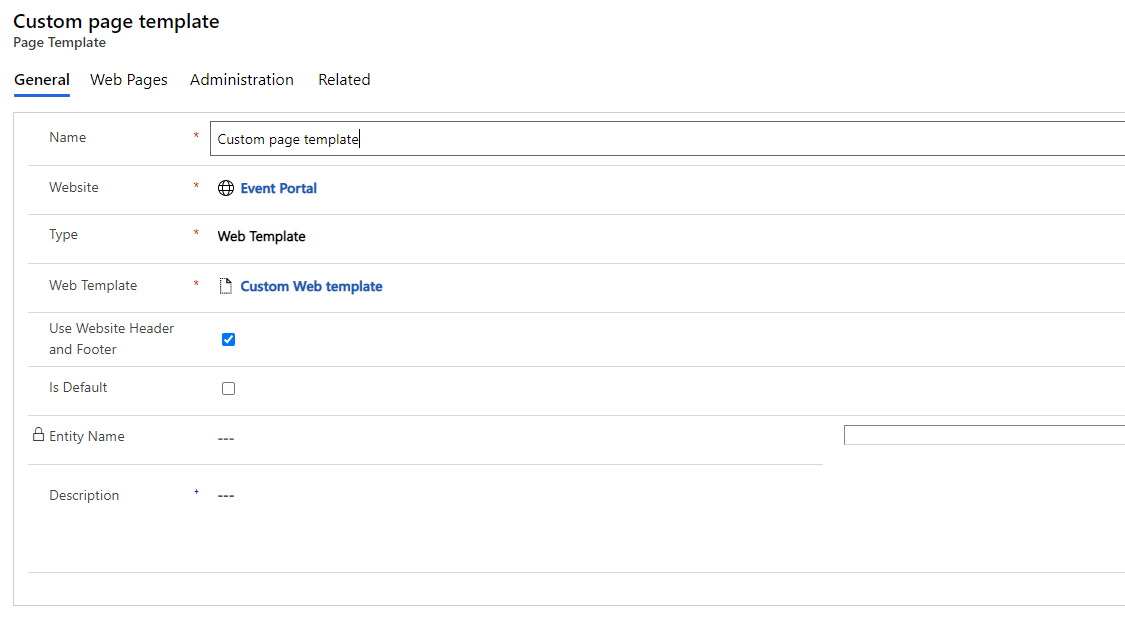
    pastedimage1600761469783v1.png

    You could check whether fetchXml is correct.

    To get correct query, we can copy the correct fetchXml query by opening console.(F12)

    Open Network > XHR, clear existing info in console then click refresh
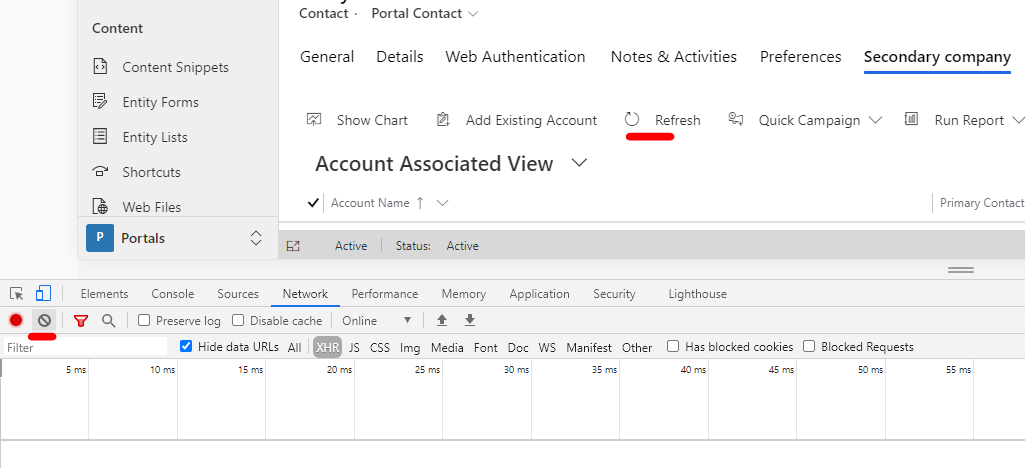
    pastedimage1600761862392v2.png

    We can get the correct N:N retrieval, copy the encoded fetchXml query,
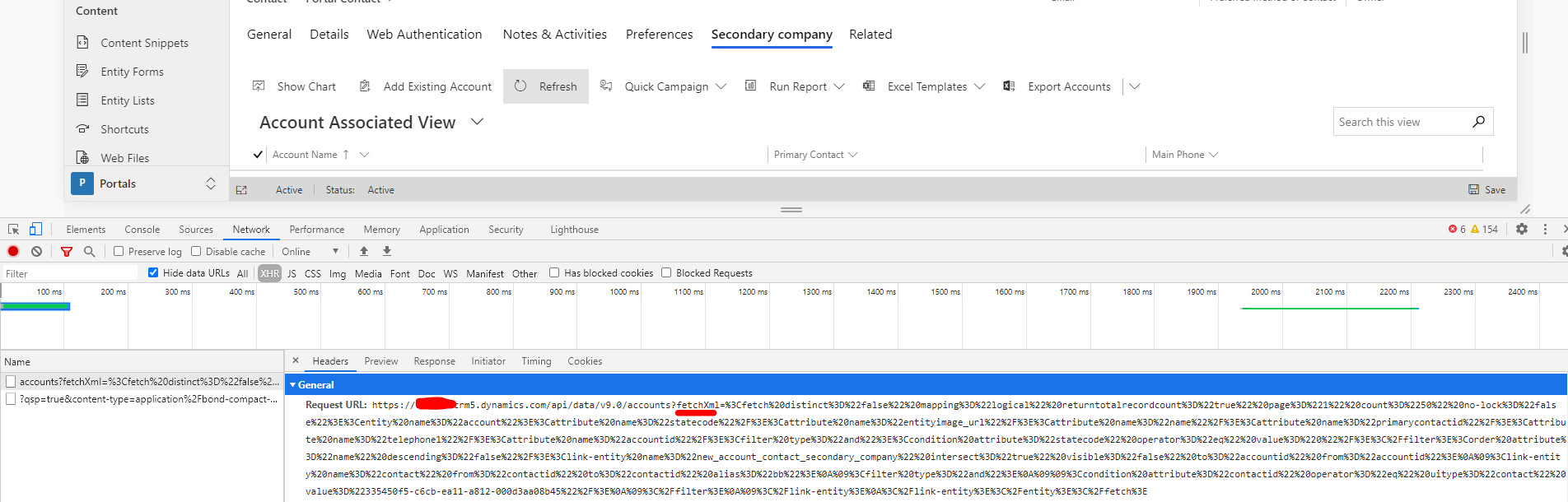
    pastedimage1600761918960v3.png

    decode it in following website.

    https://www.urldecoder.org/
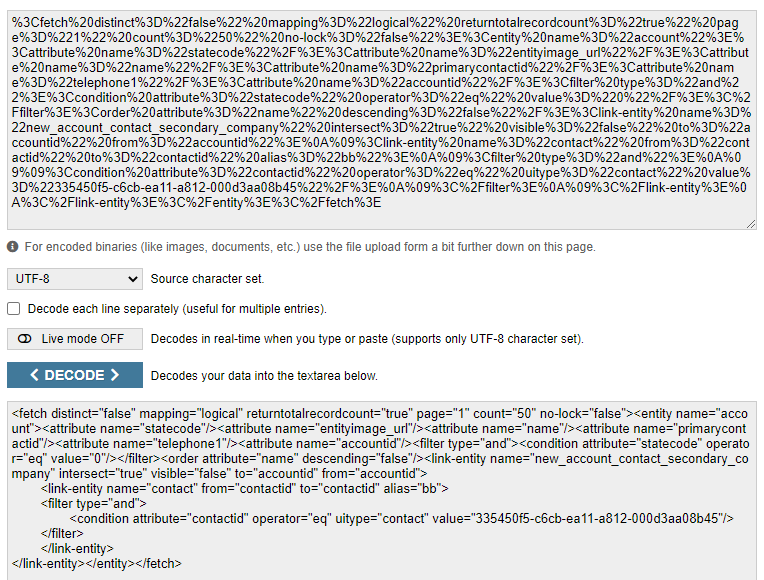
    pastedimage1600762043028v4.png

    Prettify the decoded fetchXml

    https://jsonformatter.org/xml-formatter
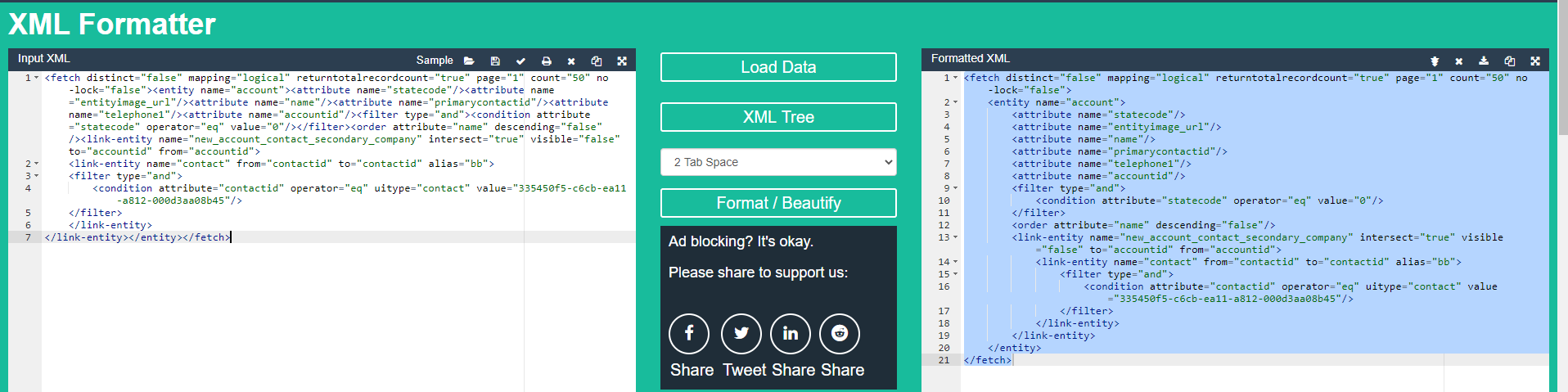
    pastedimage1600762109726v5.png

    At last, copy the formatted fetchXml to web template.

    In addition:

    1. In my code, I named fetchXml to secondaryCompany, 

    thus when looping the result, the collection name should match to it.(You are using "compte", which is not defined in your code.)
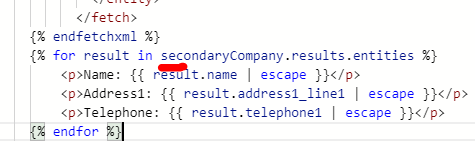
    pastedimage1600762305640v6.png

    2. To display account for sign in user, we should create a new entity permission record based on Account, and set its scope to global.
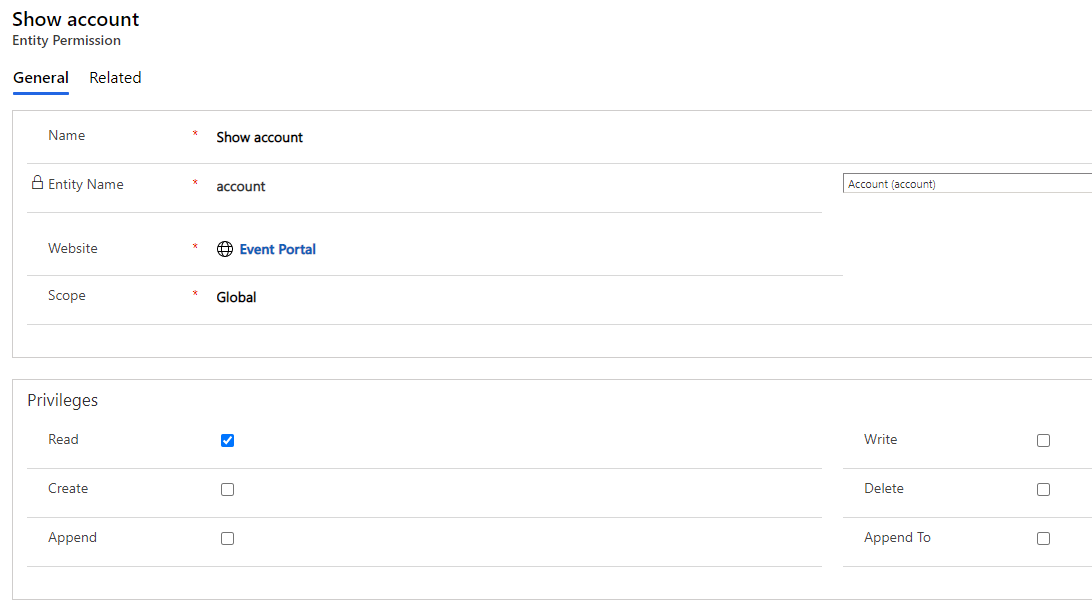
    pastedimage1600762499094v7.png

    Assign the permission to authenticated user:
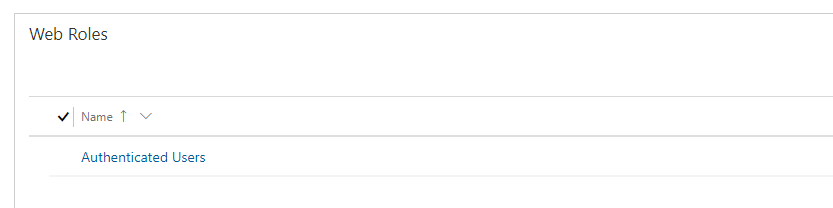
    pastedimage1600762548366v8.png

    Contact should be assigned with the role to get access to data:
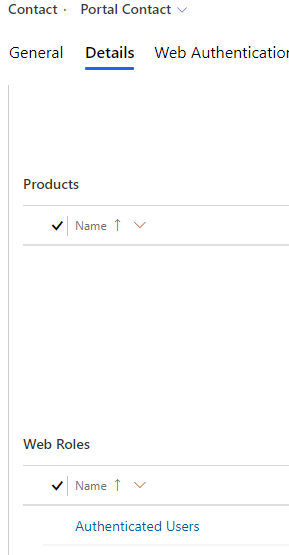
    pastedimage1600762675198v9.png

    Regards,

    Clofly

  • gullivereu Profile Picture
    15 on at

    Hi Clofly,

    Thank you for those detailed steps, it helped me and worked for me.

    I have one more question, is it possible to build same portal view from fetch results ?

    Regards,

    gullivereu

Under review

Thank you for your reply! To ensure a great experience for everyone, your content is awaiting approval by our Community Managers. Please check back later.

Helpful resources

Quick Links

Responsible AI policies

As AI tools become more common, we’re introducing a Responsible AI Use…

Neeraj Kumar – Community Spotlight

We are honored to recognize Neeraj Kumar as our Community Spotlight honoree for…

Leaderboard > Customer experience | Sales, Customer Insights, CRM

#1
Tom_Gioielli Profile Picture

Tom_Gioielli 70 Super User 2025 Season 2

#2
Gerardo Rentería García Profile Picture

Gerardo Rentería Ga... 43 Most Valuable Professional

#3
Daniyal Khaleel Profile Picture

Daniyal Khaleel 32 Most Valuable Professional

Last 30 days Overall leaderboard

Product updates

Dynamics 365 release plans



