web
You’re offline. This is a read only version of the page.
close
Skip to main content

Notifications

Announcements

No record found.

Community site session details

Community site session details

Session Id :
Customer experience | Sales, Customer Insights,...
Suggested Answer

Change "Execute as..." in a Process/Real-time workflow

(0) ShareShare
ReportReport
Posted on by 5

Hi,

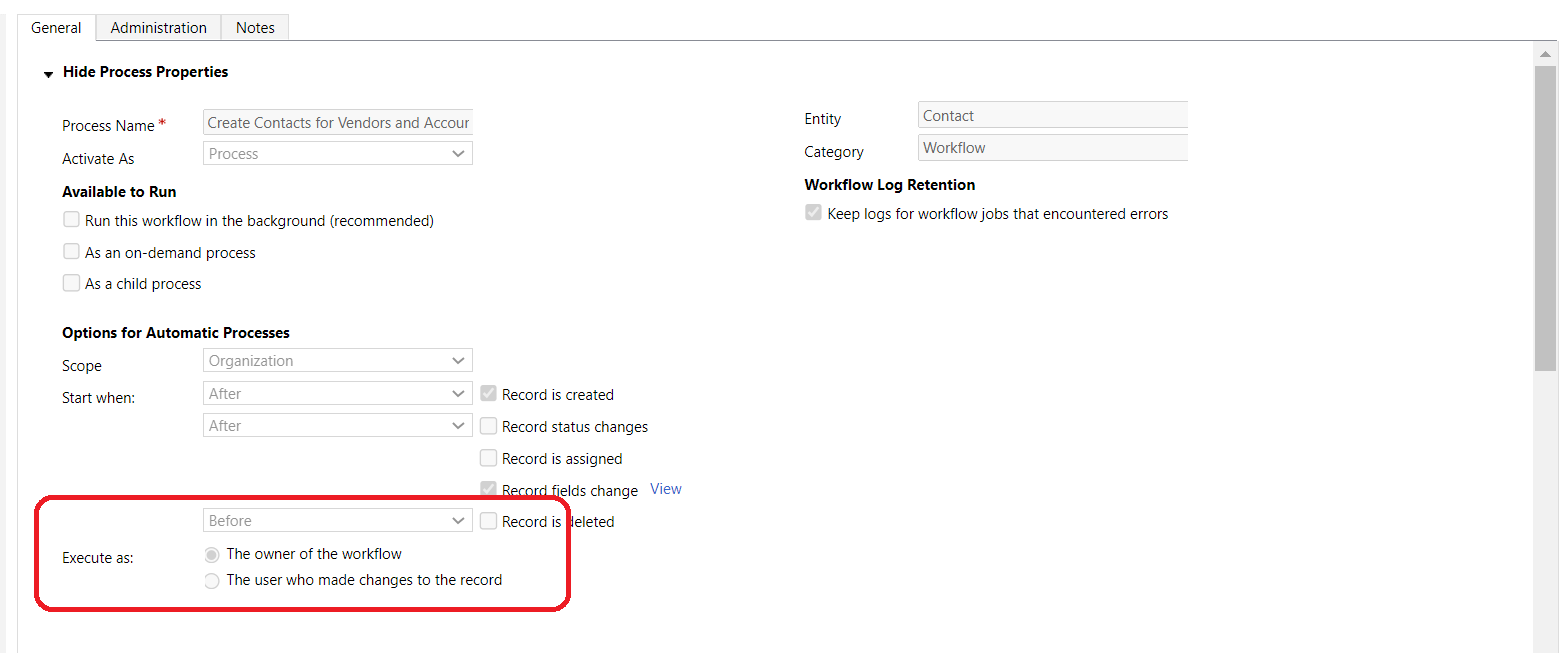
I was wondering if it is possible to edit a Process/Workflow so that it runs as  "The user who made changes to the record" and not "the owner of the workflow" ?
The previous owner of the workflow no longer works with us, and thus the workflow has stopped functioning. I've tried assigning myself the workflow, but that is only a temporary solution.

I've also tried deactivating the workflow to see if I can change the selection, but to no avail.
pastedimage1676672452992v1.png

The hope is that the impersonating user is (no name):

pastedimage1676672632167v2.png

If not, are the only other alternatives to either create the workflow from scratch, or assign the workflow to a system user?


Thank you all so much in advance!

I have the same question (0)
  • a33ik Profile Picture
    84,331 Most Valuable Professional on at

    Hello,

    I'm not sure what you meant by "I've also tried deactivating the workflow to see if I can change the selection, but to no avail.". Can you please explain what you meant?

  • Sleepy123 Profile Picture
    5 on at

    Hi,

    Thank you for the quick response.

    The field for changing the "Execute as" is closed for editing. I thought maybe that was because the workflow was set as "Active". So I deactivated it to see if that would let me change the setting for "Execute as" but it was still locked/greyed out.

  • Suggested answer
    Abdul Wahab Profile Picture
    12,119 Moderator on at

    Hi Sleepy123,

    You should have appropriate privileges. The user has a System admin role that can do this.

    Deactivate the workflow. Change the owner of the workflow. The owner should be the system administrator.

    pastedimage1676702670601v1.png

    and then change execute as

    pastedimage1676702732907v2.png

  • Sleepy123 Profile Picture
    5 on at

    Hi Abdul,

    Thank you for your reply.

    What you describe is what I was expecting, however, I'm not able to change "Execute as".

    I can confirm that:

    * I've assigned the workflow to myself

    * I've deactivated the workflow

    * I am a sys admin.

    But still, I am unable to change the desired field:
    pastedimage1676879523017v1.png

Under review

Thank you for your reply! To ensure a great experience for everyone, your content is awaiting approval by our Community Managers. Please check back later.

Helpful resources

Quick Links

Responsible AI policies

As AI tools become more common, we’re introducing a Responsible AI Use…

Neeraj Kumar – Community Spotlight

We are honored to recognize Neeraj Kumar as our Community Spotlight honoree for…

Leaderboard > Customer experience | Sales, Customer Insights, CRM

#1
Tom_Gioielli Profile Picture

Tom_Gioielli 108 Super User 2025 Season 2

#2
Jimmy Passeti Profile Picture

Jimmy Passeti 50 Most Valuable Professional

#3
Gerardo Rentería García Profile Picture

Gerardo Rentería Ga... 49 Most Valuable Professional

Last 30 days Overall leaderboard

Product updates

Dynamics 365 release plans
