web
You’re offline. This is a read only version of the page.
close
Skip to main content

Notifications

Announcements

No record found.

Community site session details

Community site session details

Session Id :
Microsoft Dynamics AX (Archived)

Error: Bulk data load failed.

(0) ShareShare
ReportReport
Posted on by

HI,

We've 2 environments. one is for development and the other one is for testing. 

What we do on weekly base is to export the model from the development environment and use that model to do a model restore on the test environment.

The next steps after the model restore are compile, synchronizing and a full cil compile.

After that when we're testing in the test environment , we can get randomly an error about Bulk data load failed. An error occurred while unpacking data.
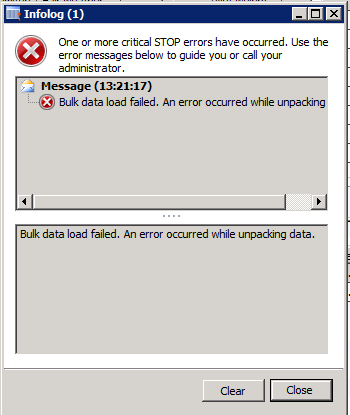
Someone knows what caused this problem? 

I even tried to reset the usage data.

Hope someone can help me with this

Regards,

William

*This post is locked for comments

I have the same question (0)
  • Ajay J Profile Picture
    106 on at

    I also see the same issue.

  • Community Member Profile Picture
    on at

    Did you figure out what the issue with this was?  I am getting the same error.

  • Community Member Profile Picture
    on at

    No not yet, as a workaround we've uninstalled the client and re install the client.

    For now It looks like it's solved, but do re-install the client t every time after a model restore?

    I'm not sure.

  • Ajay J Profile Picture
    106 on at

    Can you delete AUC (Application unicode cache) files from \C:\Documents and settings\Users\Local\Temp\. and try

  • James Chwaszczewski Profile Picture
    245 on at

    I think this is an issue with the deployment of the SSRS reports.

    - Check the Report Server setup in AX.

    - Check the Report Deployment Settings in AX.

    - Republish your report(s).

    We got this issue when a report was flagged as "static" but had not been deployed to SSRS (or the deployed report was not the current report).  I can see this as an issue if you restore the modelstore but don't redeploy the reports.

  • Nvr Profile Picture
    30 on at

    Clear your Usage Data ,

    Open your Ax Client

    Files-->Tools-->Options Window Click on Usage Data.

    In Usage Data Window Click Reset Button .

    Close your Ax Client. Reopen it.

  • Community Member Profile Picture
    on at

    I've tried this, but it didn't work.

  • Community Member Profile Picture
    on at

    We've also tried your method but after a while the error will comes back.

  • James Chwaszczewski Profile Picture
    245 on at

    I'm also seeing this problem with forms.  The stack trace doesn't show anything other than the Info.add method.

  • James Chwaszczewski Profile Picture
    245 on at

    I closed the AX client and deleted the AUC (AX User Cache) files under my login (C:\Users\<login>\AppData\Local).  The error did not reappear when I opened the form with the problem.

Under review

Thank you for your reply! To ensure a great experience for everyone, your content is awaiting approval by our Community Managers. Please check back later.

Helpful resources

Quick Links

Responsible AI policies

As AI tools become more common, we’re introducing a Responsible AI Use…

Neeraj Kumar – Community Spotlight

We are honored to recognize Neeraj Kumar as our Community Spotlight honoree for…

Leaderboard > 🔒一 Microsoft Dynamics AX (Archived)

#1
Martin Dráb Profile Picture

Martin Dráb 4 Most Valuable Professional

#1
Priya_K Profile Picture

Priya_K 4

#3
MyDynamicsNAV Profile Picture

MyDynamicsNAV 2

Last 30 days Overall leaderboard

Featured topics

Product updates

Dynamics 365 release plans



