web
You’re offline. This is a read only version of the page.
close
Skip to main content

Announcements

News and Announcements icon
Community site session details

Community site session details

Session Id :
Service | Customer Service, Contact Center, Fie...
Suggested Answer

Duplicate Detection Rule does not allow a Workflow to update an existing lead

(0) ShareShare
ReportReport
Posted on by 155

Hi Guys,

I have a duplicate detection rule with the following criteria.
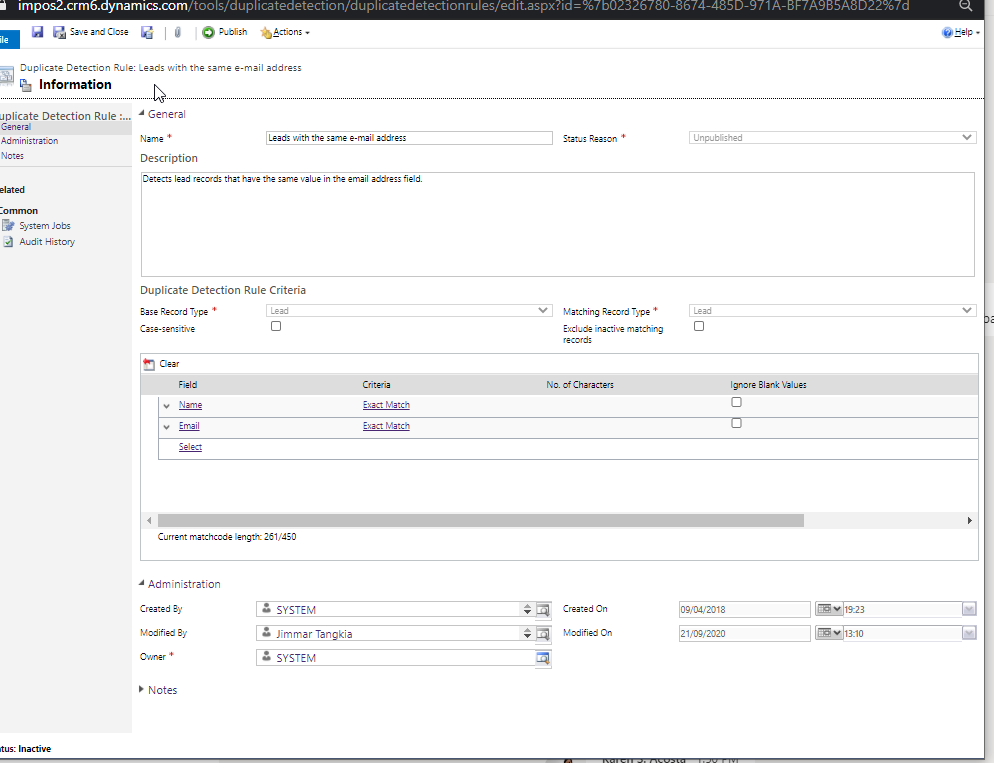
pastedimage1600698129628v1.png

When I am trying to qualify a lead it comes up with this error.
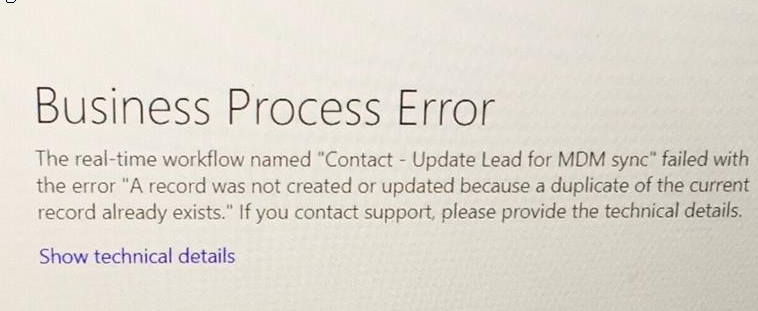
pastedimage1600698159194v2.png

The workflow does this

pastedimage1600698342537v3.png 

I dont have any idea why it would fail when the duplicate detection rule only prevents creation of Leads with the same Name and Email (or am i wrong in this one?)

This is the error message I get "Message: A record was not created or updated because a duplicate of the current record already exists."

When i turned off the duplicate detection rule the qualifying of the lead worked fine but when its published it prevents the specific lead from getting qualified.

Any ideas guys? Thanks

I have the same question (0)
  • Suggested answer
    Mahadeo Matre Profile Picture
    17,021 on at

    Duplicate detection rule will prevent updating record. You can still update record but need to bypass duplicate detection rule. TO disable / bypass duplicate detection rule you need to write custom code.

    You can use UpdateRequest and set SuppressDuplicateDetection = false.

    For more details

    docs.microsoft.com/.../enable-disable-duplicate-detection

    www.inogic.com/.../

    docs.microsoft.com/.../manage-duplicate-detection-create-update

  • Pankaj Gogoi Profile Picture
    3,177 on at

    Hi Jimmar,

    What happens when you qualify a lead, does it create a new contact, account or opportunity? Is there any other rules and which step is workflow is throwing the error?

    Best Regards

    PG

Under review

Thank you for your reply! To ensure a great experience for everyone, your content is awaiting approval by our Community Managers. Please check back later.

Helpful resources

Quick Links

Season of Sharing Community Challenge Winners!

Congratulations to our community stars!

Women in Power Builds Momentum

Expanding mentorship, skilling, and AI innovation

Congratulations to the July Top 10 Community Leaders

These are the community rock stars!

Leaderboard > Service | Customer Service, Contact Center, Field Service, Guides

#1
Muhammad Shahzad Shafique Profile Picture

Muhammad Shahzad Sh... 69 Most Valuable Professional

#2
Daniyal Khaleel Profile Picture

Daniyal Khaleel 25 Most Valuable Professional

#3
11manish Profile Picture

11manish 17 Super User 2026 Season 2

Last 30 days Overall leaderboard

Featured topics

Product updates

Dynamics 365 release plans
