web
You’re offline. This is a read only version of the page.
close
Skip to main content

Notifications

Announcements

No record found.

Community site session details

Community site session details

Session Id :
Customer experience | Sales, Customer Insights,...
Suggested Answer

Quotation - Approval workflow on the discount provided

(0) ShareShare
ReportReport
Posted on by 905

Hello everyone,

I am planning to do an approval discount process for the quotation form in our Sales hub module and the process should be as follow:

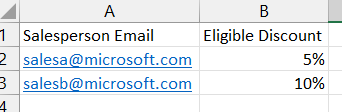
1. A pre-defined table where I can define the below sample data:
Disc-Table.png

The purpose of this table is to check the eligible discount that can be given to a salesperson which we can use in the workflow or by applying some validation to the quotation form.

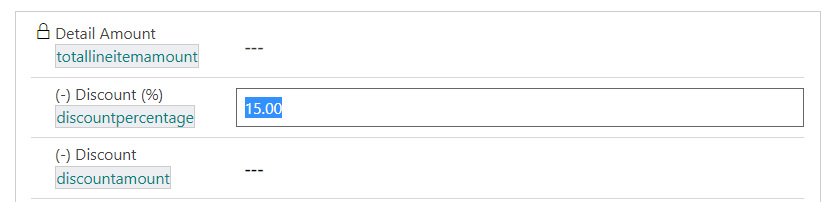
2. In the quotation form, we already have the discount percentage field where the salesperson can provide the percentage required.
Discount-perc.png

Based on the above example, If am authorized with SalesB account and I input 11% in the percentage field which is greater than 10% comparing it to the above list, an approval workflow should trigger and send the request to his/her direct manager where the direct manager can make a decision and decide if this salesperson is allowed to provide this discount number.

If it is approved he will be able to provide this discount, else he will not be able and the quotation should not be sent to the customer.

What do you think about the best way to achieve this kind of the above requirements? I know that this is something that can be done in Power Automate but I want to structure it and make it work in an efficient way and maintain the validation in the form to avoid any gaps.

Could you please advise and propose a solution? I would highly appreciate it if you can provide an example.

Thank you!
EBMRay

I have the same question (0)
  • Suggested answer
    Community Member Profile Picture
    on at

    Hi EBMRay,

    You mentioned that ' I know that this is something that can be done in Power Automate but I want to structure it and make it work in an efficient way and maintain the validation in the form to avoid any gaps.

    So you don't want to use power automate to achieve it, Why?

    What we know is that power automate is a viable method, other viable methods are not known and we look forward to hearing from anyone who knows.

    Build an approvals feature using Power Automate (Dynamics 365 Marketing Developer Guide) | Microsoft Docs

    Approval Process using Power Automate | D365 Demystified

    Tracking Opportunity Approvals – Dynamics 365 Talk (d365goddess.com)

  • EBMRay Profile Picture
    905 on at

    Hi ,

    Yes, I do want to achieve it in Power Automate but I want to know how I can control it on the quotation form itself to avoid the user sending the quotation to the customer before the manager's approval if he/she exceeded the discount percentage.

    Example: If Leah requested for 6% discount on the quotation and Leah is only eligible to give 5% the power automate cloud flow will automatically trigger in the background and send it to your manager for review.

    During the approval process, Leah should not be allowed to export the quote to PDF and send it to the customer unless her manager approved the request.

    This is the main validation point that I want to achieve, could you please suggest an idea or provide an example to control it?

    As for the workflow, I will be able to build it on power automate as it's not a hard process but what do you think is a best practice on when to trigger the workflow? Is it when he changes the discount field if it exceeded the percentage that he should give? If so, shall I create a hidden toggle button that will switch to yes and trigger the flow or is there any better way to do it?

    Awaiting your response.

    Best regards,

    EBMRay

  • EBMRay Profile Picture
    905 on at

    Hello  ,

    I would highly appreciate your input based on my last comments.

    Looking forward to your response.

    Thank you!

  • Suggested answer
    Community Member Profile Picture
    on at

    Hi EBMRay, 

    Based on your description, "Leah should not be allowed to export the quote to PDF ", so you need hide the button if the condition not met.

    Maybe you can create one field to control it:

    Ribbon button visibility based on a field value in Dynamics 365 | Ribbon Workbench | D365 Demystified

    By default, the button is hidden, If the manager approved it, change the field to one value, then the button can be shown based on it.

Under review

Thank you for your reply! To ensure a great experience for everyone, your content is awaiting approval by our Community Managers. Please check back later.

Helpful resources

Quick Links

Responsible AI policies

As AI tools become more common, we’re introducing a Responsible AI Use…

Neeraj Kumar – Community Spotlight

We are honored to recognize Neeraj Kumar as our Community Spotlight honoree for…

Leaderboard > Customer experience | Sales, Customer Insights, CRM

#1
Tom_Gioielli Profile Picture

Tom_Gioielli 171 Super User 2025 Season 2

#2
#ManoVerse Profile Picture

#ManoVerse 83

#3
Jimmy Passeti Profile Picture

Jimmy Passeti 50 Most Valuable Professional

Last 30 days Overall leaderboard

Product updates

Dynamics 365 release plans
