web
You’re offline. This is a read only version of the page.
close
Skip to main content

Notifications

Announcements

No record found.

Community site session details

Community site session details

Session Id :
Customer experience | Sales, Customer Insights,...
Suggested Answer

Audit History Not Displaying Changes

(0) ShareShare
ReportReport
Posted on by 65

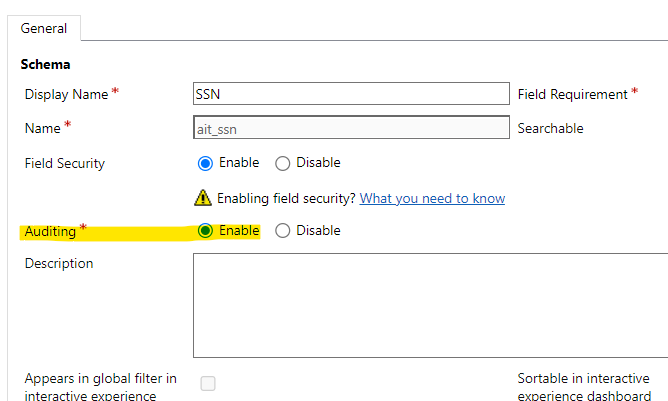
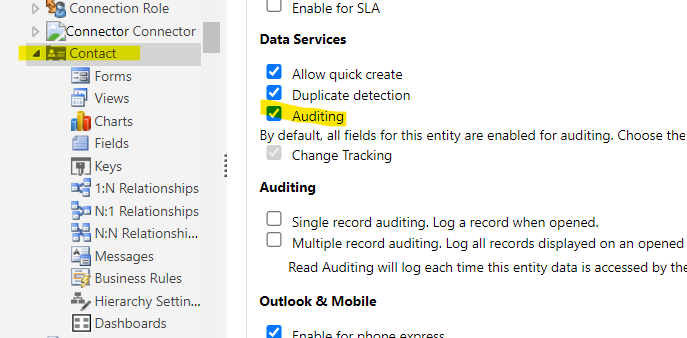
My auditing for Contact records is now not displaying.  I have checked all my settings and they show that auditing is on, but when I make changes to fields, nothing shows in audit history anymore.

I have auditing enabled at Contact Entity, auditing at field level too.  Am I missing something?  Is there a bug out there by Microsoft?
pastedimage1651761202869v1.png

pastedimage1651761245287v2.png

I have the same question (0)
  • Amit Katariya007 Profile Picture
    10,409 Super User 2025 Season 2 on at

    Hello Monica,

    Steps you have followed it is correct, just enable the global Auditing which will enable the general auditing setting in the Dynamics 365.

    Go to-->Settings -->Auditing-->Global Audit setting-->Auditing tab-->Select Start Auditing

    pastedimage1651771877820v2.png

    For Power Platform please follow below steps. 

    IMG_5F00_20220506_5F00_003201.jpg

    https://docs.microsoft.com/en-us/power-platform/admin/audit-data-user-activity

    Thank you,

    Amit Katariya

  • Bipin D365 Profile Picture
    28,983 Moderator on at

    Hi,

    Login to admin.powerplatform.microsoft.con and then enable auditing at environment level

    Browse to the Microsoft Power Platform admin center and sign in using administrator credentials.

    Go to Environments > [select an environment] > Settings > expand Audit and logs > Audit settings.

    Setting Description

    Start Auditing Start or stop auditing.

    Audit user access Log whenever the system is accessed, generally by signing in

    Start Read Auditing Logs will be sent to the Microsoft 365 Security and Compliance Center

    Thanks,

    Bipin

  • Monica Cruz Profile Picture
    65 on at

    Follow up to issue.  I did perform below actions (thank you Amit & Bipin) and still no luck.  I performed an F12 and came back with an error message.  Does anyone know what this means?

    pastedimage1651784634792v1.png

  • Suggested answer
    Amit Katariya007 Profile Picture
    10,409 Super User 2025 Season 2 on at

    Hello Monica,

    What you try to achieve ? You just needed to enable audit history correct ?

    Thank you,

    Amit Katariya

  • Suggested answer
    Bipin D365 Profile Picture
    28,983 Moderator on at

    Hi,

    You don't have to worry about the error message on Console.

    Could you please screenshot of Audit History tab on Contact record?

    Have you tried with system admin role to see if it works?

    Please mark my answer verified if this is helpful!

    Regards,

    Bipin Kumar

    Follow my Blog: xrmdynamicscrm.wordpress.com/

  • Monica Cruz Profile Picture
    65 on at

    Update:  Looks like it' a bug in tenant because all three instances (DEV/TEST/PROD) have same behavior.  I've opened a ticket w/MS and now working with them.

     Thank you to everyone for the assistance.

Under review

Thank you for your reply! To ensure a great experience for everyone, your content is awaiting approval by our Community Managers. Please check back later.

Helpful resources

Quick Links

Responsible AI policies

As AI tools become more common, we’re introducing a Responsible AI Use…

Neeraj Kumar – Community Spotlight

We are honored to recognize Neeraj Kumar as our Community Spotlight honoree for…

Leaderboard > Customer experience | Sales, Customer Insights, CRM

#1
Tom_Gioielli Profile Picture

Tom_Gioielli 170 Super User 2025 Season 2

#2
#ManoVerse Profile Picture

#ManoVerse 70

#3
Jimmy Passeti Profile Picture

Jimmy Passeti 50 Most Valuable Professional

Last 30 days Overall leaderboard

Product updates

Dynamics 365 release plans